Starting a blog doesn’t require technical expertise or expensive tools. Google offers a free, user-friendly platform called Blogger (also known as Blogspot) that allows anyone to launch a blog in minutes. Whether you want to share personal stories, promote a hobby, or begin building an online presence, this guide walks you through every step—from creating your account to publishing your first post—with clarity and precision.
Why Use Google’s Blogger Platform?
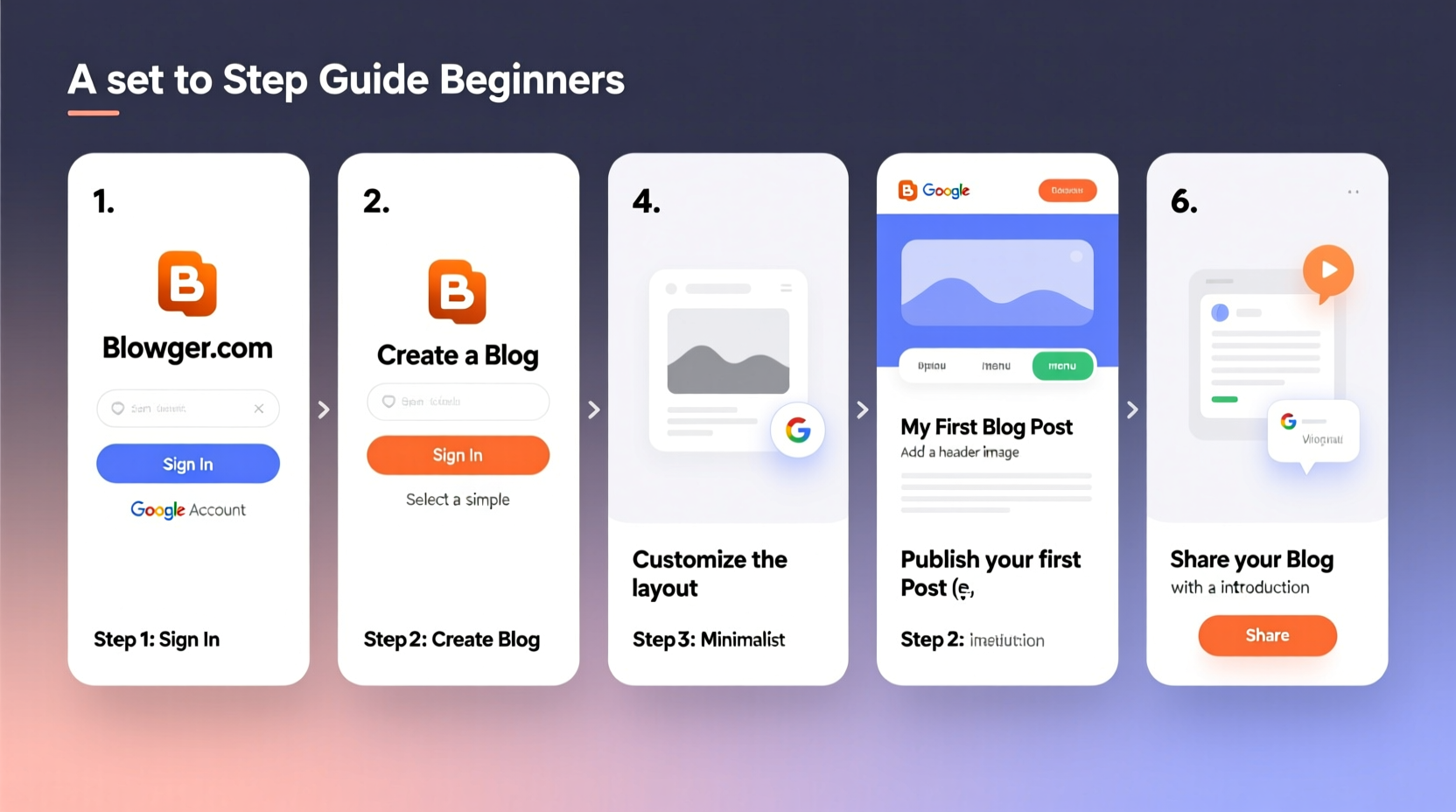
Blogger has been part of the Google ecosystem since 1999 and remains one of the most accessible blogging platforms for beginners. It integrates seamlessly with other Google services like Gmail, Google Analytics, and Google Search Console. Unlike self-hosted blogs that require domain registration and web hosting, Blogger simplifies setup with a free subdomain (yourblog.blogspot.com), intuitive interface, and no coding required.
“Blogger is ideal for new writers who want to focus on content without getting overwhelmed by technical details.” — Sarah Lin, Digital Content Strategist
Step-by-Step: Creating Your Blog on Google
Follow these steps carefully to set up your blog from scratch. The entire process takes less than 15 minutes.
- Sign in to Google: Use an existing Gmail account or create a new one at gmail.com. This account will be linked to your blog.
- Visit Blogger.com: Go to blogger.com and click “Create Your Blog.” You’ll be redirected to sign in if not already logged in.
- Start a New Blog: Click the orange “New Blog” button in the top-left corner.
- Enter Blog Details:
- Title: Choose a clear, memorable name (e.g., “Travel With Tina”).
- Address: Pick a unique URL ending in .blogspot.com (e.g., travelwithtina.blogspot.com).
- Template: Select a basic theme—“Simple,” “Contempo,” or “Soho” are clean and responsive.
- Create Blog: Click the button to finalize. You’ll be taken to your blog’s dashboard.
Customizing Your Blog’s Appearance
First impressions matter. A well-designed blog builds trust and keeps readers engaged. Blogger offers built-in customization tools under the “Theme” tab.
| Feature | What You Can Do | Best Practice |
|---|---|---|
| Layout | Add gadgets (search box, social media links, archive) | Keep sidebar clutter-free; prioritize navigation. |
| Colors & Fonts | Change text size, background, headings | Use high-contrast colors for readability. |
| Mobile View | Enable responsive design | Always preview mobile layout before publishing. |
To access these settings, go to Theme → Customize. From here, adjust fonts, upload a header image (recommended size: 1000x300 pixels), and fine-tune spacing. Save changes frequently to avoid losing progress.
Writing and Publishing Your First Post
Your blog isn’t complete until it has content. Navigate to the “Posts” tab and click “New Post.”
- Title: Make it specific and compelling (e.g., “5 Mistakes I Made Backpacking Through Thailand”).
- Content: Write directly in the editor. Use paragraphs, bullet points, and subheadings (
H2,H3) for readability. - Labels: Add tags like “travel,” “budget tips,” or “solo adventure” to help organize posts.
- Images: Click the image icon to upload photos. Compress them first using tools like TinyPNG to improve loading speed.
- Publish Settings: Choose whether to publish immediately or schedule for later.
Before hitting “Publish,” preview your post. Check formatting, spelling, and image alignment. Once live, share the link with friends or on social media to generate initial traffic.
Checklist: Pre-Publishing Essentials- ✅ Proofread for grammar and tone
- ✅ Add at least one relevant image
- ✅ Include internal or external links
- ✅ Assign appropriate labels
- ✅ Preview on desktop and mobile
Growing Your Audience: Real Example
Jamal, a college student passionate about coffee brewing, started a blog called “Brew Notes” using Blogger. He followed the setup steps outlined here and published weekly guides on French press techniques, bean sourcing, and home roasting.
Within three months, he optimized his posts for search engines by including keywords like “best grind size for cold brew” and “affordable pour-over kits.” He shared each article on Reddit’s r/coffee community and Pinterest. By month six, his blog attracted over 3,000 monthly visitors—and he began receiving sponsorship inquiries from local roasteries.
His success wasn’t instant, but consistency and strategic publishing made the difference. Jamal didn’t need a custom domain or premium tools—just focused content and patience.
Avoid These Common Beginner Mistakes
New bloggers often undermine their progress with preventable errors. Steer clear of these pitfalls:
- Inconsistent posting: Aim for at least one high-quality post per week to build momentum.
- Overcomplicating design: Fancy widgets slow down your site. Stick to essential features.
- Ignoring SEO: Use natural keywords in titles and first paragraphs. Google indexes plain text effectively.
- Not claiming ownership in Google Search Console: Even on Blogger, you can verify your site to monitor performance and indexing status.
“Your first 10 posts won’t go viral—and that’s okay. What matters is showing up consistently.” — Mark Tran, SEO Consultant
Frequently Asked Questions
Can I use my own domain name with Blogger?
Yes. After setting up your free blog, go to Settings → Basic → Publishing and click “Custom Domain.” Purchase a domain from providers like Namecheap or Google Domains, then follow Blogger’s DNS setup instructions to connect it.
Is Blogger better than WordPress for beginners?
For absolute beginners prioritizing ease and cost, yes. Blogger requires no maintenance, updates automatically, and is entirely free. WordPress.org offers more flexibility but demands hosting, plugins, and technical upkeep. Start with Blogger, then migrate later if needed.
How do I make money from my Blogger site?
Once your blog gains consistent traffic (typically 10k+ monthly pageviews), apply for Google AdSense through the “Earnings” tab in Blogger. You can also promote affiliate products, offer digital downloads, or accept sponsored content.
Final Thoughts and Next Steps
Setting up a blog on Google via Blogger is one of the simplest ways to enter the world of online publishing. You now have a functioning blog, the tools to customize it, and a clear path to publishing valuable content. The key is action: write your first post today, even if it’s imperfect. Refine your voice over time. Engage with readers. Optimize based on what works.
Every expert blogger was once a beginner who hit “Publish” for the first time. That moment starts now.
🚀 Ready to begin? Open blogger.com in a new tab, log in, and create your blog today. Share your URL in the comments below—we’d love to read your first post!