Spend more than a few hours at a desk, and your chair becomes more than just furniture—it’s a critical part of your daily well-being. For years, gaming chairs with their bold colors, racing stripes, and bucket-seat designs have dominated home offices and streaming setups. But as people spend longer seated—whether working, studying, or gaming—more are noticing something uncomfortable: their backs hurt. Despite promises of “ergonomic support,” many high-back gaming chairs actually contribute to poor posture, muscle fatigue, and chronic lower back pain. The truth is, most racer-style gaming chairs prioritize aesthetics over anatomy. In contrast, true ergonomic office chairs are engineered to support the spine’s natural curvature and promote healthy sitting habits. This article breaks down why your back may be suffering in that flashy gaming throne—and what you should consider instead.
The Allure (and Illusion) of the Racing Chair Design
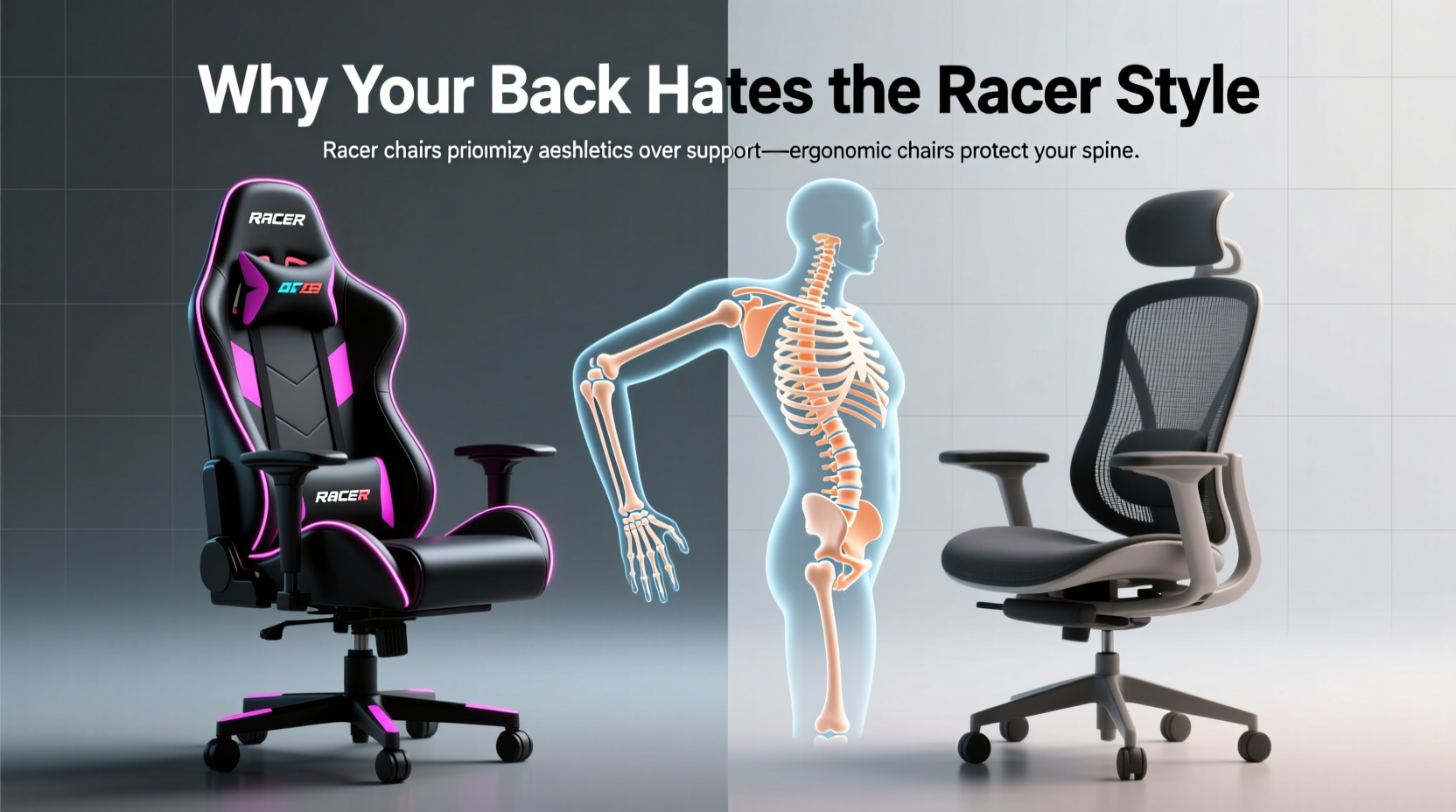
Gaming chairs borrow heavily from automotive racing seats—high side bolsters, aggressive contours, and reclined postures meant for short bursts behind the wheel. These features look dynamic and convey a sense of performance. Marketing often touts “lumbar support” and “adjustable armrests,” leading consumers to believe they’re investing in comfort and health. But visual appeal doesn’t equate to biomechanical benefit.
The problem starts with the exaggerated lumbar curve built into many gaming chairs. While intended to support the lower back, this fixed curve often sits too high or presses too hard, forcing the spine into an unnatural position. Unlike adjustable ergonomic systems, these molded supports can’t be fine-tuned to individual spinal shapes. Over time, this mismatch leads to muscle strain and disc pressure.
Additionally, the high, winged sides common in racing-style chairs restrict natural shoulder movement and encourage users to hunch forward—especially when reaching for a keyboard or mouse. This posture narrows the chest, compresses the diaphragm, and increases strain on the neck and upper back.
Tip: If your chair forces you to crane your neck or round your shoulders to reach your desk, it’s not supporting you—it’s fighting against your body.Ergonomic Office Chairs: Designed for Human Anatomy, Not Aesthetics
True ergonomic office chairs are developed through years of research into posture, spinal alignment, and musculoskeletal health. They don’t rely on one-size-fits-all curves but offer layered adjustability to accommodate different body types and tasks.
A high-quality ergonomic chair typically includes:
- Adjustable seat depth: Ensures proper thigh support without cutting off circulation behind the knees.
- Dynamic lumbar support: Can be moved up/down and sometimes in/out to match the natural inward curve of your lower spine.
- Live-back or synchronized tilt mechanisms: Allow the backrest to move with your body, maintaining spinal alignment during recline.
- 3D/4D armrests: Adjustable in height, width, depth, and angle to keep shoulders relaxed and wrists neutral.
- Highly breathable mesh back: Promotes airflow and reduces heat buildup during long sessions.
These features aren’t just luxuries—they’re essential for preventing repetitive strain injuries and promoting micro-movements that keep blood flowing and muscles engaged.
“Prolonged sitting in poorly designed chairs—even those marketed as ‘ergonomic’—can accelerate disc degeneration and lead to chronic low back pain.” — Dr. Lena Patel, Physical Medicine and Rehabilitation Specialist
Side-by-Side Comparison: Gaming Chair vs Ergonomic Office Chair
| Feature | Gaming Chair (Racer Style) | Ergonomic Office Chair |
|---|---|---|
| Lumbar Support | Fixed foam pad, often non-adjustable and incorrectly positioned | Adjustable support that aligns with natural spine curve |
| Seat Depth | Typically fixed; may be too deep for shorter users | Adjustable to fit leg length and prevent knee pressure |
| Backrest Material | Dense foam with synthetic leather—traps heat and degrades over time | Breathable mesh that conforms slightly and allows airflow |
| Armrest Adjustability | Often 2D (height and pivot), limited range | 3D or 4D: height, width, depth, and angle adjustment |
| Tilt Mechanism | Basic recline with lock positions; no synchro-motion | Synchronized tilt maintains seat-to-back angle during recline |
| Long-Term Comfort | Foam compresses within months; heat buildup causes discomfort | Durable materials and dynamic support sustain comfort over years |
| Price Range (USD) | $150–$400 | $300–$1,200+ |
While some premium gaming chairs now include better adjustability, most still fall short in material quality and biomechanical responsiveness compared to mid-range ergonomic models like the Herman Miller Sayl, Steelcase Leap, or Humanscale Freedom.
A Real-World Example: From Pain to Postural Relief
Take Mark, a software developer who worked remotely for two years using a black-and-red gaming chair he bought online. Initially excited by the chair’s bold look and included “lumbar pillow,” he began experiencing lower back stiffness after six months. By year one, he had persistent sciatica-like pain radiating down his left leg. He visited a physiotherapist, who immediately pointed to his chair.
The therapist explained that the rigid, high bolstered back was pushing Mark’s spine into hyperlordosis—a dramatic inward curve in the lower back—while the seat pan was too deep, causing him to slide forward and slouch. His armrests were set too high, elevating his shoulders and tightening his trapezius muscles.
After switching to a used Herman Miller Mirra with fully adjustable lumbar, seat depth, and armrests, Mark noticed improvement within days. Within three weeks, his back pain diminished significantly. He later admitted: “I thought I was buying performance. I was actually buying pain.”
How to Choose a Chair That Respects Your Spine
Whether you're a gamer, remote worker, or student, selecting the right chair requires evaluating function over form. Here’s a step-by-step guide to making a spine-friendly choice:
- Assess your sitting duration: If you sit more than 3 hours daily, prioritize adjustability and breathability over style.
- Test seat depth: When seated, there should be about 1–2 inches between the edge of the seat and the back of your knees.
- Check lumbar placement: The support should press gently into the small of your back, not higher near your ribcage.
- Evaluate armrest positioning: Arms should rest comfortably at 90 degrees, elbows close to your body, without shrugging.
- Look for a reclining mechanism: A chair that allows slight backward tilt (100°–110°) reduces disc pressure.
- Prioritize mesh over PU leather: Synthetic leather cracks and traps heat; mesh keeps you cooler and lasts longer.
- Don’t skip trial periods: Many reputable brands offer 30-day home trials—use them.
Checklist: Is Your Chair Harming Your Back?
Use this checklist to evaluate your current seating setup:
- ✅ Does your lower back feel supported without a cushion or pillow?
- ✅ Can you recline slightly without losing back support?
- ✅ Are your feet flat on the floor (or on a footrest) with knees at 90°?
- ✅ Do your arms rest naturally at your sides with elbows bent at 90°?
- ✅ Can you move your torso slightly without the armrests blocking motion?
- ✅ Does the seat material stay cool after 30 minutes of sitting?
- ❌ If you answered \"no\" to two or more, your chair may be contributing to back strain.
FAQ: Common Questions About Gaming and Ergonomic Chairs
Can I make my gaming chair more ergonomic?
You can improve it slightly—replace the lumbar pillow with a properly contoured one, add a footrest if your feet don’t reach the floor, and use a separate headrest if you recline often. However, fundamental issues like fixed seat depth and non-breathable materials can’t be fixed. Upgrading remains the best long-term solution.
Are all gaming chairs bad for your back?
No—but most are. A few higher-end models (like those from Secretlab Titan Evo or Razer Iskur) now offer improved ergonomics, including adjustable lumbar systems and better materials. Still, they rarely match the biomechanical sophistication of dedicated ergonomic chairs in the same price range.
Do ergonomic chairs really make a difference?
Yes. Studies show that workers using adjustable ergonomic chairs report up to 54% less musculoskeletal discomfort. Proper support reduces fatigue, improves concentration, and lowers the risk of long-term injury. As one occupational therapist put it: “Your chair should disappear beneath you—not announce its presence with pain.”
Conclusion: Stop Decorating Your Desk, Start Supporting Your Body
The racing-style gaming chair is a symbol of digital culture—bold, aggressive, and visually striking. But your spine doesn’t care about aesthetics. It responds to alignment, pressure distribution, and movement. Choosing a chair based on looks alone is like buying running shoes for their color scheme rather than arch support.
If you spend hours seated, your chair should work silently in the background, allowing you to focus on your game, your code, or your creative project—without a dull ache creeping up your back by midday. Ergonomic office chairs may lack neon stitching and hydraulic flair, but they deliver what matters: sustainable comfort, spinal integrity, and long-term health.
💬 Your back spends more time in your chair than almost anything else—what will you do to give it better support? Share your seating journey or ask questions in the comments below.