Remote work has reshaped how we think about workspace design. Without the structure of a traditional office, many professionals now rely on makeshift setups—often involving a couch, bed, or kitchen table. In this shift, two popular solutions have emerged: the compact standing desk and the lap desk. Both promise mobility and convenience, but when it comes to improving posture, they deliver very different outcomes. Understanding their impact on spinal alignment, muscle engagement, and long-term comfort is essential for anyone serious about sustainable remote work.
Poor posture doesn’t just cause discomfort—it can lead to chronic back pain, reduced concentration, and even respiratory issues over time. Choosing the right desk isn't just about space-saving or portability; it's about protecting your body while you work. This article compares compact standing desks and lap desks in terms of ergonomic support, usability, and long-term health benefits, helping you decide which option truly supports better posture.
Ergonomic Design: How Each Desk Supports Your Body
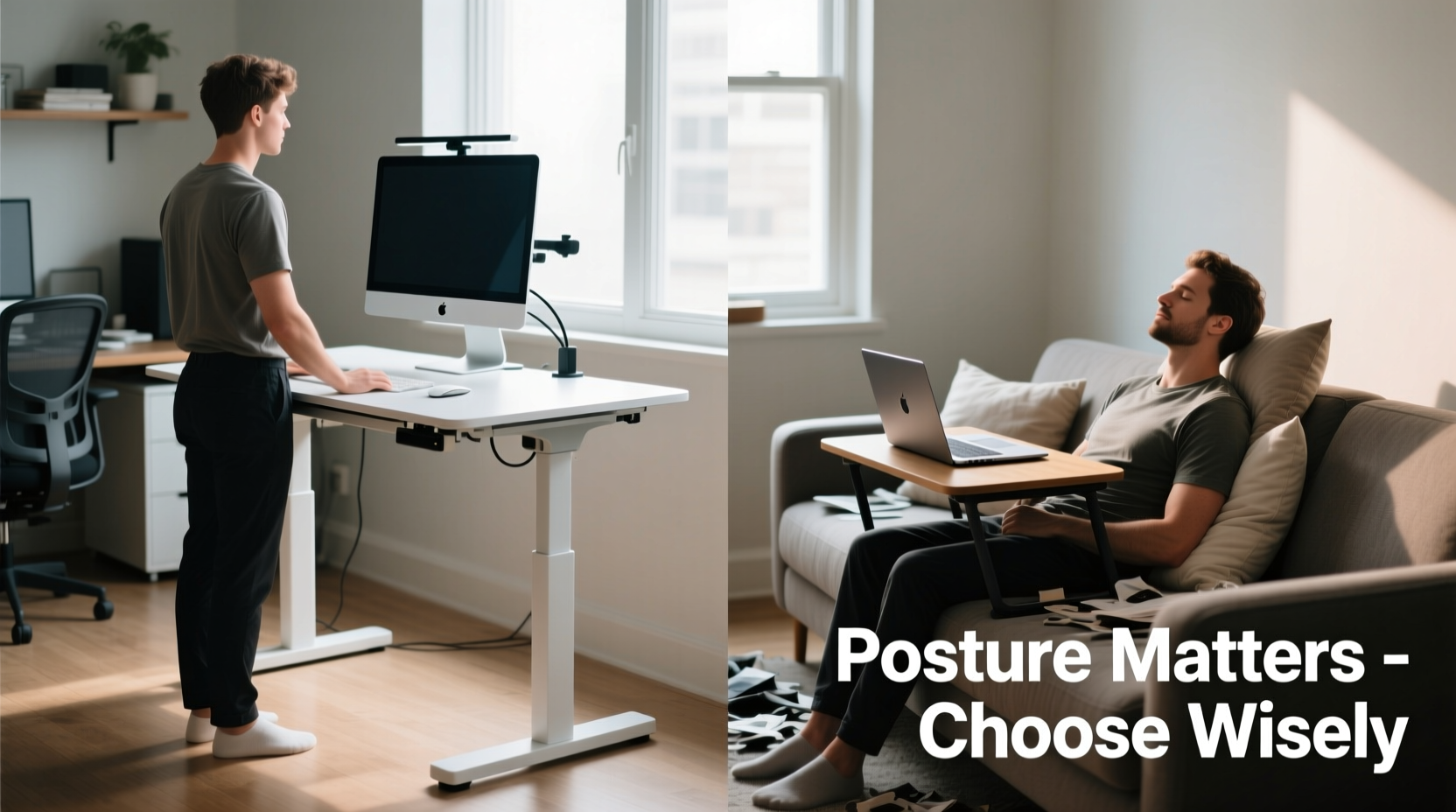
Ergonomics is the science of designing workspaces to fit the user, minimizing strain and maximizing efficiency. A well-designed workspace aligns your eyes with the top third of your monitor, keeps your elbows at 90 degrees, and supports a neutral spine. Let’s examine how each desk type meets these criteria.
Compact Standing Desks: These are height-adjustable (manually or electrically) platforms designed to elevate your laptop or monitor to eye level when standing. Most models allow customization so that your keyboard sits at elbow height, encouraging shoulders to relax and arms to remain parallel to the floor. When properly adjusted, a standing desk promotes an upright posture, reducing forward head tilt and slouching.
Lap Desks: Typically flat or slightly angled trays used while sitting or lying down, lap desks are portable but rarely adjustable. They often force users to look downward at screens, creating what experts call \"text neck\"—a condition caused by prolonged forward head positioning. Even padded or contoured models rarely correct the fundamental issue: the screen ends up too low for optimal viewing.
Tip: If using a lap desk, pair it with an external keyboard and elevate your screen with books or a stand to reduce neck strain.Postural Impact: Long-Term Effects on Spine and Muscles
Sustained poor posture leads to muscular imbalances. The trapezius, levator scapulae, and cervical extensors become overworked when holding the head forward, while core stabilizers weaken from lack of engagement. Over time, this contributes to kyphosis (rounded upper back), disc compression, and fatigue.
Standing desks encourage dynamic movement. Alternating between sitting and standing throughout the day activates postural muscles, improves circulation, and reduces static loading on the spine. Research from the *Journal of Physical Activity and Health* shows that sit-stand desks reduce lower back pain by up to 32% within four weeks of regular use.
In contrast, lap desks reinforce sedentary habits. Whether used on the sofa or in bed, they promote slumped sitting or reclined positions where lumbar support is absent. The pelvis tilts posteriorly, flattening the natural curve of the lower spine. This position increases pressure on intervertebral discs by up to 40% compared to neutral sitting, according to studies cited by the *Spine Journal*.
“Even short periods of unsupported sitting can compromise spinal mechanics. A lap desk might seem convenient, but without proper back support and screen elevation, it becomes a posture hazard.” — Dr. Lena Patel, Ergonomics Consultant at the Human Factors Institute
Comparison Table: Key Features and Posture Outcomes
| Feature | Compact Standing Desk | Lap Desk |
|---|---|---|
| Height Adjustability | Yes – allows customization for standing or seated use | No – fixed height, usually below waist level |
| Screen Positioning | Can be set at eye level with risers or dual-tier designs | Rarely reaches eye level; encourages downward gaze |
| Back Support | Promotes upright stance; reduces reliance on chair support | Often used without back support; increases slouching risk |
| Mobility & Space Use | Compact but requires floor space; some fold against wall | Highly portable; usable anywhere including beds and sofas |
| Encourages Movement | Yes – facilitates standing breaks and posture shifts | No – promotes prolonged static sitting or lying |
| Long-Term Posture Benefit | Significant – supports neutral spine and active posture | Negligible to negative – may worsen spinal misalignment |
Real-World Scenario: Two Remote Workers, Two Choices
Consider Sarah and James, both freelance graphic designers working from home.
Sarah uses a compact standing desk in her small apartment. She pairs it with an anti-fatigue mat and alternates between standing and sitting every 30 minutes. Her monitor is elevated to eye level, and she uses an external keyboard and mouse. After six months, she reports less lower back stiffness and improved focus. Her posture checks in video calls show her shoulders relaxed and chin aligned over her chest.
James prefers his lap desk. He works from the couch most days, sometimes from bed when deadlines loom. His screen sits 12 inches below eye level, and he frequently leans forward to see details. Within four months, he begins experiencing tension headaches and mid-back tightness. A physical therapist identifies early signs of thoracic kyphosis and recommends immediate changes to his setup.
This contrast illustrates how tool choice directly influences musculoskeletal health—even among people doing similar work.
Step-by-Step Guide: Building a Posture-Friendly Workspace
Whether you choose a standing desk or continue using a lap desk temporarily, follow these steps to minimize postural damage:
- Assess Your Current Setup: Sit in your usual work position and observe your body. Is your head leaning forward? Are your shoulders hunched? Does your lower back feel unsupported?
- Elevate Your Screen: Use stacked books, a monitor riser, or a dedicated stand to bring the top of your screen to eyebrow level.
- Add External Input Devices: Connect a separate keyboard and mouse so you can position them at elbow height, regardless of screen location.
- Choose the Right Base: If using a lap desk, place it on a firm surface like a dining chair—not a soft couch or bed—to maintain pelvic stability.
- Set Movement Reminders: Use a timer or app to prompt position changes every 25–30 minutes. Stand up, stretch, walk briefly.
- Invest in a Standing Option: Transition to a compact standing desk if possible. Look for models with gas-spring height adjustment or clamp-on mechanisms for small spaces.
- Practice Neutral Alignment: Aim for ears over shoulders, shoulders over hips, and hips over ankles. Keep wrists straight while typing.
Checklist: Choosing the Best Desk for Posture
- ☐ Can the desk be adjusted to elbow height?
- ☐ Does it allow screen placement at eye level?
- ☐ Is it stable enough to prevent wobbling during typing?
- ☐ Does it encourage movement rather than prolonged stillness?
- ☐ Can it be used with proper seating or standing support?
- ☐ Is it suitable for your available space and daily routine?
- ☐ Does it reduce neck, shoulder, or lower back strain?
When a Lap Desk Might Be Acceptable (With Caveats)
There are limited scenarios where a lap desk isn’t inherently harmful—if used correctly. For example:
- Short-duration tasks (e.g., checking emails for 15 minutes)
- Used on a supportive chair with lumbar cushion
- Coupled with a raised screen and external keyboard
- Not used daily or for primary work sessions
However, relying on a lap desk as your main workstation undermines efforts to build healthy postural habits. It’s best treated as a transitional tool—not a long-term solution.
Frequently Asked Questions
Can I improve my posture using only a lap desk?
It’s extremely difficult. While accessories like risers and external keyboards help, the inherent limitations of lap desks—low height, instability, and association with poor seating—make them unsuitable for consistent posture improvement. They may offer temporary convenience but won’t support lasting spinal health.
Are compact standing desks worth the investment?
For most remote workers, yes. Studies show reductions in back pain, increased energy levels, and improved productivity with regular standing desk use. Compact models now start under $100 and fit in apartments, dorms, or shared spaces. The return on investment in terms of comfort and health far outweighs the initial cost.
How long should I stand at my desk each day?
Experts recommend alternating between sitting and standing every 30 to 60 minutes. Start with 15–20 minutes of standing per hour and gradually increase as your body adapts. Total standing time should not exceed two hours per hour worked. Listen to your body—discomfort is a signal to switch positions.
Final Verdict: Which Desk Improves Posture?
The evidence is clear: a compact standing desk significantly outperforms a lap desk in promoting healthy posture. While lap desks win in portability and affordability, they do so at the expense of spinal alignment and muscular balance. Standing desks, especially adjustable ones, empower users to create dynamic, ergonomic work environments—even in tight spaces.
Posture isn’t just about looking alert on Zoom calls; it’s about preserving your physical well-being over years of remote work. Investing in a compact standing desk is not merely buying furniture—it’s investing in your long-term health, energy, and professional sustainability.
“The best posture is the next one. But to move freely, you need a foundation that supports neutrality and change.” — Dr. Marcus Tran, Biomechanics Specialist
Take Action Today for a Healthier Tomorrow
You don’t need a full office renovation to protect your posture. Start by evaluating how your current desk affects your body. Make one upgrade—whether it’s raising your screen, adding a keyboard, or switching to a standing platform. Small changes compound into lasting benefits.
If you're still using a lap desk as your primary work surface, consider trialing a compact standing desk for two weeks. Track your energy, pain levels, and focus. The difference may surprise you.
💬 Have you switched from a lap desk to a standing setup? Share your experience or questions in the comments—your insight could help others make smarter choices!