
Sitting for extended periods—whether working, studying, or gaming—requires more than just a place to rest. The chair you choose plays a critical role in your posture, energy levels, and long-term musculoskeletal health. As remote work and digital entertainment become the norm, many people find themselves choosing between budget gaming chairs and ergonomic office chairs. While both promise comfort, their design philosophies, support structures, and long-term benefits differ significantly. Understanding these differences helps ensure that hours spent seated don’t come at the cost of spinal strain or chronic discomfort.
Design Philosophy: Form vs Function
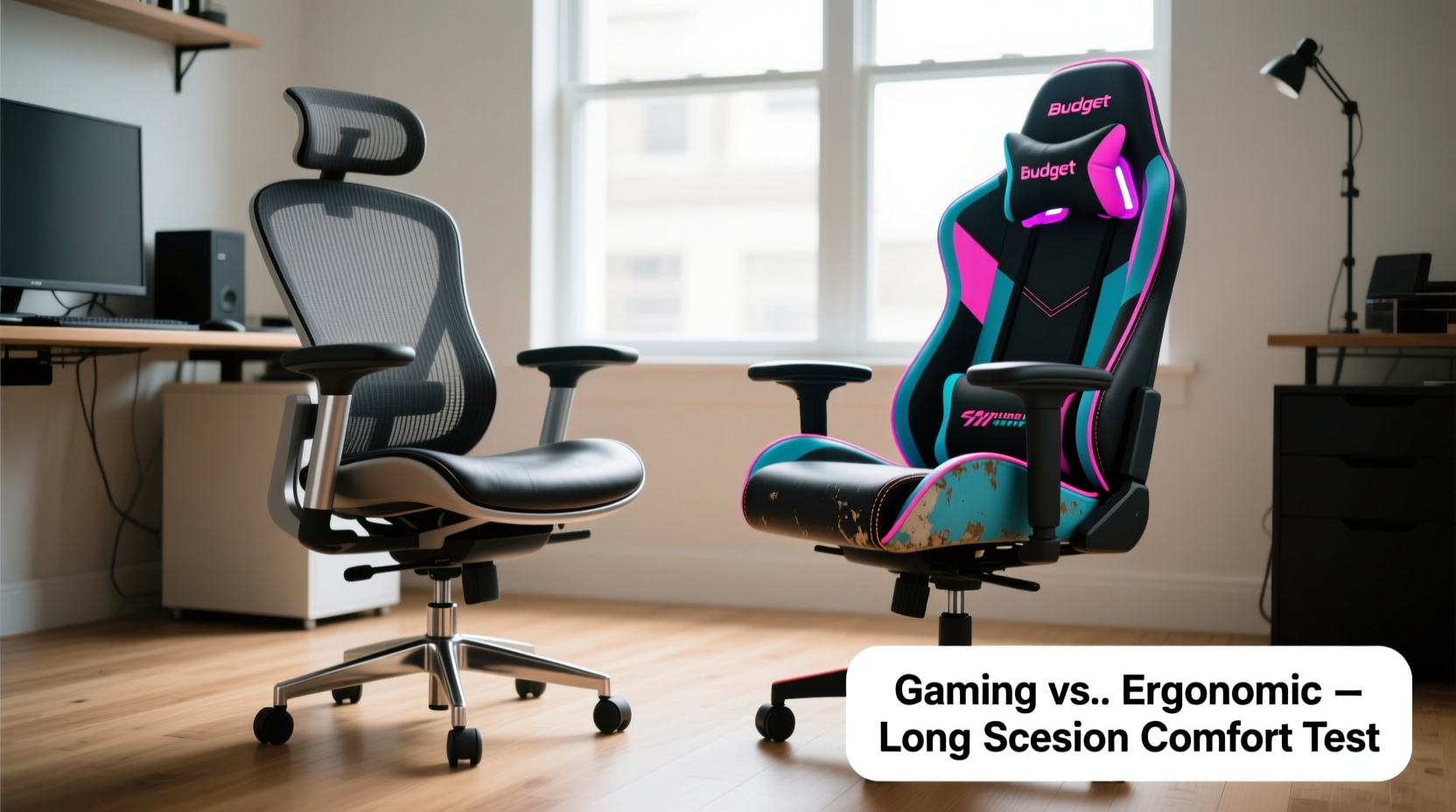
Gaming chairs, especially budget models under $200, are often designed with aesthetics in mind. Bold colors, racing-style bucket seats, aggressive stitching, and flashy logos cater to a youthful, performance-driven image. These chairs typically mimic high-end sports car seats, emphasizing lateral support during fast-paced gameplay. However, this aesthetic focus can compromise ergonomics. Many budget gaming chairs prioritize visual appeal over adjustability and anatomical alignment.
In contrast, ergonomic office chairs are engineered around biomechanics. Their design stems from decades of research into posture, spinal alignment, and workplace efficiency. Features like synchronized tilt mechanisms, adjustable lumbar zones, and waterfall seat edges are standard. These chairs aim to reduce pressure on the lower back, encourage natural spine curvature, and minimize fatigue during 8+ hour workdays.
Tip: A chair’s look shouldn’t override its ability to support your spine. Prioritize adjustability and build quality over color schemes.Support and Adjustability: Where the Real Difference Lies
The key differentiator between budget gaming chairs and ergonomic office chairs is not price—it’s how well they adapt to your body.
Budget gaming chairs often offer limited adjustments. Most include height adjustment, recline function, and basic armrests (sometimes 2D: up/down and in/out). Lumbar support is usually a fixed pillow attached via Velcro, which tends to shift or sag over time. Seat depth is rarely adjustable, forcing shorter users to sit too far back or taller users to lack thigh support.
Ergonomic office chairs, even mid-range models, provide comprehensive customization. Look for:
- 3D or 4D armrests – Adjustable in height, width, depth, and angle to align perfectly with your desk and shoulders.
- Dynamic lumbar support – Built-in systems that contour to your lower back and move with you as you recline.
- Seat depth adjustment – Ensures proper thigh support without cutting off circulation behind the knees.
- Tilt tension control – Allows you to customize how easily the chair reclines, promoting active sitting.
These features may seem excessive, but they’re essential for maintaining neutral posture. According to Dr. Sarah Nguyen, an occupational physiotherapist specializing in workplace ergonomics:
“An ideal chair doesn’t force your body into a position. It allows dynamic movement while keeping your spine in alignment. Budget gaming chairs often lock users into one rigid posture, increasing the risk of disc compression and muscle fatigue.” — Dr. Sarah Nguyen, PhD, Occupational Health Consultant
Material Quality and Long-Term Durability
Budget gaming chairs frequently use PU leather or synthetic mesh. While visually sleek, PU leather tends to crack within 1–2 years, especially in humid or hot environments. Foam padding, often thin and low-density, compresses quickly, leading to a “sunk-in” feel that reduces support. Metal frames may be present, but gas lifts and base components are sometimes made from lower-grade alloys prone to wobbling or failure.
Ergonomic office chairs use higher-grade materials. Mesh-backed models (e.g., Humanscale Diffrient World, Steelcase Leap) feature tension-adjustable knit or elastomer fabrics that promote airflow and resist sagging. Seat foam is high-resilience polyurethane, designed to retain shape after thousands of uses. Bases are typically reinforced nylon or aluminum, and Class 4 gas lifts ensure smooth, safe height adjustment for years.
A real-world example illustrates this difference:
Mini Case Study: Two Users, Two Chairs, Same Routine
Mark, a freelance graphic designer, bought a $150 racing-style gaming chair for his home office. After six months of 10-hour daily use, he noticed the seat cushion had flattened, the lumbar pillow slipped constantly, and the PU leather began peeling near the seams. He developed lower back pain and switched to a $280 ergonomic chair. Within weeks, his discomfort decreased significantly.
Meanwhile, Lena, a software developer, invested in a used Herman Miller Aeron (refurbished, $320). Now three years in, her chair shows no signs of wear. The breathable mesh prevents overheating, and the fully adjustable arms let her type without shoulder strain. She reports fewer neck aches and improved focus during long coding sessions.
The takeaway: initial cost matters less than longevity and consistent support.
Comparative Analysis: Key Features Side by Side
| Feature | Budget Gaming Chair | Ergonomic Office Chair |
|---|---|---|
| Price Range | $80–$200 | $250–$700+ |
| Lumbar Support | Fixed pillow (often ineffective) | Integrated, adjustable system |
| Armrest Adjustability | 2D (height, width) | 3D or 4D (height, width, depth, pivot) |
| Seat Depth Adjustment | Rare | Common in mid-to-high-end models |
| Backrest Material | PU leather (prone to cracking) | Breathable mesh or adaptive fabric |
| Weight Capacity | Typically 220–250 lbs | Often 300+ lbs (higher-end models up to 400) |
| Durability (Expected Lifespan) | 1–3 years with heavy use | 7–12+ years with proper care |
| Recline & Tilt Mechanism | Basic tilt lock | Synchronized tilt with tension control |
This comparison reveals that while budget gaming chairs appear affordable, their functional limitations and shorter lifespan may result in higher long-term costs due to early replacement and potential medical expenses from poor posture.
Health Implications of Prolonged Sitting
No chair eliminates the risks of sedentary behavior, but the right one mitigates them. Poorly supported sitting leads to slouching, forward head posture, and uneven hip alignment—all precursors to chronic pain.
Budget gaming chairs often encourage a reclined, “laid-back” posture that seems comfortable initially but disrupts spinal alignment. The high back and headrest tempt users to lean back excessively, reducing engagement of core muscles and increasing pressure on the sacroiliac joint.
Ergonomic chairs promote a balanced sitting posture: feet flat, knees at 90°, hips slightly above knee level, and lower back fully supported. This neutral alignment reduces disc pressure by up to 30% compared to slouched sitting, according to a 2021 study published in *Applied Ergonomics*.
To maximize benefits, pairing your chair with healthy habits is crucial.
Action Checklist: Optimizing Your Seated Experience
- ✅ Adjust armrests so elbows rest at 90° without shrugging shoulders.
- ✅ Position monitor top at or slightly below eye level, about an arm’s length away.
- ✅ Set lumbar support to fill the curve of your lower back—no gap should remain.
- ✅ Take a 5-minute break every hour to stand, stretch, or walk.
- ✅ Use a footrest if your feet don’t rest flat on the floor.
- ✅ Avoid crossing legs; keep hips and knees aligned.
When a Budget Gaming Chair Might Suffice
It’s not always black and white. For some users, a budget gaming chair is a reasonable short-term solution.
If you're:
- Under 18 and still growing (a temporary chair until upgrading)
- Using the chair for less than 4 hours daily
- On a strict budget with no immediate access to credit or financing
- Needing a chair primarily for casual gaming or weekend projects
However, even in these cases, consider modifications:
Tip: Replace the stock lumbar pillow with a memory foam roll or rolled-up towel placed at the small of your back. This simple fix improves support instantly.FAQ: Common Questions Answered
Can I use a gaming chair for office work?
You can, but most budget gaming chairs lack the adjustability needed for productive, pain-free work. If you must use one, modify it with external lumbar support and ensure your desk setup aligns with ergonomic principles.
Are expensive ergonomic chairs worth it?
For anyone spending 6+ hours daily seated, yes. High-quality ergonomic chairs reduce the risk of repetitive strain injuries, improve concentration, and often last a decade or more. The long-term return on investment—measured in health, productivity, and reduced medical costs—is substantial.
Do all ergonomic chairs look boring?
Not anymore. Modern ergonomic designs blend functionality with sleek aesthetics. Brands like Herman Miller, Autonomous, and Haworth offer minimalist, professional styles suitable for home offices or creative studios. Some even incorporate subtle color accents without sacrificing support.
Conclusion: Invest in Your Body, Not Just Your Setup
Choosing between a budget gaming chair and an ergonomic office chair isn’t just about preference—it’s a decision that affects your physical well-being. While flashy gaming chairs dominate social media and influencer reviews, they often fall short in critical areas like spinal support, breathability, and durability. Ergonomic office chairs, though pricier upfront, deliver superior comfort, adaptability, and long-term value.
If you spend hours each day seated, treat your chair as a health tool, not a piece of furniture. Measure your workspace, assess your sitting habits, and prioritize adjustability over aesthetics. Even modest investments in ergonomics—like a refurbished certified chair or a mid-tier model from a reputable brand—can prevent years of discomfort.
🚀 Your spine will thank you later. Evaluate your current chair using the checklist above, and take one step today toward a healthier, more supported sitting experience. Share your setup or questions in the comments—let’s build better habits together.