TPU (thermoplastic polyurethane) camo phone cases are popular for their durability, flexibility, and rugged aesthetic. They offer excellent shock absorption and grip, making them ideal for active users. However, over time, dirt, oils, and moisture can accumulate between the case and the phone. When it's time to clean or replace the case, improper removal can lead to scratches, screen cracks, or even warping of the phone’s frame. Removing a tightly fitted TPU case—especially one with textured camouflage patterns—requires care and technique. This guide walks you through the safest method to remove your TPU camo case while protecting both your phone and the case itself.
Why Proper Removal Matters
While TPU is more flexible than hard plastic, it still forms a snug fit around modern smartphones. Many camo cases feature raised edges, reinforced corners, and tight tolerances designed to maximize protection. Forcing the case off using fingernails or sharp tools risks:
- Scratching the phone’s finish, especially on aluminum or glass-backed models
- Damaging ports, buttons, or camera lenses
- Cracking the screen if pressure is applied unevenly
- Deforming or tearing the case, reducing its reusability
A proper removal process preserves your investment in both your phone and its protective gear. It also ensures that when you reinstall the case—or switch to a new one—the fit remains secure and functional.
Tip: Always power off your phone before attempting case removal to avoid accidental button presses or app launches.Step-by-Step Guide to Safe Removal
- Prepare Your Workspace
Choose a clean, flat surface with good lighting. Lay down a soft microfiber cloth to protect your phone if it slips from your hands. - Clean Your Hands
Wash and dry your hands thoroughly. Oils and debris from your skin can transfer to the phone during handling, increasing the risk of slippage or residue buildup. - Inspect the Case Fit
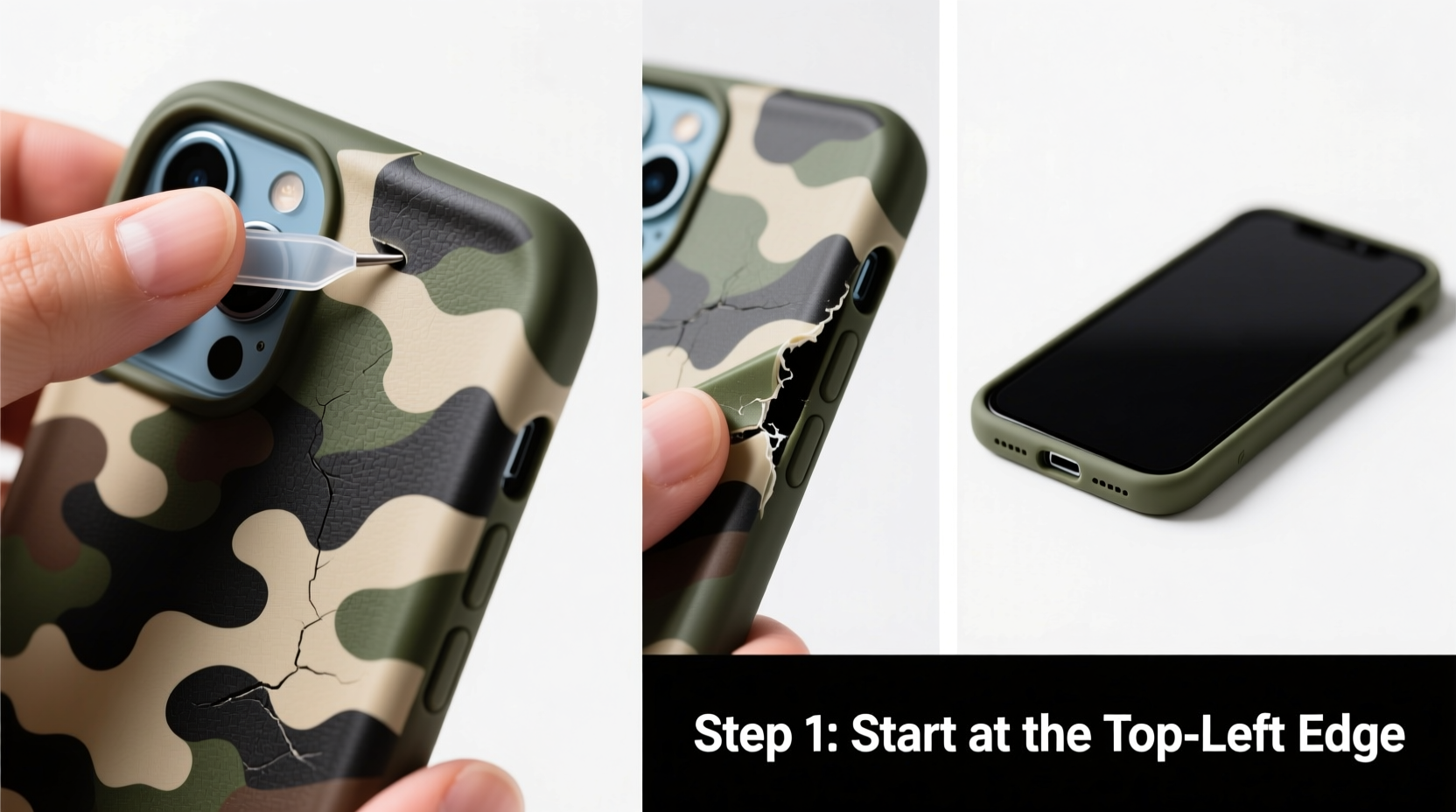
Examine how the case attaches—most TPU camo cases snap onto the phone’s edges. Note any particularly tight areas, such as near the charging port or volume buttons. - Start at the Bottom Edge
Gently insert your thumb under the bottom edge of the case, near the charging port. Use the pad of your thumb—not your nail—to prevent puncturing the soft TPU material. - Lift Gradually
Slowly pry the bottom corner upward. Apply steady, even pressure. You should feel the case begin to separate from the phone’s frame. Do not rush this step. - Work Around the Sides
Once one corner is free, move to the sides. Use your fingers to gently pull the case away from the phone’s left and right edges. Keep your grip firm but controlled. - Release the Top Last
The top edge, where the front-facing camera and sensors are located, often has tighter clearance. Avoid pulling directly upward here. Instead, tilt the case slightly forward once the sides are loose, easing it over the top edge without scraping the screen. - Set the Phone Down Carefully
Once fully removed, place your phone screen-down on the microfiber cloth. Inspect both the device and the interior of the case for trapped dust or wear.
What to Do If the Case Is Stuck
If the case resists despite gentle effort, do not force it. A stuck case may have developed suction or accumulated grime that bonds it to the phone. In such cases:
- Use a small piece of double-sided tape to get better grip on the case edge
- Apply a hairdryer on low heat for 10–15 seconds to slightly soften the TPU (keep it at least 6 inches away)
- Try rotating the removal point—sometimes starting at the side works better than the bottom
“Many customers bring in phones with micro-scratches from aggressive case removal. Taking 30 extra seconds to do it right prevents long-term cosmetic damage.” — Jordan Lee, Mobile Repair Technician, TechCare Pro
Do’s and Don’ts of TPU Case Removal
| Do’s | Don’ts |
|---|---|
| Use clean hands or non-slip gloves for better grip | Use metal tools like screwdrivers or knives |
| Remove the case slowly, corner by corner | Twist or bend the phone while removing the case |
| Clean the inside of the case and phone after removal | Yank the case straight up from one edge |
| Store the case in a dust-free container if reusing | Leave the case exposed to direct sunlight or heat |
Real Example: A Close Call with a Camo Case
Mark, an outdoor enthusiast, used a black-green camo TPU case on his smartphone for hiking and trail running. After six months, he noticed grit buildup along the edges and decided to clean it. In a hurry, he tried peeling the case off using his car key. The metal scratched the phone’s aluminum frame and nearly cracked the screen when the case snapped back. He later learned that a few minutes of careful finger work would have avoided the damage. Now, he follows a routine removal process and keeps a microfiber pouch for storing his case during cleaning.
This scenario highlights how a small oversight can compromise both aesthetics and resale value. Even minor scratches can reduce a phone’s trade-in worth by 10–15%, according to certified refurbishers.
Checklist: Safe TPU Camo Case Removal
Safety Checklist:- ✅ Power off the phone
- ✅ Wash and dry hands
- ✅ Work on a soft, clean surface
- ✅ Start at the bottom edge with thumb pressure
- ✅ Progress slowly around the sides
- ✅ Lift the top edge gently, avoiding screen contact
- ✅ Inspect phone and case post-removal
- ✅ Clean both before reattaching or storing
Frequently Asked Questions
Can I reuse my TPU camo case after removal?
Yes, as long as it hasn’t been stretched, torn, or permanently deformed. Most high-quality TPU cases maintain their elasticity for multiple removals and reapplications. Just ensure they’re cleaned and dried before reuse.
Is it safe to use heat to loosen a tight TPU case?
Low, indirect heat from a hairdryer for no more than 15 seconds can help relax the material. Avoid prolonged exposure or holding the dryer too close, as excessive heat can warp the case or damage phone seals. Never use boiling water or open flames.
Why does my TPU case feel sticky after months of use?
Over time, TPU can degrade due to exposure to UV light, oils from skin, and environmental pollutants. This breakdown causes a tacky surface. Wipe it with a 70% isopropyl alcohol solution and let it dry completely. If stickiness persists, replacement is recommended.
Final Tips for Long-Term Case and Phone Care
Removing your TPU camo case safely is just one part of responsible device maintenance. To extend the life of both your phone and its accessories:
- Clean the case every 2–3 weeks with mild soap and water
- Allow all components to air-dry fully before reassembly
- Avoid wearing the case in extreme heat (e.g., on a car dashboard)
- Rotate between two cases to reduce wear on a single unit