Planning a rustic vineyard photoshoot—whether for an engagement, wedding preview, brand campaign, or personal portfolio—requires more than just booking a location and showing up with a camera. The magic lies in intentionality: cohesive styling, atmospheric lighting, seasonally resonant details, and seamless coordination. Pinterest isn’t just a source of fleeting inspiration—it’s a dynamic visual project management tool when used strategically. With over 450 million active users and a search algorithm trained to surface highly contextual, aesthetic-rich results, Pinterest functions as both a creative compass and a logistical backbone. This guide walks through how professional photographers, stylists, and couples alike leverage Pinterest not as a passive gallery, but as an active planning engine—mapping color palettes, scouting real-world vineyard backdrops, vetting vendors, pre-visualizing shot lists, and even managing timelines—all before the first shutter click.
1. Build a Purpose-Driven Mood Board (Not Just a Pin Dump)
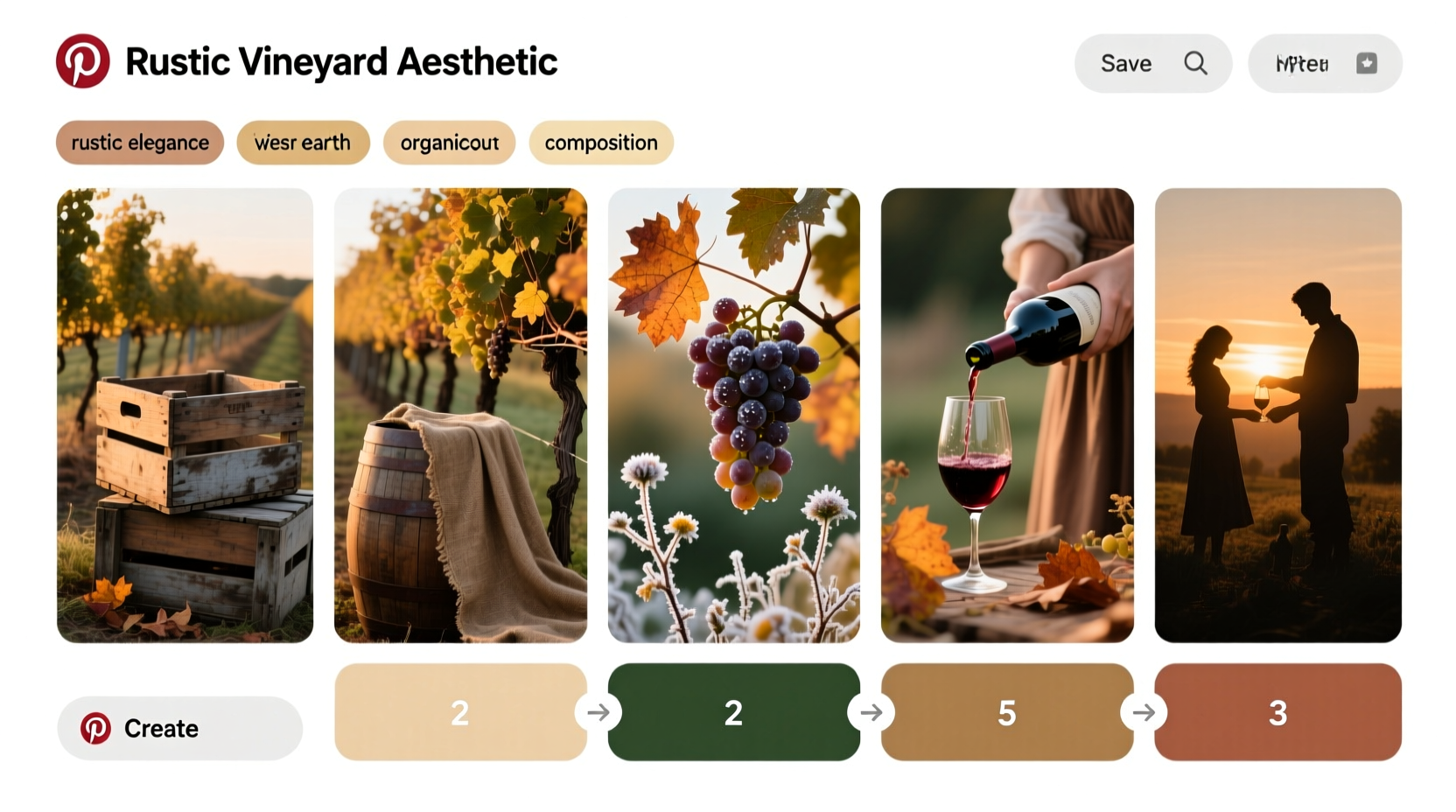
A successful Pinterest mood board for a vineyard shoot goes beyond collecting pretty images. It’s a curated visual brief that communicates tone, texture, scale, and narrative. Start by creating a private board titled with specificity: “Rustic Vineyard Shoot – Fall 2024 – Oak & Terracotta Palette.” Avoid generic terms like “vineyard” or “rustic”—they return overly broad, commercially saturated results. Instead, layer precise modifiers: “dry-farmed Sonoma vineyard,” “unmanicured hillside rows,” “vintage French oak barrel detail,” “linen + suede bridal styling,” or “golden hour vine row backlighting.”
Pinterest’s visual search works best when you pin *real photographs*—not stock illustrations or AI-generated images—because its algorithm recognizes lighting quality, material texture, and spatial relationships. Prioritize pins from actual photographers’ portfolios (check bios for location tags), winery-owned social posts, and editorial features in publications like VinePair or Wine Enthusiast. As you collect, annotate each pin with a short note in the description field: “Use this arched trellis for ceremony framing,” “Barrel stacking style matches client’s request for ‘reclaimed but refined’,” or “Light direction shows ideal 4:30 PM angle at Jordan Vineyard.”
Tip: Create separate sub-boards within your main board: “Lighting Reference,” “Styling Details,” “Vineyard Architecture,” and “Real Client Outfits.” This prevents visual fatigue and enables quick filtering during vendor briefings.2. Reverse-Engineer Real Vineyard Locations Using Geotagged Pins
Most photographers assume location scouting requires driving hours or hiring a local fixer. But Pinterest offers a surprisingly effective geolocation strategy. Search for phrases like “Napa rustic wedding vineyard” or “Willamette Valley engagement shoot,” then filter results by “Most Recent.” Scroll past sponsored pins and look for posts tagged with identifiable landmarks: “near Dry Creek Road,” “behind Chateau Montelena,” or “old stone tasting room, Paso Robles.” Click into the pin—and crucially, click the profile of the person who pinned it. Often, that’s the photographer, couple, or venue manager. Their profile frequently includes location tags, captions naming roads or neighboring towns, or links to their website with exact coordinates.
Once you identify three to five candidate vineyards, cross-reference those locations on Google Maps Street View and Instagram geotags. Look for consistency: Are the rows oriented east-west (ideal for morning light)? Is there a usable shaded pergola or weathered barn? Does the property have gravel drive access for gear transport? Pinterest doesn’t replace site visits—but it eliminates 70% of unsuitable options before you book a tour.
3. Curate a Vendor Vetting Toolkit Using Pinterest as a Portfolio Filter
When hiring a florist, stylist, or hair/makeup artist for a rustic vineyard shoot, Pinterest serves as a rapid, aesthetic-first vetting system. Rather than scrolling through dozens of websites, search “rustic vineyard florist Napa” or “organic bouquet Sonoma.” Then, examine the *quality of curation* in their boards—not just their own work, but what they save from others. A skilled floral designer will pin images showcasing texture contrast (dried lavender + fresh scabiosa), seasonal appropriateness (late-summer cosmos vs. spring peonies), and scale awareness (bouquets sized for wide-angle vine row shots). A weak curator pins only generic “boho bouquet” images without context.
| Vendor Type | What to Look For on Pinterest | Red Flag to Watch |
|---|---|---|
| Florist | Pins showing dried elements integrated with fresh blooms; close-ups of stem prep for durability in heat | Only studio shots on white backgrounds—no outdoor or vineyard context |
| Stylist | Boards organized by season and terrain (e.g., “Fall Vineyard Textures,” “Gravel Path Styling”); fabric swatch comparisons | No mention of wrinkle resistance, sun protection, or footwear suitability for uneven ground |
| Hair & Makeup | Pins emphasizing longevity (wind-resistant updos, sweat-proof formulas), natural skin texture, and golden-hour glow enhancement | Heavy contouring or glitter-heavy looks inconsistent with rustic authenticity |
4. Develop Your Shot List Using Pinterest’s Visual Sequencing Logic
Pinterest’s “related pins” feature is an underused shot-list generator. Begin with one strong anchor image: say, a wide shot of vine rows receding into golden light. Click “More like this,” and Pinterest surfaces variations—same composition but different times of day, seasons, or styling. Save these as a sequence: “Opening Wide,” “Approach Detail (feet on gravel path),” “Mid-Row Interaction,” “Barrel Close-Up (hands holding wine glass),” “Sunset Silhouette.” This creates a natural visual narrative arc, mirroring how viewers experience a vineyard: moving from expansive landscape to intimate human detail.
Then, use Pinterest’s search bar to stress-test your list. Type “rustic vineyard detail shot ideas” and study the top results. You’ll notice recurring high-value moments: dew on grape leaves at dawn, rust on vintage tractor wheels, calloused hands pruning vines, linen napkins blowing slightly in breeze. These aren’t posed—they’re observed. Incorporating three to five such “authentic detail” shots grounds your series in realism and avoids cliché.
“Clients don’t remember every pose—they remember the feeling of wind in their hair while standing between two rows of Cabernet vines at 5:17 p.m. Pinterest helps us pre-identify those feeling-driven moments so we’re ready to capture them, not chase them.” — Maya Chen, Documentary Wedding Photographer, Sonoma-based since 2013
5. Execute a 4-Week Pinterest-Integrated Planning Timeline
Using Pinterest effectively means syncing it with real-world deadlines. Here’s how top-tier planners structure their workflow:
- Week 4 Before Shoot: Finalize private mood board with 60–80 highly annotated pins. Share board link with client and key vendors (florist, stylist) via email with clear instructions: “Please review and comment on 3 pins you’d like to adapt—include notes on feasibility.”
- Week 3: Use Pinterest-scouted locations to schedule virtual tours. Compile side-by-side comparison screenshots (from Pinterest + Google Maps) highlighting lighting angles, parking, and backup rain locations. Present as a simple PDF.
- Week 2: Build a “Pinning Protocol” for vendors: Florist shares 5 new pins showing mock-up arrangements in similar light conditions; Stylist pins 3 fabric swatches with UV-resistance ratings; HMUA pins 2 “wind test” videos of updo durability.
- Week 1: Export final board as PDF. Print physical copies for on-site reference (battery-free, glare-resistant, and instantly shareable with assistants). Highlight 8 critical pins with neon tabs: “Primary Backdrop,” “Golden Hour Window,” “Rain Plan Location,” etc.
- Shoot Day: Keep mobile Pinterest app open in split-screen mode alongside your shot list app. When unexpected light shifts occur (e.g., sudden cloud cover), search “overcast vineyard lighting examples” and pull up 3 pins showing how to adjust composition—immediately.
Mini Case Study: The Mendocino Coastal Vineyard Project
In spring 2023, stylist Lena Rossi planned a brand campaign for a small-batch organic winery in Mendocino County. The client requested “wild, untamed, coastal-rustic”—but rejected every conventional vineyard stock image as “too manicured.” Lena created a board titled “Mendocino Headland Vineyards – Wind-Scoured & Salt-Aged.” She searched obscure terms: “coastal fog vineyard California,” “blown sand on grape clusters,” and “redwood barrel storage shed.” Within two days, she found a geotagged photo from a local hiking blog showing a hidden 5-acre plot owned by a retired viticulturist—unlisted on any wedding directory. She contacted him via Instagram (linked from his Pinterest profile), secured exclusive access, and used his property’s natural wind-sculpted cypress hedges and salt-bleached oak barrels as primary set pieces. The resulting campaign increased the winery’s direct-to-consumer sales by 32%—and every hero image matched a pin from her original board within 5 degrees of framing and light temperature.
FAQ
How many pins should my mood board contain?
Quality trumps quantity. Aim for 40–70 pins that represent distinct decisions: 15 for lighting, 12 for color, 8 for textures, 7 for composition, and 8 for real-world logistics (e.g., “gravel path wheelchair access,” “shade coverage map”). Boards over 100 pins dilute focus and confuse vendors.
Can I use Pinterest to find affordable rental props for vineyard shoots?
Absolutely—but refine your search. Instead of “rustic props,” try “vintage wine crate rental California” or “linen table runner rental Sonoma.” Many prop rental companies maintain active, well-tagged Pinterest accounts. Look for pins linking directly to their inventory pages, not just inspirational posts.
Is it ethical to replicate a Pinterest pin exactly?
Direct replication risks copyright infringement and aesthetic stagnation. Use pins as springboards—not blueprints. Ask: What problem does this image solve? (e.g., “How to soften harsh noon light?”) Then adapt the solution to your unique location, models, and gear. Authenticity emerges from thoughtful translation—not duplication.
Conclusion
Pinterest transforms from a passive idea repository into a precision planning instrument the moment you treat it like a living document—not a scrapbook. Every pin you save, annotate, and organize is a decision made in advance, reducing on-site hesitation and elevating creative confidence. Rustic vineyard photography thrives on harmony: between cultivated and wild, structured and spontaneous, timeless and timely. Your Pinterest board becomes the quiet architect of that balance—mapping where light falls before sunrise, clarifying which textures complement wind-tousled hair, and ensuring your team speaks the same visual language before stepping onto the soil. Stop scrolling for inspiration. Start building your next shoot, one intentional pin at a time.
💬 Have a Pinterest planning win—or a lesson learned the hard way? Share your vineyard shoot board link or biggest takeaway in the comments. Let’s build a smarter, more grounded creative community—together.