Applying a tempered glass screen protector should be a simple task—yet for many, it ends in frustration: tiny dust particles trapped underneath, air bubbles that refuse to settle, or misalignment that ruins both protection and aesthetics. The truth is, success isn’t about luck; it’s about preparation, precision, and process. With the right approach, you can achieve a flawless, bubble-free application that looks professionally installed. This guide walks you through every essential step, from choosing the right environment to post-installation checks, ensuring your device's screen stays protected without compromising clarity or touch sensitivity.
Why Proper Application Matters
A poorly applied screen protector defeats its purpose. Dust specks under the film create visual distractions and potential scratch points. Air bubbles compromise adhesion and can grow over time, leading to lifting edges. Misalignment not only affects usability but also reduces edge-to-edge protection, especially on curved displays. Tempered glass is designed to absorb impact and resist scratches, but only when fully bonded to the screen. A perfect fit ensures optimal shock absorption, seamless touch response, and long-term durability.
“Over 70% of screen protector failures come from improper installation, not product quality.” — David Lin, Mobile Device Protection Specialist
Essential Tools and Environment Setup
The foundation of a clean installation starts before you even open the screen protector package. Your environment plays a critical role. Choose a room with minimal airflow—close windows and turn off fans or HVAC systems to reduce airborne particles. Natural light helps visibility, but avoid direct sunlight, which can cause premature activation of adhesive layers.
Tip: Perform the installation in a bathroom after a hot shower. The increased humidity reduces static, helping dust settle faster.Here’s what you’ll need:
- Tempered glass screen protector kit (includes glass, cleaning wipes, dust stickers, alignment tray if included)
- Microfiber cloth (lint-free, preferably from the kit or a dedicated eyewear cloth)
- Alcohol wipe or screen cleaning solution
- Dust removal stickers (usually included in the kit)
- Tape (optional, for extra dust removal)
- Plastic card or squeegee (for smoothing)
- Well-lit, enclosed space with minimal foot traffic
Step-by-Step Installation Process
Follow this sequence carefully. Rushing any step increases the risk of contamination or misalignment.
- Power Off the Device: Turn off your phone or tablet completely. A black screen makes dust and alignment errors easier to spot.
- Clean Hands and Workspace: Wash and dry your hands thoroughly. Wipe down the surface where you’ll be working using a damp cloth.
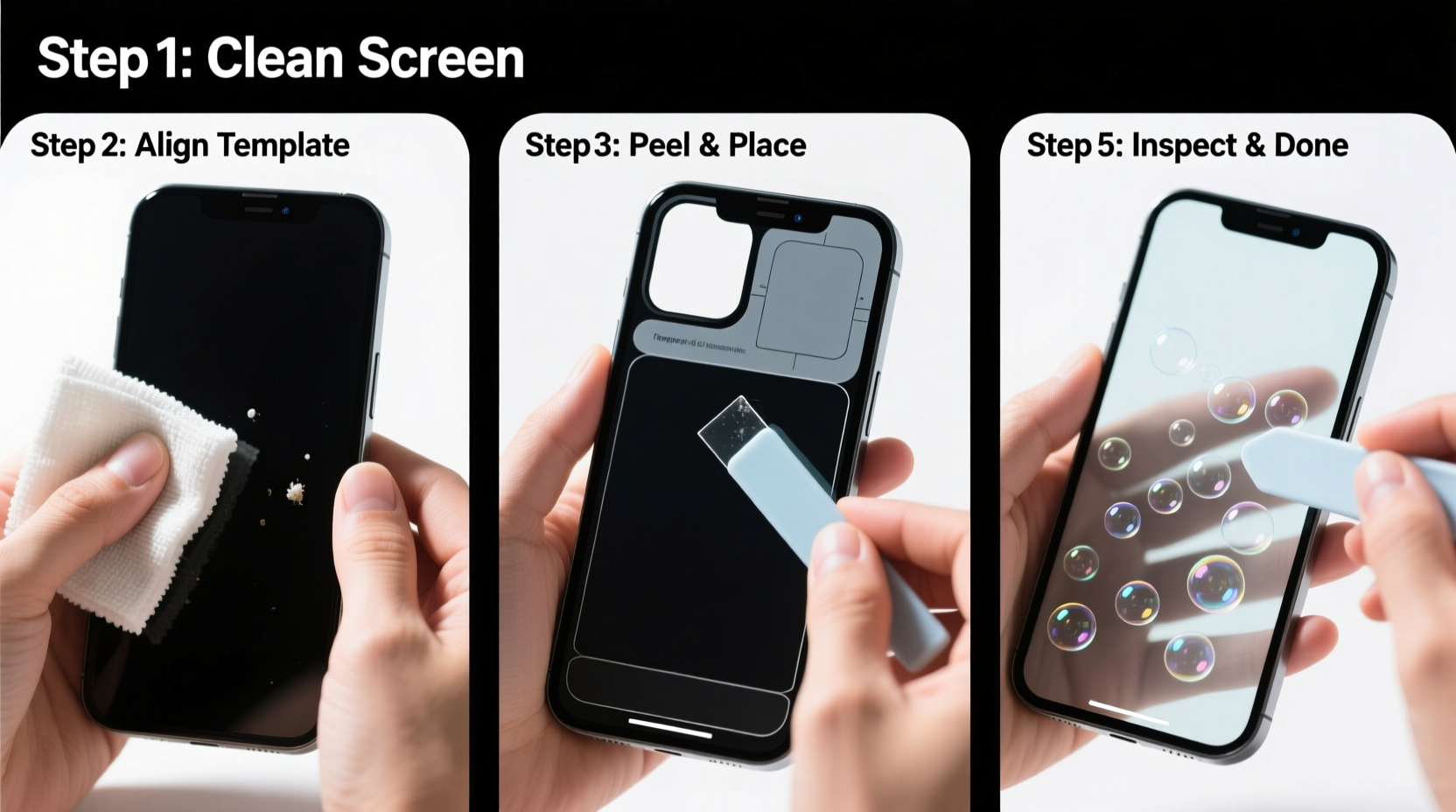
- Initial Screen Cleaning: Use the microfiber cloth to remove fingerprints and smudges. Then, use the alcohol wipe to disinfect and eliminate oils. Let the screen dry completely—about 30 seconds.
- Final Dust Removal: Peel the dust removal sticker and gently dab it across the entire screen surface. Avoid dragging; lift and reposition frequently. For stubborn particles, use a piece of transparent tape (not recommended for OLED screens unless necessary).
- Double-Clean the Screen: Wipe again with the microfiber cloth, then use a second alcohol wipe if available. Inspect under bright light at different angles.
- Prepare the Protector: Open the tempered glass package carefully. Do not touch the adhesive side. Hold it by the edges only.
- Use Alignment Tray (If Included): Some kits include a plastic frame that snaps onto the device to guide placement. Attach it securely before proceeding.
- Peel Backing Slowly: Remove the rear protective film from the glass, keeping fingers clear of the adhesive surface.
- Align and Lower Gently: Hold the glass by the top corners, align it with the camera cutout and buttons, then slowly lower it onto the screen. Let it fall into place naturally—do not slide or adjust once contact is made.
- Press and Smooth: Starting from the center, press down firmly with your finger or the provided squeegee, moving outward in circular motions to push out any residual air.
- Wait and Inspect: Wait 5–10 minutes. Most minor bubbles will disappear as the adhesive bonds. Tap gently around edges to encourage adhesion.
Do’s and Don’ts During Installation
| Do’s | Don’ts |
|---|---|
| Work in a closed, still room | Install near open windows or vents |
| Use dust stickers instead of touching the screen | Blow on the screen to remove dust (adds moisture and saliva particles) |
| Hold the glass by the edges only | Touch the adhesive side with fingers |
| Let the protector self-align once placed | Slide or reposition after initial contact |
| Wait 10 minutes before final inspection | Panic over small bubbles immediately after application |
Troubleshooting Common Issues
Even with care, minor issues can occur. Here’s how to handle them:
- Small Air Bubbles: Most vanish within 24 hours. If persistent, gently press from the center outward with a soft card. Never use sharp objects.
- Dust Specks Under Glass: If caught early, lift the edge slightly and use a dust sticker to pull the particle out. Re-seat carefully.
- Misalignment: If the glass hasn’t fully adhered, lift from one corner and reposition. Once bonded, realignment is impossible without damaging the adhesive.
- Edge Lifting: Indicates poor adhesion. Clean the area again and press firmly. Consider replacing the protector if it continues to peel.
Mini Case Study: The Office Worker’s First Attempt
Sarah, a project manager, tried installing a screen protector at her desk during lunch. Despite following online videos, she ended up with three visible bubbles and a speck of lint near the front camera. Frustrated, she removed it and waited until that evening. This time, she cleared her dining table, turned off the ceiling fan, washed her hands, and used all components in the kit—including the dust sticker she had ignored earlier. The second attempt was flawless. The difference? Environment control and attention to detail. “I didn’t realize how much dust floats in the air until I saw it stick to the adhesive,” she said. “Now I wouldn’t install one without prepping like surgery.”
Frequently Asked Questions
Can I reuse a tempered glass screen protector after removing it?
No. Once the adhesive layer is exposed and touched—even briefly—it loses its tackiness and collects contaminants. Reapplication will result in poor bonding and trapped debris.
How long does it take for bubbles to disappear?
Most minor bubbles resolve within 5 to 30 minutes as the silicone adhesive spreads evenly. Larger or clustered bubbles may indicate misapplication and won’t disappear on their own.
Are liquid screen protectors better than tempered glass?
Liquid protectors are nano-coatings that harden on the screen surface, offering some scratch resistance but no physical barrier against drops. They don’t replace tempered glass, which provides measurable impact protection. Use them as a supplement, not a substitute.
Final Checklist Before You Begin
Run through this quick verification list to ensure readiness:
- ✅ Device is powered off
- ✅ Work area is clean and draft-free
- ✅ Hands are washed and dry
- ✅ All tools from the kit are laid out
- ✅ Microfiber cloth is clean and lint-free
- ✅ Dust stickers are accessible
- ✅ No pets or children nearby (to avoid sudden movement or static interference)
Conclusion: Precision Pays Off
A perfectly applied tempered glass screen protector enhances your device’s longevity without sacrificing usability. It takes less than 15 minutes, but the payoff—a scratch-free, responsive screen for months or years—makes the effort worthwhile. By treating the process with care, using the right techniques, and respecting the importance of cleanliness and alignment, you eliminate guesswork and frustration. Whether you’re protecting a new flagship phone or replacing an old protector, follow this guide to achieve results that look like they came from the factory.
🚀 Ready for a flawless finish? Gather your tools tonight and give your device the protection it deserves—clean, bubble-free, and perfectly aligned.