Repetitive strain injuries (RSIs), carpal tunnel syndrome, and chronic wrist pain are common among desk workers, gamers, and creatives who spend hours each day navigating digital interfaces. While the traditional optical or laser mouse dominates most workspaces, an increasing number of users are turning to ergonomic alternatives—especially the trackball mouse—to reduce physical strain. But with its unconventional design and different input mechanics, many wonder: Is the learning curve of a trackball mouse truly worth it for wrist pain relief?
This article explores the biomechanical differences between trackball and standard mice, evaluates the adjustment period, and assesses whether long-term health benefits outweigh short-term usability challenges.
How Trackball Mice Differ from Regular Mice
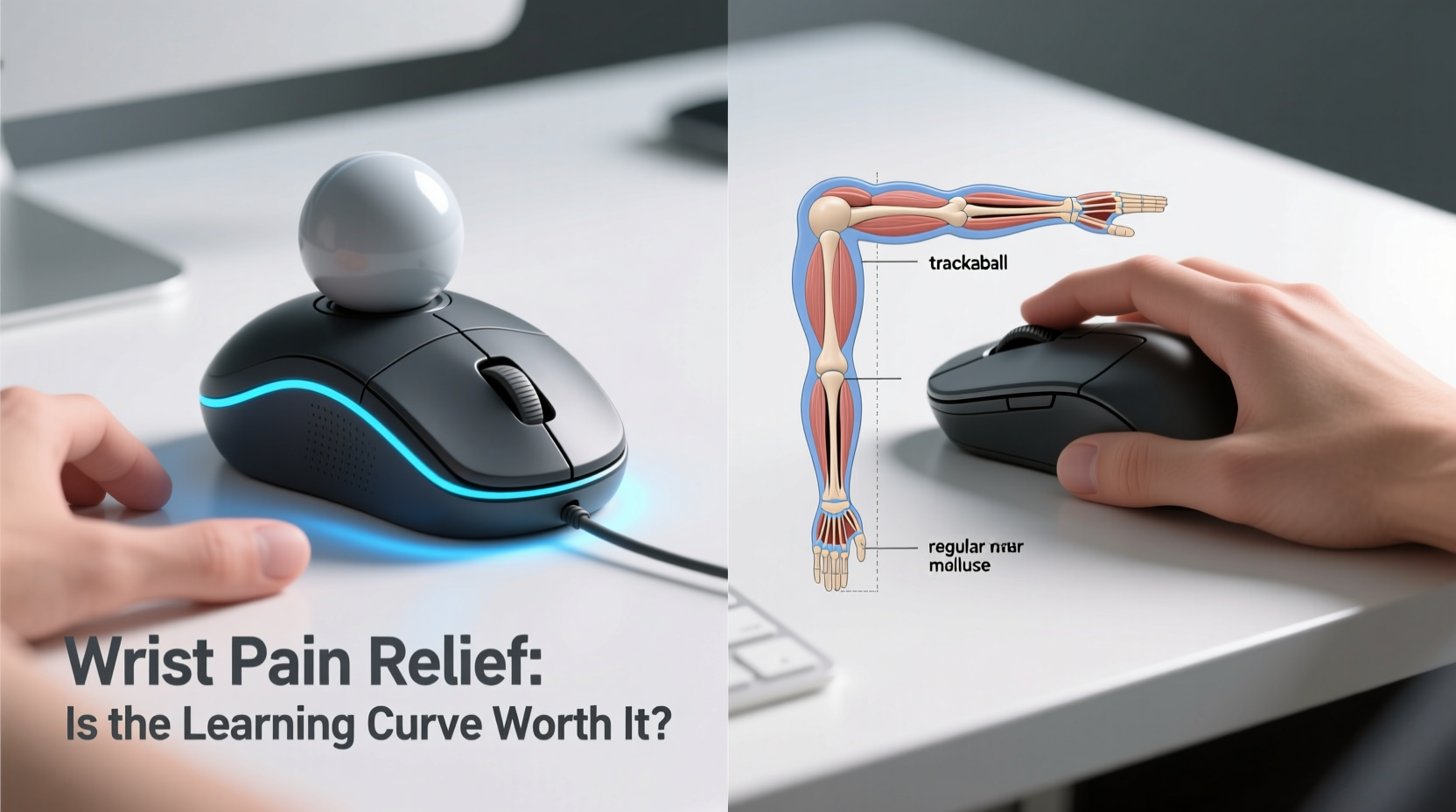
The fundamental distinction lies in how cursor movement is generated. A conventional mouse relies on hand translation—users move the entire device across a surface to control the pointer. This requires constant forearm motion, repeated wrist adjustments, and sustained grip tension, all of which contribute to muscle fatigue and joint stress over time.
In contrast, a trackball mouse remains stationary. Instead of moving the device, users manipulate a protruding ball with their thumb or fingers to navigate the screen. The rest of the hand stays relatively still, minimizing large-muscle engagement and reducing the need for repetitive arm sweeps.
This static design aligns more closely with ergonomic principles that emphasize minimal movement, neutral posture, and reduced exertion. According to Dr. Laura Chen, occupational therapist and ergonomics consultant:
“Reducing distal limb motion—especially at the wrist and forearm—can significantly lower the risk of developing musculoskeletal disorders. Devices like trackball mice shift control to smaller, more precise muscles, decreasing cumulative strain.” — Dr. Laura Chen, OTD, Ergonomics Specialist
Biomechanical Impact: Wrist, Forearm, and Shoulder
Standard mice place consistent demands on the extensor carpi radialis brevis and longus muscles—the primary wrist stabilizers. Over extended use, these muscles become fatigued, leading to microtrauma, inflammation, and eventually conditions like tendinitis or epicondylitis (commonly known as “mouse elbow”).
Trackball models, particularly thumb-operated ones, engage intrinsic hand muscles rather than relying on gross motor movements. This reduces torque on the wrist joint and limits ulnar deviation (the inward bending of the wrist), a key contributor to nerve compression in the carpal tunnel.
Finger-operated trackballs, such as those using the index and middle fingers, offer similar advantages but may require greater finger dexterity. However, both variants eliminate the constant dragging motion associated with traditional mice, which directly correlates to decreased shoulder elevation and trapezius strain—a frequent complaint among remote workers using poorly positioned desks.
Tip: Position your trackball mouse at elbow height, aligned with your keyboard’s center, to maintain neutral shoulder and wrist alignment.Comparative Analysis: Trackball vs Regular Mouse
| Feature | Trackball Mouse | Regular Mouse |
|---|---|---|
| Movement Mechanism | Stationary; ball controlled by thumb/fingers | Moved across surface via hand translation |
| Wrist Motion Required | Minimal | High (repetitive) |
| Ergonomic Posture Support | High (neutral wrist position easier to maintain) | Low to moderate (depends on setup) |
| Learning Curve | Moderate to steep (3–14 days average) | Negligible (intuitive for most) |
| Precision for Fine Tasks | Good to excellent (once adapted) | Excellent (immediate) |
| Suitable for Small Desk Spaces | Yes (no glide space needed) | No (requires flat surface area) |
| Common Pain Relief Reports | High (wrist, forearm, shoulder) | None (may exacerbate existing issues) |
Real-World Adaptation: A Case Study
James R., a graphic designer based in Portland, had been experiencing sharp radial wrist pain after five years of full-time mouse use. Despite trying gel pads, vertical mice, and frequent breaks, his discomfort persisted. His physician recommended eliminating translational motion entirely.
He switched to a Logitech MX Ergo trackball and began logging his adaptation process. The first two days were frustrating—overshooting targets, difficulty with drag-and-drop functions, and noticeable thumb fatigue. By day five, he reported smoother scrolling and improved targeting accuracy. After ten days, he could perform detailed vector tracing in Adobe Illustrator without discomfort.
“It felt like relearning touch typing,” James said. “But once my brain mapped the new control scheme, precision came back—and the pain didn’t return.” Six months later, he uses the trackball exclusively and has discontinued anti-inflammatory medication.
The Learning Curve: What to Expect
Transitioning to a trackball isn't seamless. Most users experience a temporary dip in productivity lasting between three to ten days. Thumb-operated models often have a steeper initial curve due to unfamiliar muscle activation patterns. Finger-operated versions may feel more intuitive but can lead to finger cramping if not used correctly.
Here’s a realistic timeline for adaptation:
- Days 1–3: Frustration phase. Cursor movement feels sluggish or erratic. Users frequently revert to old habits. Accuracy drops during clicking and dragging tasks.
- Days 4–7: Adjustment phase. Muscle memory begins forming. Users report fewer errors and increased confidence in basic navigation.
- Days 8–14: Integration phase. Precision improves significantly. Multitasking (e.g., selecting text while scrolling) becomes fluid. Discomfort starts to diminish.
- Day 15+: Mastery phase. Efficiency matches or exceeds prior levels. Many users prefer the trackball permanently.
Success depends heavily on consistency. Switching back and forth between devices delays neural adaptation. Committing fully for at least two weeks dramatically increases the likelihood of long-term adoption.
Actionable Tips for Smoother Transition
Tip: Adjust tracking speed in your OS settings early. Start with a slightly slower DPI than usual to improve control during the learning phase.- Use the same hand consistently—don’t alternate between hands unless using a symmetrical model designed for ambidextrous use.
- Clean the trackball weekly. Dust buildup causes inconsistent rolling and frustrates new users unnecessarily.
- Enable acceleration smoothing in your operating system or third-party software (like Logitech Options or SteerMouse).
- Practice daily with low-stakes tasks: browsing, organizing files, or playing simple games like solitaire.
- Take micro-breaks every 20 minutes to stretch fingers and reset posture.
Checklist: Is a Trackball Right for You?
Before investing time and money into a trackball, evaluate your needs and limitations. Use this checklist to determine suitability:
- ✅ Do you experience wrist, forearm, or shoulder pain during or after computer use?
- ✅ Have you already tried wrist rests, ergonomic keyboards, or vertical mice without lasting relief?
- ✅ Can you commit to a minimum two-week trial without switching back to your old mouse?
- ✅ Is your workspace limited in size, making large mouse movements impractical?
- ✅ Are you open to retraining muscle memory for potential long-term benefit?
- ✅ Do you perform tasks requiring fine control (e.g., photo editing, CAD, coding) where precision matters?
If you answered “yes” to three or more, a trackball is likely worth exploring.
FAQ: Common Questions About Trackball Mice
Can a trackball mouse completely eliminate wrist pain?
While no device guarantees pain elimination, many users report significant reduction or complete resolution of symptoms after adapting to a trackball. Success depends on overall ergonomics—including chair height, monitor placement, and typing posture—but removing repetitive translational motion is a major contributing factor.
Are trackball mice good for gaming?
Most competitive gamers prefer traditional mice due to higher polling rates and tactile feedback. However, casual gamers or those playing turn-based or strategy games often find trackballs comfortable and viable. Precision improves with practice, though rapid flick movements remain challenging.
Which is better: thumb or finger trackball?
Thumb models (e.g., Elecom Huge, Logitech M570) are generally preferred for prolonged use because they allow the hand to rest flat and reduce finger strain. Finger-operated designs (e.g., Kensington Expert Wireless Trackball) offer finer control for some but may cause digit fatigue. Try both if possible, or start with a thumb version for general office work.
Long-Term Benefits vs Short-Term Challenges
The core question—whether the learning curve is worth it—boils down to cost-benefit analysis over time. In the short term, yes, there is inconvenience. You’ll lose some efficiency, possibly miss deadlines, and feel awkward navigating familiar interfaces.
But consider the alternative: ongoing pain, reduced work capacity, medical visits, and potential need for corticosteroid injections or surgery. According to the Bureau of Labor Statistics, over 30% of workplace injuries involve soft tissue damage from repetitive motion—many originating from poor input device choices.
Investing two weeks in adaptation may prevent years of discomfort. Moreover, once mastered, trackball users often report greater control, less fatigue, and improved focus due to reduced physical distraction.
“The best ergonomic tool is the one you’ll actually use consistently. For people with wrist strain, the trackball isn’t just an alternative—it’s a preventive intervention.” — Dr. Arjun Patel, Physical Medicine & Rehabilitation, Johns Hopkins Medicine
Conclusion: Prioritize Long-Term Comfort Over Immediate Convenience
Choosing between a trackball and a regular mouse isn’t merely about preference—it’s a decision with lasting implications for physical well-being. While the traditional mouse offers instant usability, its long-term impact on wrist and arm health can be detrimental. The trackball, despite its learning curve, provides a scientifically supported method to reduce strain through minimized motion and improved posture.
If you're struggling with wrist pain, numbness, or recurring discomfort, dismissing the trackball due to initial awkwardness means potentially missing a sustainable solution. Embrace the adjustment period as a necessary investment. With structured practice, proper setup, and patience, the transition pays dividends in comfort, endurance, and quality of work.
🚀 Ready to reduce wrist strain? Choose a reputable trackball model, commit to a 14-day trial, and document your progress. Your future self—and your wrists—will thank you.