Choosing a mechanical keyboard isn’t just about switches or RGB lighting—it’s also about layout. Among the most debated choices are 60% and Tenkeyless (TKL) keyboards. Both eliminate the numeric keypad, but they differ significantly in size, functionality, and workflow integration. The central question for many users is whether dropping the arrow keys—especially on a 60% board—comes at too high a cost. The answer depends on how you type, what you do with your computer, and how adaptable you’re willing to be.
This article breaks down the real differences between 60% and TKL keyboards, explores when arrow key access matters, and helps you decide if sacrificing dedicated navigation keys is worth the space savings and cleaner desk setup.
Understanding Keyboard Layouts: 60% vs TKL
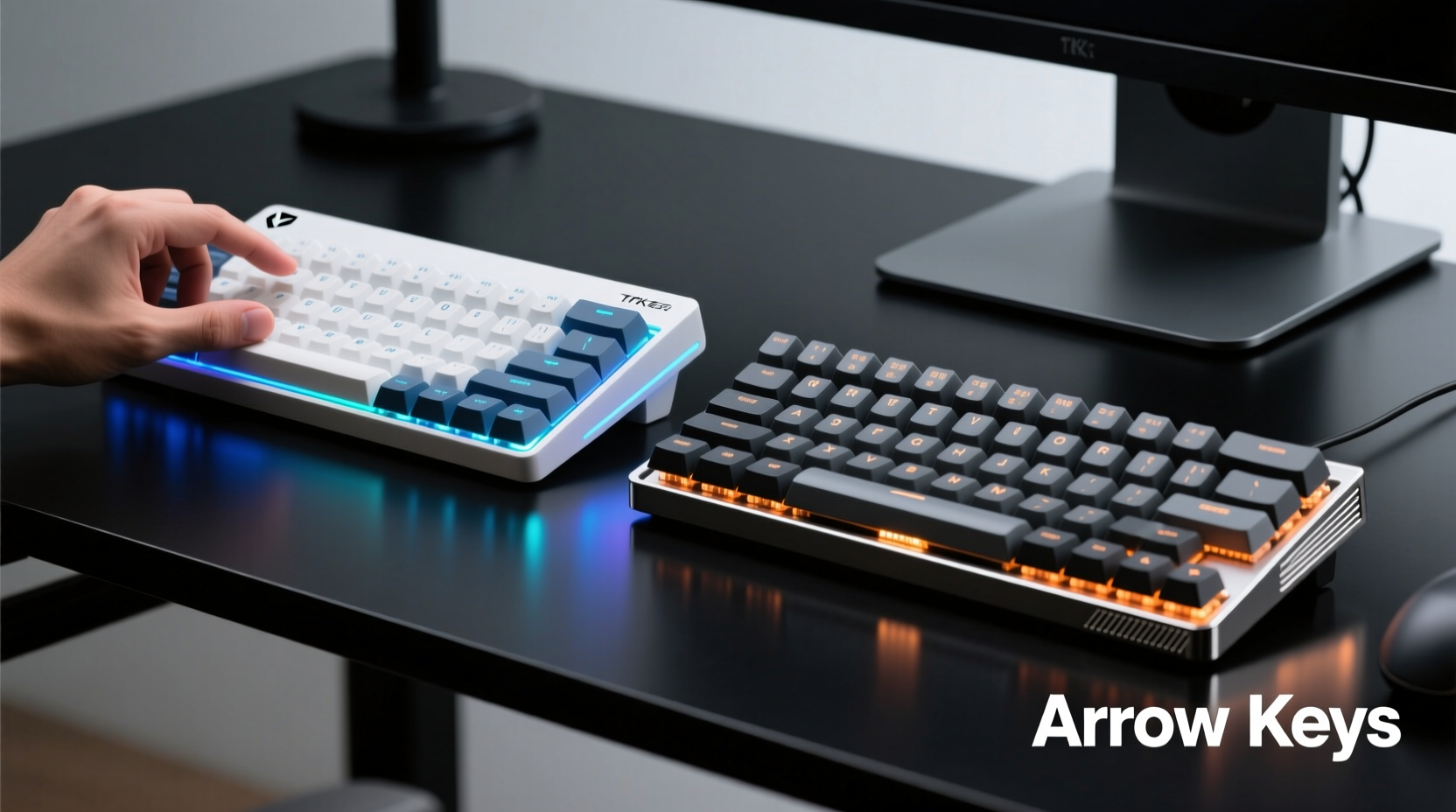
The naming conventions for keyboard sizes can be confusing. “60%” and “Tenkeyless” don’t refer to physical dimensions but to the percentage of a full-size 104-key layout that remains.
- Full-size (100%): Includes all keys—alphanumeric, function row, navigation cluster, arrow keys, and numeric keypad.
- Tenkeyless (TKL, ~80%): Removes the numeric keypad but retains function keys, navigation cluster (Insert, Delete, Home, End, etc.), and arrow keys.
- 60% layout (~60%): Strips away the function row, navigation cluster, and arrow keys entirely. These functions are accessed via layers using modifier keys like Fn.
Visually, the difference is stark. A TKL keyboard saves horizontal space but maintains vertical depth similar to a full-size model. A 60% board is dramatically smaller—often less than half the footprint—making it ideal for minimalist setups or travel.
Tip: If desk space is limited or you frequently reposition your mouse, a 60% keyboard can significantly improve ergonomics by allowing closer hand alignment.Do You Actually Need Arrow Keys?
The short answer: it depends on your workflow. For many users, arrow keys are used constantly—for navigating text, editing code, moving through spreadsheets, or playing games. But frequency doesn’t always equate to necessity.
In practice, most modern operating systems and applications support alternative navigation methods. On a 60% keyboard, arrow functions are typically mapped to a secondary layer, often activated by holding a dedicated Fn key and pressing WASD or IJKL. This means you can still move the cursor—you just need to press two keys instead of one.
For casual typing or web browsing, this shift is barely noticeable. But for power users—programmers, writers, spreadsheet analysts—the added keystroke can feel like friction. Over time, muscle memory adapts, and layered navigation becomes second nature. However, the initial adjustment period varies.
“After three weeks of daily use, my brain stopped ‘missing’ the arrow keys. Now I reach for Fn+J without thinking.” — Adrian Lin, software developer and mechanical keyboard enthusiast
Comparative Breakdown: 60% vs TKL
| Feature | 60% Keyboard | TKL Keyboard |
|---|---|---|
| Footprint | ~6.7 x 2.5 inches | ~14 x 5 inches |
| Arrow Keys | No (accessed via layer) | Yes (dedicated) |
| Function Row (F1–F12) | No (layered) | Yes |
| Numeric Keypad | No | No |
| Navigation Cluster | No (Home, End, PgUp, etc. via layer) | Yes |
| Ease of Transition | Moderate to difficult | Easy |
| Ideal For | Minimalist setups, travelers, advanced users | Office work, gaming, general productivity |
The table highlights a clear trade-off: the 60% offers maximum space efficiency at the cost of direct access to common navigation tools. The TKL strikes a balance—compact enough for most desks while preserving essential keys.
When the 60% Shines
A 60% keyboard excels in scenarios where desk real estate is at a premium or portability matters. Gamers who use mouse-centric controls may rarely touch arrow keys. Developers who rely on Vim-style navigation (hjkl) find layered movement intuitive. Minimalists appreciate the clean aesthetic and reduced clutter.
Additionally, the absence of a right-side cluster encourages better hand discipline. With no escape hatch to the navigation keys, users stay centered over the home row, potentially improving typing posture and reducing wrist strain.
Where TKL Holds the Edge
TKL keyboards maintain broad compatibility with everyday tasks. Editing documents in Microsoft Word, navigating Excel grids, or using Adobe Photoshop all benefit from immediate access to arrow keys and function buttons. Users switching from full-size keyboards adapt quickly to TKL, often not even noticing the missing numpad.
Gamers who play titles requiring frequent use of function keys (e.g., MMOs with skill bars) or arrow-based movement (older platformers, strategy games) will find TKL far more accommodating than 60% boards.
Tip: Try remapping frequently used functions (like Ctrl+C/V) to easier positions if you're using a 60% board—many firmware options like QMK or VIA allow deep customization.Real-World Example: A Developer’s Transition
Daniel, a backend engineer with five years of experience, switched from a full-size keyboard to a 60% model after reading about ergonomic benefits. His workflow involved heavy terminal use, Git operations, and coding in VS Code—all environments where precise cursor control matters.
Initially, he struggled. Navigating long JSON files or debugging Python scripts required constant use of the Fn layer. He found himself pausing mid-flow to recall which key combo triggered Page Down. Productivity dipped by an estimated 15% in the first week.
But within two weeks, muscle memory kicked in. He began customizing his layout using QMK firmware: he remapped Caps Lock to Fn, placed arrow keys on IJKL, and enabled tap-to-toggle for faster access. By day 21, he wasn’t just coping—he preferred it. The tighter hand positioning reduced shoulder tension, and the streamlined look of his desk improved focus.
“I thought I’d never give up those arrow keys,” Daniel said. “Now I realize they were a crutch. I’m faster with layered keys than I was before.”
Expert Insight: What Ergonomics Say
Dr. Lena Tran, an occupational therapist specializing in computer-related repetitive strain injuries, notes that keyboard size impacts more than just convenience.
“The farther your hands travel from the center line, the greater the risk of ulnar deviation and shoulder protraction. Compact keyboards like 60% and TKL help keep wrists neutral and elbows close to the body, which aligns with ergonomic best practices.” — Dr. Lena Tran, OTD, CSCS
However, she cautions against assuming smaller is always better. “If a user experiences cognitive load from hunting for layered keys, they may develop micro-pauses or tension in the forearms. The ideal keyboard reduces both physical and mental effort.”
Her recommendation? Start with TKL if you're new to compact layouts. It offers ergonomic benefits without steep learning curves. Move to 60% only if you’re prepared to invest time in customization and adaptation.
How to Decide: A Step-by-Step Guide
Choosing between 60% and TKL shouldn’t be arbitrary. Follow this process to make a data-driven decision based on your actual usage.
- Track your key usage for 48 hours. Use tools like WhatPulse or Keystroke Logger (privacy-safe mode) to see how often you press arrow keys, function keys, or navigation buttons.
- Assess your primary activities. Are you coding, writing, gaming, or doing data entry? High reliance on F-keys or cursor movement favors TKL.
- Measure your desk space. If your current keyboard pushes your mouse off-center, a 60% could improve ergonomics.
- Test a virtual 60% layout. Use online simulators (like Keyboard Tester) to practice Fn-layer navigation. See if IJKL feels natural for arrows.
- Consider customization ability. Does the keyboard support QMK/VIA? Remappable keys reduce friction on 60% boards.
- Borrow or rent before buying. Some retailers offer trial periods. Use a friend’s 60% board for a day of real work.
This method prevents costly mistakes. Many users assume they’ll adapt easily—only to return keyboards weeks later due to workflow disruption.
FAQ: Common Questions Answered
Can I still use Excel effectively on a 60% keyboard?
Yes, but less efficiently. Moving between cells requires Fn + arrow combos. Power users often remap keys or use Alt shortcuts (e.g., Alt+↓ for dropdowns). For heavy spreadsheet work, TKL or full-size remains superior.
Are 60% keyboards harder to learn for beginners?
Definitely. New typists benefit from visible, dedicated keys to build foundational muscle memory. Starting with a 60% layout adds unnecessary complexity. Beginners should start with TKL or full-size models.
Do TKL keyboards work well for gaming?
Excellent for most games. They retain arrow keys (used in many older or indie titles) and function keys (for macros or inventory management). FPS and MOBA players often prefer them over full-size boards for better mouse clearance.
Final Verdict: Do You Really Miss the Arrow Keys?
You might—initially. But long-term, most users report that they don’t miss dedicated arrow keys as much as they expected. The human brain adapts remarkably well to new input patterns, especially when the payoff includes a cleaner workspace and improved ergonomics.
The critical factor isn’t the absence of keys—it’s how seamlessly their replacements integrate into your flow. A well-programmed 60% keyboard with thoughtful layer design can outperform a cluttered full-size model. But poor firmware or bad key placement turns a minimalist dream into a productivity nightmare.
For general use, office work, or mixed tasks, TKL is the smarter default choice. It removes bulk without sacrificing accessibility. For enthusiasts, coders, or minimalists willing to invest time in tuning their setup, 60% offers a compelling upgrade path—one where the lack of arrow keys becomes irrelevant rather than limiting.
Checklist: Choosing Your Next Keyboard
- ✅ Determine your primary use case (work, gaming, programming)
- ✅ Measure available desk space
- ✅ Track your arrow and function key usage for 2 days
- ✅ Test a 60% layout simulator online
- ✅ Verify firmware support (QMK, VIA, etc.)
- ✅ Consider trying a rental or loaner model
- ✅ Prioritize switch type and build quality alongside layout
Conclusion
The debate between 60% and TKL keyboards isn’t about which is objectively better—it’s about alignment with your habits, goals, and environment. Arrow keys aren’t disappearing; they’re just relocated. Whether that relocation hinders or helps depends on how you work and how willing you are to evolve your technique.
If you value efficiency, aesthetics, and a centered typing posture, a 60% keyboard may be worth the adjustment. If seamless access to every key matters more than footprint, TKL delivers the best of both worlds. There’s no universal answer—but now you have the tools to find your own.
🚀 Ready to downsize? Start by measuring your current setup and logging your key usage. Share your journey or ask questions in the comments—let’s build smarter typing habits together.