
A well-planned security system begins not with the camera model you choose, but with where you place it. Even the most advanced camera will fail if installed in a blind spot or poorly lit area. Strategic placement ensures you capture usable footage, deter intruders, and gain full visibility over your property’s vulnerable zones. This guide walks through proven principles for positioning indoor and outdoor cameras to maximize protection, avoid common mistakes, and create a seamless surveillance network.
Identify Key Entry Points and High-Risk Zones
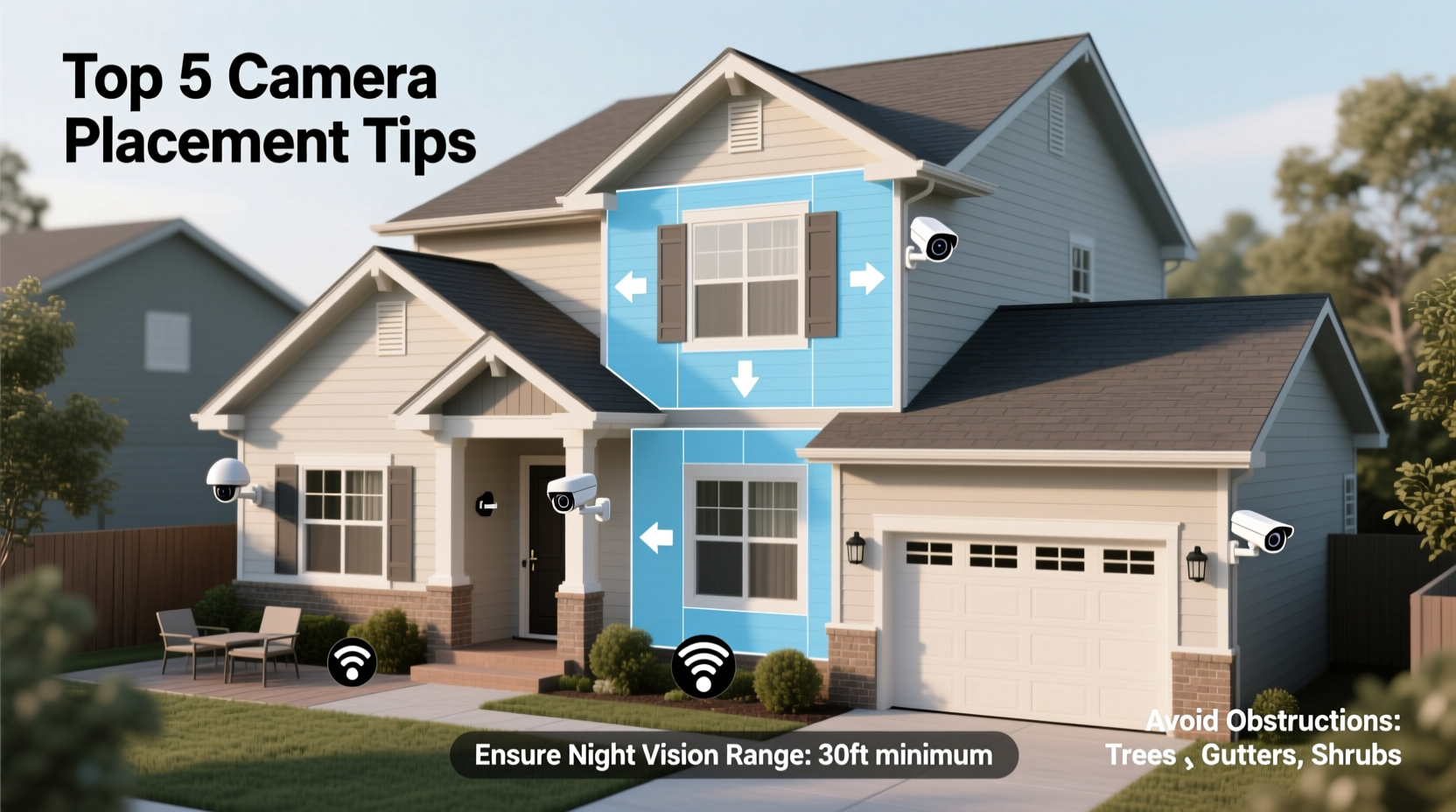
The foundation of effective camera placement is understanding how an intruder might access your home. Most break-ins occur through doors and ground-floor windows. Start by walking around your property and identifying every potential entry point. Focus on:
- Front, back, and side doors
- Garage entrances and connecting interior doors
- Basement and first-floor windows
- Sliding glass doors
- Attics or roof access points (if applicable)
Cameras should be positioned to clearly capture faces and actions at these locations. Avoid placing them too high or at extreme angles that distort facial features. A height of 7 to 9 feet above ground is optimal—high enough to prevent tampering but low enough for facial recognition.
Tip: Always aim cameras slightly downward to capture faces. A straight-on angle may only show the top of a person’s head.Outdoor Camera Placement: Maximize Deterrence and Coverage
Outdoor cameras serve dual purposes: deterring crime and recording evidence. Visibility matters. A camera that’s clearly visible can discourage would-be intruders before they act. However, some areas require covert monitoring, such as side alleys or rear fences.
Front Door and Porch
This is one of the most critical zones. Package theft, porch pirates, and suspicious visitors are common here. Install a doorbell camera or a fixed-angle camera angled to cover both the doorstep and the approach path. Ensure it captures from multiple angles—side walkways, stairs, and adjacent bushes.
Backyard and Rear Access
The backyard is often overlooked but highly vulnerable. Position cameras to cover patios, pool areas, storage sheds, and any gates leading to neighboring properties. Use wide-angle lenses or pan-tilt-zoom (PTZ) models to monitor large open spaces.
Sidewalks and Driveways
Monitor vehicle access and foot traffic. Cameras here help identify license plates and track movements toward your home. Place them near garage entrances or driveway corners, ensuring night vision covers the entire stretch.
Garage and Utility Areas
If your garage connects to the house, it's a prime target. Cover both the exterior door and the internal access point. Include motion-triggered lighting to enhance camera performance in darkness.
“Over 60% of residential break-ins begin at unmonitored side or rear entries. Proper camera placement closes those gaps.” — Mark Reynolds, Certified Security Analyst, National Home Defense Council
Indoor Camera Placement: Balance Security and Privacy
While indoor cameras are less common due to privacy concerns, they play a vital role in monitoring household activity, especially when children, pets, or caregivers are present. Prioritize areas where unauthorized access could escalate quickly.
Main Hallways and Stairwells
These act as natural funnels. A single camera in a central hallway can capture movement between rooms. Avoid pointing it directly into bedrooms or bathrooms.
Interior Doors to Garages or Basements
An intruder entering via the garage may move silently into the home. A camera facing the interior door provides early detection.
Home Offices and Valuables Storage
If you keep sensitive documents, safes, or expensive equipment at home, discreet indoor cameras can provide reassurance. Use models with local storage to maintain data control.
Tip: Inform family members and guests about indoor cameras to maintain trust and comply with privacy laws in your region.Optimal Height, Angle, and Lighting Considerations
Even the best camera fails if placed incorrectly. Technical factors like mounting height, lens angle, and lighting dramatically affect image quality.
Mounting Height
As mentioned, 7–9 feet is ideal. Too high, and facial details blur. Too low, and the camera becomes vulnerable to vandalism or obstruction.
Lens Angle and Field of View
Most cameras offer a horizontal field of view between 90° and 140°. Wider angles cover more space but reduce clarity at distance. For narrow pathways, use a narrower FOV focused on choke points.
Night Vision and Infrared Performance
Infrared (IR) cameras work well in total darkness, but their range is limited—typically 20 to 30 feet. Avoid placing them opposite reflective surfaces like glass or shiny walls, which cause IR glare. Test footage at night to ensure clear imaging without overexposure.
Avoiding Glare and Shadows
Position cameras away from direct sunlight or bright outdoor lights. Backlighting (e.g., a subject standing in front of a bright window) washes out faces. Use cameras with HDR (High Dynamic Range) to balance light exposure.
| Factor | Best Practice | Common Mistake |
|---|---|---|
| Height | 7–9 feet above ground | Too high (>10 ft), reducing facial detail |
| Angle | Slightly downward (10°–15°) | Straight forward, capturing tops of heads |
| Lighting | HDR + ambient lighting | Direct backlight or IR reflection |
| Field of View | Match to space size (wide for yards, narrow for doors) | Overreaching with ultra-wide lens |
Step-by-Step Guide to Planning Your Camera Layout
Follow this structured approach to design a comprehensive surveillance setup tailored to your home.
- Sketch Your Property Layout: Draw a simple floor plan of your home and yard. Include doors, windows, driveways, and major landscaping features.
- Mark Entry Points: Highlight all doors, ground-level windows, and garage access points.
- Identify Blind Spots: Note areas not visible from the street or neighbors’ homes—these are high-risk zones.
- Select Camera Types: Choose between doorbell cams, bullet, dome, or PTZ models based on location needs.
- Determine Power and Connectivity: Decide between wired (more reliable) or wireless (easier install). Ensure Wi-Fi strength reaches all camera locations.
- Simulate Coverage: Use manufacturer specs (e.g., 100° FOV, 30-ft night vision) to estimate coverage per camera. Overlap fields slightly to eliminate gaps.
- Install and Test: Mount cameras securely, adjust angles, and review footage in daylight and nighttime conditions.
Real-World Example: Securing a Two-Story Suburban Home
Consider a typical two-story home with a front porch, side garage, fenced backyard, and basement entrance. The homeowner previously experienced package theft and noticed unfamiliar people loitering near the side gate.
They installed four cameras:
- Front: Doorbell camera with 180° view covering porch and sidewalk.
- Side Garage: Bullet camera aimed at the garage door and connecting side gate.
- Rear Yard: PTZ camera on the back deck, rotating to monitor patio, shed, and fence line.
- Interior: Fixed camera in the hallway facing the garage access door.
Within three weeks, the system captured footage of someone attempting to open the side gate. The homeowner alerted police, who used the facial footage to identify a repeat offender. The deterrent effect was immediate—no further incidents occurred.
Checklist: Essential Camera Placement Best Practices
- ✅ Cover all external doors and ground-floor windows
- ✅ Position cameras 7–9 feet high with a slight downward angle
- ✅ Use weatherproof housings for outdoor units
- ✅ Enable motion zones to reduce false alerts
- ✅ Test night vision and IR performance monthly
- ✅ Avoid pointing cameras into neighbors’ properties (legal risk)
- ✅ Combine visible and hidden cameras for layered deterrence
- ✅ Regularly clean lenses to prevent fogging or dirt buildup
Frequently Asked Questions
Can I point a camera toward my neighbor’s house?
No. While laws vary by state and country, intentionally recording private areas of a neighbor’s property (yards, windows, patios) may violate privacy laws and lead to legal disputes. Always aim cameras within your own property boundaries.
How many cameras do I need for a standard home?
Most homes benefit from 3 to 5 cameras: front door, back door, garage/side entry, and one interior monitoring point. Larger properties or homes with multiple access points may require 6 or more. Focus on quality coverage over quantity.
Do security cameras deter crime?
Yes. Studies show homes without visible security systems are up to 300% more likely to be targeted. A 2022 University of North Carolina study found that 60% of burglars actively avoid homes with cameras or alarm signs. Visible cameras, especially with motion-activated lights, significantly reduce risk.
Conclusion: Take Control of Your Home’s Safety Today
Effective security isn’t about owning the most expensive cameras—it’s about placing the right ones in the right spots. By mapping your home’s vulnerabilities, optimizing angles and lighting, and maintaining consistent monitoring, you create a system that deters threats and delivers actionable intelligence. Whether you’re protecting against theft, monitoring deliveries, or keeping an eye on loved ones, smart camera placement turns passive devices into active guardians.
🚀 Ready to secure your home? Walk around your property today with this guide in hand. Identify one weak spot and install your first camera. Peace of mind starts with a single, well-placed lens.