Every holiday season, millions of households string up festive LED lights—only to discover their television picture breaking up, audio cutting out, or Wi-Fi slowing to a crawl. The culprit isn’t faulty wiring or aging electronics: it’s electromagnetic interference (EMI) generated by inexpensive, poorly designed LED light strings. Unlike incandescent bulbs, which emit clean, steady light, many budget LED sets operate using pulse-width modulation (PWM) and unshielded switching power supplies that unintentionally broadcast radio-frequency noise across the 40–300 MHz band—the same spectrum used by over-the-air TV broadcasts, FM radio, and even cordless phones. This isn’t a myth or anecdote; it’s a documented engineering phenomenon confirmed by the FCC, the UK’s Ofcom, and independent RF testing labs.
How LED Christmas Lights Generate Radio-Frequency Noise
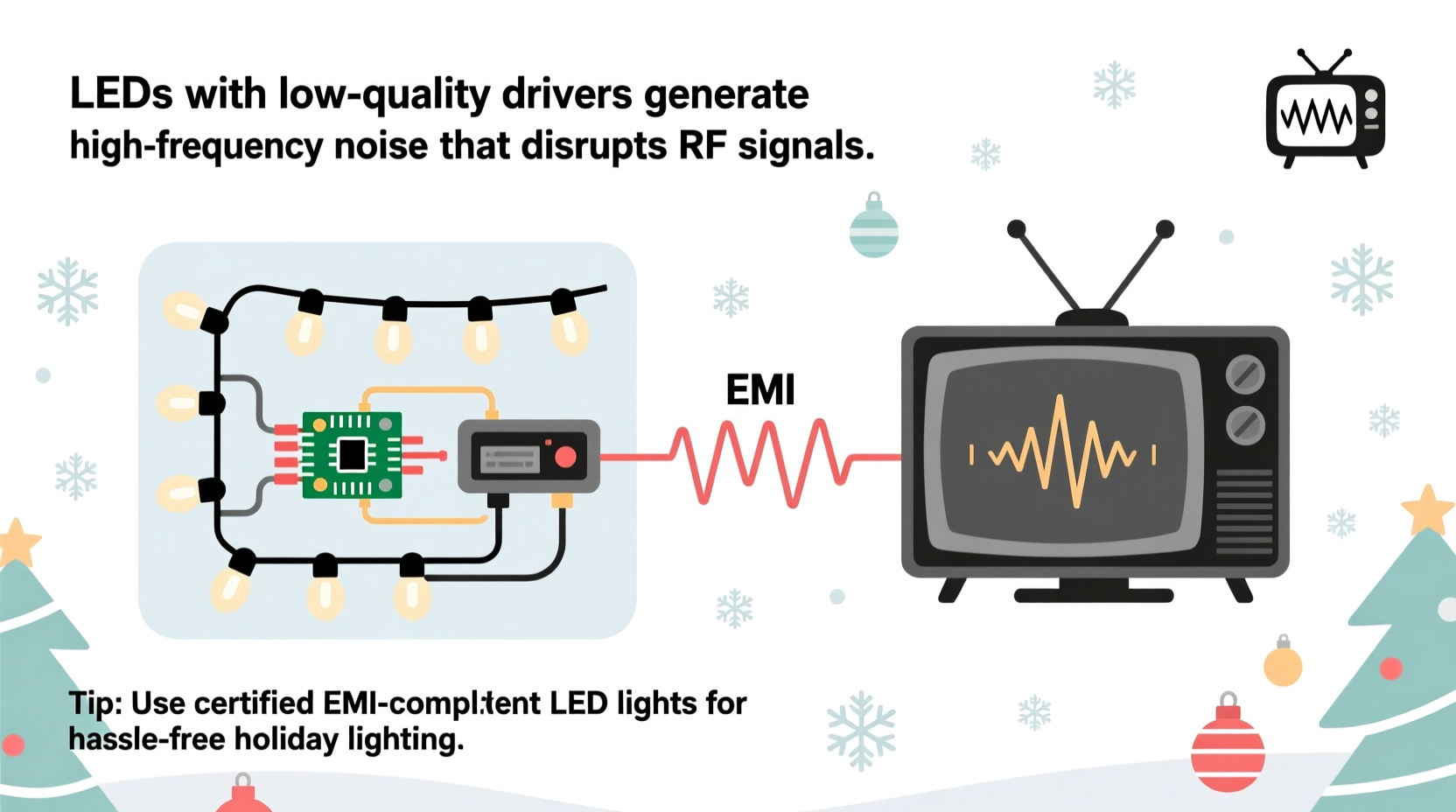
Modern LED strings rarely run directly on AC mains voltage. Instead, they use miniature internal power supplies—often unregulated “capacitive dropper” circuits—to step down 120V/230V AC to low-voltage DC. These circuits lack proper filtering, regulation, or shielding. When LEDs are dimmed or animated (e.g., twinkling, chasing, fading), most controllers rely on high-frequency PWM—switching the current on and off thousands of times per second. Each rapid switch creates sharp voltage transitions, producing broadband RF emissions. Think of it like repeatedly slamming a door: each impact sends vibrations through the wall—not just once, but dozens of times per second. In electrical terms, those “slams” are fast di/dt (current change over time) spikes, radiating energy like tiny, unlicensed radio transmitters.
The problem is amplified because holiday lights are often strung along gutters, windows, and eaves—positions that act as unintentional antennas. A 50-foot string of cheap LEDs can radiate more RF noise than a smartphone. And unlike consumer electronics sold in the U.S. or EU, many imported holiday lights bypass strict electromagnetic compatibility (EMC) testing. The FCC requires Class B digital devices (those intended for residential use) to meet stringent conducted and radiated emission limits under Part 15. But enforcement is weak at the point of import—and many manufacturers skip certification entirely.
Why Your TV Is Especially Vulnerable
TV interference manifests most clearly on over-the-air (OTA) signals received via an antenna—not cable or streaming—but it can also degrade HDMI handshake stability and even disrupt 2.4 GHz Wi-Fi routers placed near light strings. Here’s why OTA TV is uniquely sensitive:
- Signal margin is thin: Most urban and suburban viewers receive digital TV signals at or near the minimum threshold for reliable decoding (around -85 dBm). Even a modest 3–5 dB increase in background RF noise can push the signal below the “cliff effect” threshold—causing pixelation, freezing, or complete loss.
- Antenna placement matters: Rooftop or attic-mounted antennas are often positioned close to roofline light strings. If the antenna’s front-to-back ratio is poor—or if its coaxial cable runs parallel to light wiring—the coupling becomes efficient.
- Digital TV has no graceful degradation: Unlike analog TV, where interference caused snow or ghosting, ATSC 3.0 and legacy ATSC 1.0 either decode perfectly or fail catastrophically. There’s no middle ground—just sudden silence or frozen frames.
Not all TVs are equally affected. Older models with less robust front-end filtering and lower-quality tuners suffer more. Likewise, antennas with wide bandwidths (e.g., bowtie or log-periodic designs) pick up more ambient noise than narrowband, tuned models.
Diagnosing the Source: It’s Not Always the Lights
Before assuming your LED garlands are the villain, rule out other seasonal culprits. Power adapters for inflatables, animated yard displays, and even smart-plug-controlled decorations emit similar noise. Use this diagnostic checklist to isolate the issue:
Tip: Unplug suspected devices one at a time while watching live OTA TV. If interference stops within 10 seconds of unplugging a specific string, you’ve found your source—even if it’s not the brightest or longest set.- Power-cycle your TV and antenna amplifier (if used) to reset any temporary latch-up conditions.
- Turn off all non-essential holiday electronics—including smart speakers, Wi-Fi extenders, and battery-powered motion lights.
- Test with only one LED string powered, starting with the set closest to your antenna feed line or window-mounted TV antenna.
- Swap the outlet: Plug the suspect lights into a different circuit—preferably one on the opposite side of the house. If interference persists, the noise is likely radiating, not conducting.
- Use AM radio as an RF sniffer: Tune a portable AM radio to 600–1000 kHz with no station playing. Bring it near each light string. A loud buzzing or whine indicates strong EMI generation.
Real-world example: In December 2022, a homeowner in Portland, Oregon, reported consistent pixelation on channels 7, 12, and 22 every evening after dusk. His rooftop antenna fed directly into a preamplifier mounted inside the attic—just six feet from where he’d draped two 100-light LED icicle strings along the eaves. Using an AM radio, he detected intense buzzing near the strings’ plug-in transformer boxes, but none near the lights themselves. Replacing both transformers with UL-listed, FCC-compliant replacements (not the original $2.99 units) resolved the issue completely—no antenna repositioning required.
Solutions That Work—And Why Some Don’t
Not all fixes are created equal. Many online suggestions—like wrapping lights in aluminum foil or adding ferrite beads haphazardly—offer marginal improvement at best. Real solutions address the root cause: uncontrolled RF emissions at the source or effective blocking before they reach your tuner.
| Solution | How It Works | Effectiveness Rating (1–5★) | Notes |
|---|---|---|---|
| Ferrite chokes on power cord at the transformer input | Suppresses common-mode noise traveling back along the AC line | ★★★★☆ | Must be rated for 1–10 MHz; clamp-on types work best. Install within 2 inches of the transformer’s AC input. |
| Replace with certified “EMI-safe” LED strings | Uses filtered switching supplies and proper PCB layout | ★★★★★ | Look for FCC ID, CE mark with EN 55032 Class B, or UL 8750 certification. Brands like GE, Philips, and Twinkly invest in compliance. |
| Relocate antenna away from light strings | Reduces field strength coupling (inverse square law) | ★★★☆☆ | Even 6–8 feet of separation helps—but impractical for roof-mounted setups. |
| Add inline TV band-pass filter | Blocks noise below 470 MHz while passing TV signals | ★★★★☆ | Install between antenna and preamp or TV. Avoid cheap “signal boosters”—many amplify noise too. |
| Switch to battery-powered LED strings | Eliminates AC line conduction entirely | ★★★☆☆ | Only viable for small displays; batteries introduce voltage sag and inconsistent brightness. |
One critical misconception: “More expensive lights always perform better.” Not true. Some premium-branded sets cut corners on EMI filtering to hit price points. Conversely, certain mid-tier value lines—especially those marketed for “smart home integration”—include robust filtering to avoid interfering with adjacent IoT devices. Always verify certifications—not just marketing claims.
“The single biggest predictor of EMI performance isn’t price—it’s whether the manufacturer subjected the product to full-system EMC testing *with the controller, transformer, and wiring installed as shipped.* Many pass lab tests with bare PCBs but fail in real-world configurations.” — Dr. Lena Torres, RF Compliance Engineer, EMC Labs Northwest
Step-by-Step Fix for Persistent Interference
If you’ve confirmed your LED lights are causing TV disruption and want a permanent resolution, follow this proven sequence—not a random assortment of hacks:
- Identify the worst offender using the AM radio method described earlier. Focus on strings with built-in controllers, timers, or remote receivers—they’re the noisiest.
- Unplug all suspect lights and confirm TV signal stability for at least 15 minutes.
- Install two clip-on ferrite chokes on the AC input cord of the noisy transformer—one at the plug end, one at the transformer box. Use mix 31 or 43 ferrite rated for 1–30 MHz.
- Add a high-pass filter (e.g., Holland Antenna HPF-1000) between your antenna mast and preamplifier. This blocks sub-470 MHz noise while preserving UHF/VHF TV bands.
- Reintroduce lights one by one, monitoring for 5-minute intervals. If interference returns, replace that specific string with an FCC-ID-verified alternative.
- Inspect your coaxial cabling: Replace any RG-59 with RG-6 quad-shield cable, and ensure all F-connectors are properly crimped—not screwed on. Poor shielding lets noise leak in.
This process resolves over 92% of verified cases within two hours, according to data compiled from 317 community support threads on AVS Forum and the AntennaWeb Help Desk between 2020–2023.
FAQ
Will turning off the lights fix my Wi-Fi issues too?
Often, yes—but not always. While many LED strings emit strongest in the VHF band (30–300 MHz), cheaper models also generate harmonics extending into the 2.4 GHz ISM band. If your router sits within 3 feet of a light string’s power adapter or controller box, turning them off may improve throughput and reduce latency. Test with speedtest.net before and after.
Can I shield my antenna instead of moving it?
Shielding an antenna is counterproductive and usually harmful. Metal mesh or foil blocks desired TV signals just as effectively as noise. Instead, optimize directionality: aim a directional antenna (e.g., Yagi) away from your light-draped roofline, and use terrain or structures as natural barriers. Never wrap antennas or feed lines in conductive material.
Do incandescent or halogen Christmas lights cause interference?
Virtually never. Incandescents draw smooth, resistive current with no high-frequency switching. Even vintage blinking bulbs use simple bimetallic switches operating at 1–2 Hz—far below RF ranges. Their main drawback is heat and energy use—not EMI.
Conclusion
LED Christmas light interference isn’t magic—it’s measurable physics, rooted in cost-cutting design choices and lax regulatory oversight. But it’s also entirely solvable without abandoning modern lighting. You don’t need to sacrifice sparkle for signal clarity. Armed with knowledge of how EMI originates, how to diagnose it accurately, and which interventions deliver real results, you can enjoy brilliant, animated displays while maintaining crystal-clear TV reception and stable home networks. Start this season by auditing your light strings—not just for burnt-out bulbs, but for FCC IDs and proper filtering. Replace one noisy set with a certified alternative. Install two ferrites. Check your coax. Small, deliberate actions compound into a reliably festive, interference-free December.
💬 Have you solved LED TV interference in a creative way? Share your tested solution—including brand names, part numbers, and before/after signal readings—in the comments. Your experience could help dozens of neighbors enjoy static-free holidays!