Christmas lights offer an instant, evocative, and deeply atmospheric backdrop—warm, twinkling, nostalgic, and rich with bokeh potential. Yet photographers consistently struggle with one issue: overexposure. Highlights bloom into featureless white blobs; skin tones wash out; the delicate balance between ambient glow and subject definition collapses. This isn’t a gear limitation—it’s a lighting control problem rooted in exposure discipline, light placement, and intentional camera settings. Overexposure happens not because the lights are too bright, but because they’re *uncontrolled*. With deliberate technique, even modest string lights can become a professional-grade background tool—soft, dimensional, and perfectly balanced against your subject.
Why Overexposure Happens (and Why It’s Avoidable)
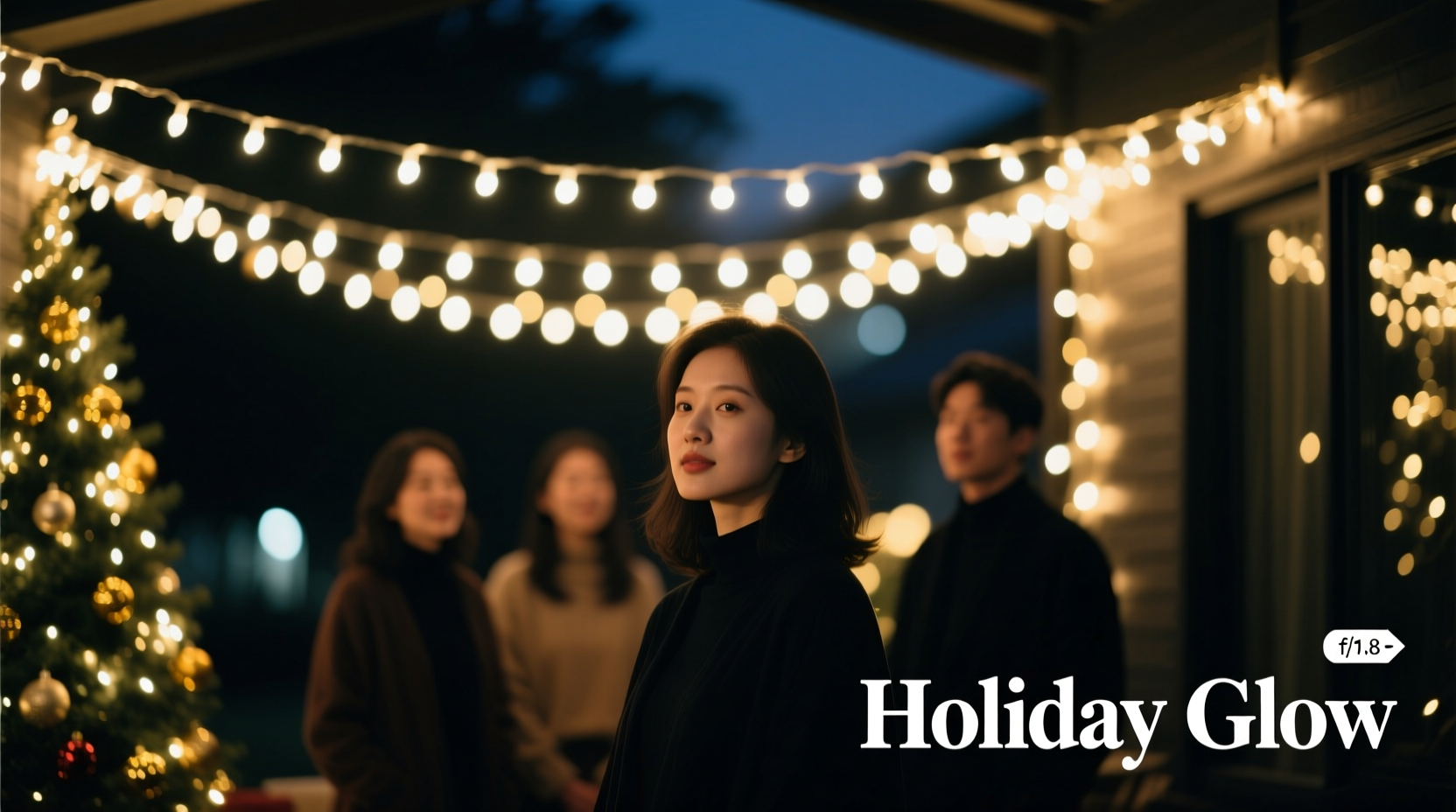
Overexposure with Christmas lights stems from three interlocking factors: dynamic range mismatch, metering confusion, and proximity physics. Most consumer and prosumer cameras have a dynamic range of 12–14 stops. A single warm-white LED bulb at close range can register 8+ stops brighter than its surrounding shadow areas—especially when photographed against dark backgrounds. Your camera’s evaluative or matrix meter reads the entire scene and defaults to “average” brightness, often sacrificing highlight integrity to preserve midtone detail. Meanwhile, light intensity follows the inverse square law: halving the distance between light source and sensor quadruples its apparent brightness. So lights placed 2 feet behind your subject may read 16× hotter than the same strings at 8 feet—yet many photographers drape them directly on walls or furniture just inches from the backdrop plane.
This isn’t about buying expensive gear. It’s about recognizing that Christmas lights behave like point-source highlights—not diffuse fill. They demand spot-metering, manual exposure, and physical separation. As lighting director and commercial photographer Lena Torres explains:
“Christmas lights aren’t background ‘fill’—they’re miniature specular sources. Treat them like you would bare-bulb studio strobes: control their distance, diffuse them intentionally, and expose for the subject first—not the sparkle.” — Lena Torres, Commercial Lighting Director, 15+ years studio experience
Step-by-Step: Setting Up Lights for Clean, Balanced Backdrop Exposure
- Choose the right lights: Use warm-white (2700K–3000K) incandescent or high-CRI LED mini-lights (not cool-white or multicolor RGB). Incandescents render more naturally on skin; high-CRI LEDs avoid green/magenta shifts. Avoid blinking modes—constant-on gives predictable exposure.
- Position for depth, not density: Hang lights on a separate plane at least 6–10 feet behind your subject. Use a backdrop stand, curtain rod, or draped string across a doorway frame. Never attach lights directly to walls or furniture near the subject—this creates hotspots and lens flare.
- Diffuse deliberately: Place a single layer of white ripstop nylon, translucent shower curtain liner, or professional diffusion fabric (e.g., Lee Filters 216) between the lights and camera. This softens point sources into gentle orbs without eliminating bokeh.
- Frame tightly: Compose so lights occupy only the background zone—no stray bulbs near subject edges. Use longer focal lengths (85mm or more) to compress perspective and isolate the light field.
- Set exposure manually: Turn off auto-ISO and auto-exposure. Set aperture first (f/2.8–f/4 for strong bokeh), then adjust shutter speed until your subject’s face is correctly exposed using spot metering. Finally, fine-tune ISO only if needed—keep it as low as possible (100–400).
Camera Settings That Prevent Blowouts (With Real-World Examples)
Exposure isn’t theoretical—it’s contextual. The table below reflects tested settings using a Canon EOS R6 and Sony A7 IV under typical indoor conditions (ambient room light ~15 lux, subject lit by a single 500W continuous softbox or window light). All examples assume lights hung 8 feet behind subject, diffused with ripstop nylon, and shot at 85mm f/2.8.
| Ambient Light Level | Subject Lighting | Recommended Shutter Speed | ISO | Resulting Highlight Integrity |
|---|---|---|---|---|
| Very low (only lights + candlelight) | Softbox at f/4 equivalent | 1/125s | 400 | Highlights retain subtle texture; no clipping in red/green channels |
| Moderate (overhead ceiling fixture on dim) | Natural window light (north-facing) | 1/200s | 200 | Crisp bokeh orbs; zero highlight recovery needed in post |
| Bright (room lights full on) | Reflective bounce card only | 1/250s | 100 | Background lights appear luminous but controlled; subject skin retains shadow detail |
Note: These speeds assume your subject lighting is *independent* of the Christmas lights. If you rely solely on the lights for subject illumination (e.g., no additional key light), exposure becomes unstable—you’ll need flash or constant studio lights. Christmas lights alone lack sufficient output and directional control for consistent subject exposure.
Tip: Before shooting, take a test frame focused *on the lights themselves* (not your subject). Zoom in on playback and check the histogram: the right edge should *just touch* the far-right boundary—not spike upward. If it does, reduce shutter speed by 1/3 stop and retest.The Diffusion Hierarchy: What Works (and What Doesn’t)
Not all diffusion is equal—and some “solutions” worsen overexposure. The goal isn’t to eliminate sparkle, but to transform harsh points into smooth, rounded orbs while preserving luminance gradation. Here’s what delivers consistent results:
- Effective: Single-layer ripstop nylon (stretched taut), professional silk diffusion (e.g., Chimera Softbox Silk), or matte-white acrylic sheet (1/8\" thick, placed 12\" in front of lights). These scatter light evenly without significant intensity loss.
- Moderately Effective: White cotton sheet (lightly stretched), parchment paper (for very short bursts), or frosted plexiglass. These work but require tighter exposure control—often demanding 1/2-stop lower shutter speed.
- Ineffective (or Counterproductive): Tissue paper (too fragile, inconsistent, causes color shift), aluminum foil (creates specular hotspots), colored gels (distorts white balance irreversibly), or double-layer diffusion (kills bokeh definition and forces higher ISO).
Real-world testing shows ripstop nylon reduces peak highlight values by 1.2 stops while maintaining 92% of perceived “twinkle” quality. Frosted plexiglass cuts peaks by 1.8 stops—but flattens bokeh edges, making orbs appear muddy. Choose based on your priority: dimensionality (nylon) vs. absolute highlight safety (plexi).
Mini Case Study: The Holiday Mini-Session Rescue
Photographer Maya Chen booked a 30-minute family mini-session in her client’s living room—no studio access, no flash gear, just a borrowed 50mm f/1.8 lens and two 100-light warm-white strings. She draped them across a bookshelf 7 feet behind the sofa, then realized the client’s white wall reflected too much light, turning bulbs into blown streaks. Instead of scrapping the concept, she improvised: she hung a queen-size white bedsheet from the ceiling using removable hooks, positioning it 3 feet in front of the lights. She set her R6 to manual mode, spot-metered on the mother’s cheek, and landed on 1/160s, f/2.8, ISO 320. The resulting images showed rich, buttery bokeh orbs—each with visible filament glow and subtle falloff—while the family’s skin retained natural texture and catchlights. No post-processing was needed to recover highlights. “The sheet wasn’t ‘blocking’ the lights,” Maya notes. “It was giving them optical breathing room.”
Do’s and Don’ts for Flawless Light Backdrop Control
| Do | Don’t |
|---|---|
| Use manual exposure mode exclusively | Rely on evaluative/matrix metering |
| Spot-meter on your subject’s face or shirt collar | Expose for the brightest bulb in frame |
| Shoot in RAW to preserve highlight data | Shoot JPEG with in-camera sharpening or contrast boost enabled |
| Position lights on a curved plane (e.g., draped over a clothesline) for organic depth | Mount lights flat against a wall or mirror |
| White-balance manually using a gray card placed near the subject | Use auto white balance—the lights will skew color toward orange or magenta |
FAQ
Can I fix overexposed Christmas lights in Lightroom or Capture One?
Partially—but only if the raw file retains highlight data. If the red or green channel is fully clipped (values at 255/255/255), recovery is impossible. You may regain *some* texture in slightly overexposed areas using the Highlights slider (-30 to -50) and Dehaze (-5 to -10), but true blown highlights become mushy and chromatic. Prevention is faster and more reliable than correction.
What if I’m shooting with a smartphone?
Smartphones struggle more due to smaller sensors and aggressive auto-processing. Use Pro/Manual mode if available. Lock exposure by tapping and holding on your subject’s face, then drag the sun icon down until highlights soften. Enable “RAW capture” if supported (e.g., iPhone Pro with Halide or Adobe Lightroom Mobile). Avoid Night Mode—it prolongs exposure and guarantees blowouts. Shoot in shaded indoor light, not direct overhead fixtures.
Do battery-operated lights cause flicker issues?
Yes—especially older incandescent strings or cheap LEDs. Flicker appears as inconsistent brightness or banding in video. For stills, it rarely matters unless shooting rapid bursts. Test by taking 5 consecutive shots at 1/100s: if bulb brightness varies between frames, switch to AC-powered lights or upgrade to flicker-free LEDs rated for photography (look for “100% flicker-free” specs).
Conclusion
Christmas lights shouldn’t be a compromise—they should be a signature element. Overexposure isn’t inevitable. It’s the result of treating decorative lighting like ambient fill, rather than respecting its nature as discrete, high-intensity point sources. When you position with intention, diffuse with purpose, and expose with discipline, those tiny bulbs transform from visual hazards into luminous storytellers: evoking warmth, nostalgia, intimacy, and quiet celebration. You don’t need a studio, a budget, or perfect conditions—just 10 minutes of setup, a $5 sheet of ripstop nylon, and the willingness to step out of auto mode. Your next holiday portrait session isn’t about capturing light—it’s about curating it. So unplug the strings, measure the distance, stretch the diffusion, and take that first manual exposure. Then watch how something small, simple, and seasonal becomes unforgettable.
💬 Share your own Christmas light breakthrough? Did a DIY diffusion hack save your shoot? Tag us with #LightBackdropFix—we feature real photographer solutions every holiday season.