Sitting for extended periods—especially with poor posture—can lead to chronic back pain, reduced productivity, and long-term musculoskeletal issues. For remote workers, freelancers, and home-office professionals, investing in a supportive chair is not a luxury; it's a necessity. Yet many assume that proper lumbar support and adjustability come with a high price tag. The truth is, you don’t need to spend hundreds of dollars to find an ergonomic office chair that supports your spine and fits your financial limits.
The key lies in knowing what features matter most, where to compromise, and how to spot value over branding. This guide cuts through the marketing noise and delivers practical, research-backed advice on selecting an affordable yet highly effective ergonomic chair that keeps your back healthy and your wallet intact.
Why Back Support Matters in Office Chairs
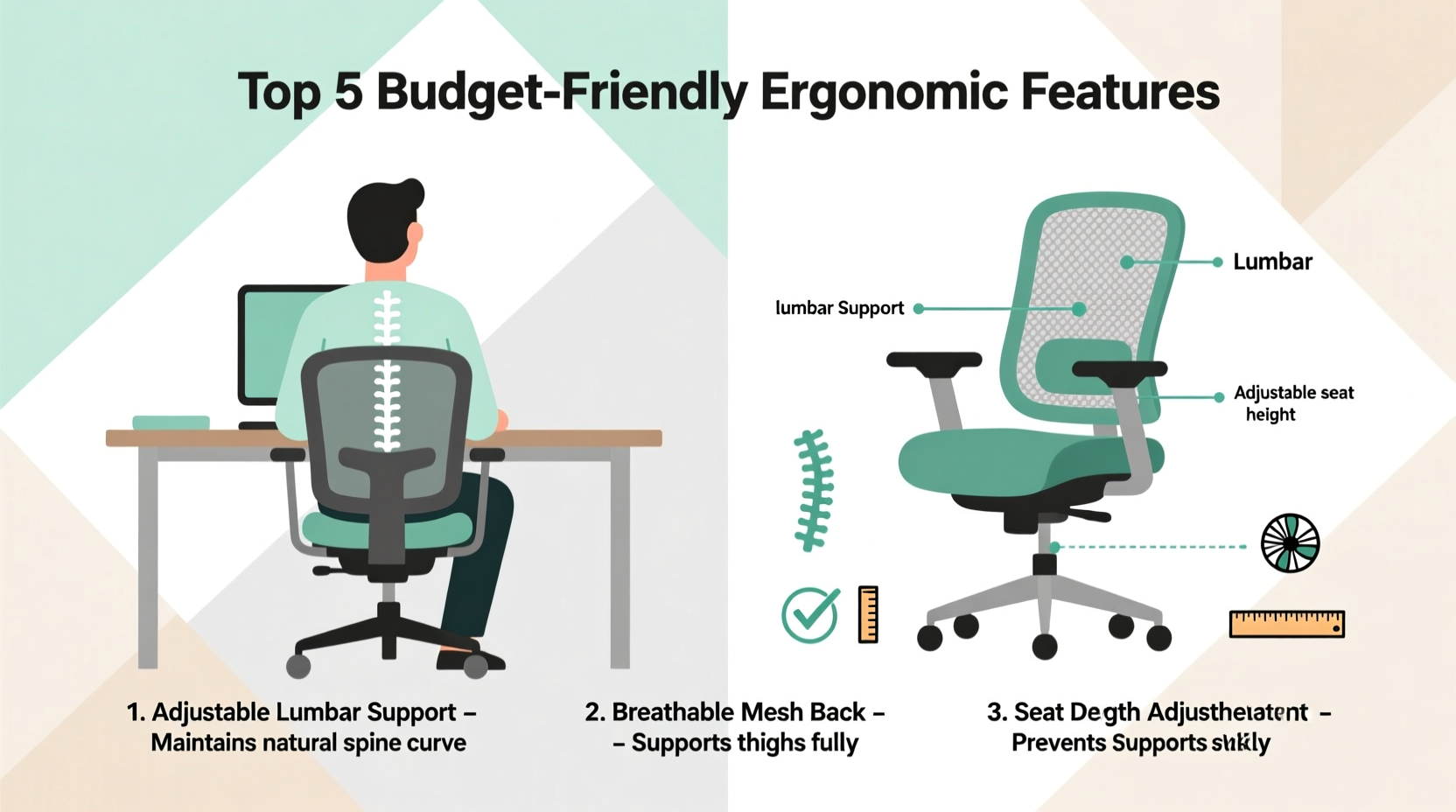
Your spine has three natural curves: cervical (neck), thoracic (upper back), and lumbar (lower back). When seated, the lumbar curve tends to flatten, especially on poorly designed chairs. Over time, this misalignment increases pressure on spinal discs, leading to discomfort, muscle fatigue, and even herniated discs.
An ergonomic chair supports these natural curves—particularly the lower back—by maintaining proper pelvic alignment and reducing strain on the spine. According to Dr. Alan Hedge, a Cornell University ergonomics expert:
“Sitting in a chair without adequate lumbar support is like standing with one leg shorter than the other—it forces your body into compensatory postures that cause cumulative damage.” — Dr. Alan Hedge, Director of the Human Factors & Ergonomics Laboratory, Cornell University
For those spending more than four hours daily at a desk, a supportive chair isn’t optional. It’s preventive healthcare.
Essential Features That Actually Improve Back Support
Not all “ergonomic” chairs are created equal. Many budget models advertise vague benefits like “comfortable design” or “breathable fabric,” but lack the structural support needed for long-term use. Focus instead on these five non-negotiable features:
- Lumbar support: Must align with the natural inward curve of your lower back. Adjustable height or depth is ideal.
- Seat depth and width: Should allow 2–4 inches between the edge of the seat and the back of your knees.
- Backrest angle and recline: A tilt mechanism lets you shift positions, reducing static load on the spine.
- Adjustable armrests: Prevent shoulder hunching and reduce neck strain when typing.
- Synchro-tilt or forward tilt function: Allows the seat and backrest to move together during recline, preserving hip-spine alignment.
Smart Ways to Save Without Sacrificing Quality
You can find a high-support chair under $200—if you know where to look and what trade-offs are acceptable. Here’s how to stretch your dollar:
1. Prioritize Function Over Brand Name
Premium brands like Herman Miller or Steelcase offer excellent engineering, but their prices often reflect design aesthetics and brand prestige as much as functionality. Comparable support exists in lesser-known brands such as Hbada, Tangkula, or Flash Furniture, which source similar mechanisms at a fraction of the cost.
2. Buy Refurbished or Open-Box Models
Many office furniture retailers sell factory-refurbished chairs with full warranties. These are typically customer returns or display units in pristine condition. You can save 30–50% compared to new models.
3. Shop During Tax-Free Holidays or Back-to-School Sales
Retailers like Amazon, Staples, and Office Depot run deep discounts in July, August, and September. Pair these with student or military discounts for additional savings.
4. Consider Modular Upgrades
If your current chair lacks lumbar support, add a memory foam back cushion ($15–$30) instead of replacing the entire unit. Similarly, a footrest ($20–$40) can improve posture and reduce lower back strain when used with a slightly reclined seat.
5. Skip Unnecessary Add-Ons
Avoid paying extra for heated seats, massage functions, or RGB lighting—features marketed more to gamers than ergonomic users. Stick to core biomechanical needs.
Comparison: Budget vs. Premium Ergonomic Chairs
| Feature | Budget Chair (<$150) | Premium Chair (>$400) |
|---|---|---|
| Lumbar Support | Fixed or limited adjustability; may require cushion addition | Fully adjustable in height, depth, and firmness |
| Seat Padding | Medium-density foam; may compress after 12+ months | High-resilience foam or mesh suspension; maintains shape for years |
| Recline Mechanism | Basic tilt tension control | Synchro-tilt with multiple lock positions and forward tilt |
| Frame Durability | Steel-reinforced plastic base; 3–5 year warranty | Full-metal frame; 10–12 year warranty |
| Best For | Home offices, part-time use, short-term solutions | Full-time professionals, long-term investment |
While premium chairs last longer and offer superior micro-adjustments, budget models can still deliver 80% of the benefits if selected wisely.
Step-by-Step Guide: Choosing Your Chair in 7 Practical Steps
- Measure Your Desk and Space
Determine available clearance. Ensure the chair fits under your desk when reclined and allows room for movement. - Assess Your Body Type
Note your height, weight, and typical sitting posture. Taller users (over 6') need deeper seats and higher backrests. Heavier individuals (>220 lbs) should prioritize reinforced frames. - Define Your Budget Range
Set a realistic limit—ideally between $100 and $200. Include tax and shipping costs. - Research 3–5 Shortlisted Models
Look for chairs with at least 4-star average ratings and detailed user feedback on back support. Read negative reviews carefully—they reveal recurring flaws. - Verify Adjustability Options
Check product specs for seat height, backrest angle, armrest position, and lumbar support adjustments. - Test Return Policy and Warranty
Choose sellers offering at least a 30-day return window and a 1-year minimum warranty. Avoid final-sale items unless you’ve tested them in person. - Assemble and Calibrate at Home
After delivery, spend 15 minutes adjusting settings. Sit for 20-minute intervals throughout the day to fine-tune support.
Real Example: How Maria Fixed Her Back Pain on a $140 Budget
Maria, a freelance graphic designer from Austin, spent six months working from her kitchen table on a dining chair. After persistent lower back pain, she consulted a physical therapist who identified poor lumbar support as the root cause.
With a $150 budget, she researched online and settled on the Hbada Ergonomic Mesh Chair. Though unfamiliar, it had 4.3 stars from over 2,000 reviews, with repeated praise for its “surprisingly good lumbar pad.” She prioritized a model with seat depth adjustment, ensuring her legs weren’t compressed.
Within two weeks of using the chair—with the backrest reclined to 105 degrees and armrests aligned with her elbows—her morning stiffness disappeared. Six months later, she reports no back pain and increased focus during long design sessions.
“I thought I’d need to spend $400,” she says. “But this chair does everything I need. The mesh keeps me cool, and my lower back finally feels supported.”
Must-Have Checklist Before Buying
Before clicking “Add to Cart,” confirm the following:
- ✅ Lumbar support targets the small of the back (not upper or mid-back)
- ✅ Seat height adjusts so feet rest flat on the floor or footrest
- ✅ Backrest reclines between 90° and 110° with tension control
- ✅ Armrests are adjustable in height and width (or removable)
- ✅ Chair fits under your desk when fully reclined
- ✅ Minimum 1-year warranty and 30-day return policy
- ✅ Weight capacity exceeds your body weight by at least 20%
Frequently Asked Questions
Can a cheap chair really support my back long-term?
Yes—if it includes proper lumbar support, adjustable features, and durable materials. While budget chairs may not last as long as premium ones (typically 3–5 years vs. 10+), they can provide excellent short-to-mid-term relief when chosen carefully. Look for reinforced nylon bases, breathable mesh backs, and pneumatic seat lifts rated for daily use.
Is mesh better than padded fabric for back support?
Mechanically, yes. Mesh promotes airflow, reducing sweat and discomfort during long sits. More importantly, high-quality mesh conforms dynamically to your spine’s shape, providing passive support without relying solely on padding. However, some users with sensitive skin or cold environments may prefer padded fabric with added lumbar rolls.
How do I know if the lumbar support is positioned correctly?
Sit upright with your pelvis pushed back into the chair. The lumbar pad should press gently into the inward curve of your lower back—about two inches above your beltline. If it hits your ribs or glutes, it’s too high or low. Some chairs let you slide the support up/down; others require external cushions for correction.
Final Thoughts: Invest Wisely, Sit Healthily
Choosing the right ergonomic office chair doesn’t demand a big budget—it demands attention to detail. Back support hinges on thoughtful design, not flashy branding. By focusing on adjustability, proper alignment, and proven features, you can protect your spine and enhance your daily comfort for years to come.
Don’t wait for pain to become chronic. Evaluate your current seating, apply the checklist, and make a change before minor discomfort turns into long-term injury. Your future self will thank you every time you sit down.
💬 Found a great budget chair that saved your back? Share your experience in the comments—help others discover smart, affordable solutions!