In recent years, gaming chairs have surged in popularity—not just among gamers, but also remote workers, students, and even corporate professionals. Marketed with bold colors, aggressive lines, and a racing seat-inspired design, these chairs promise performance, comfort, and elite ergonomics. But behind the flashy aesthetics lies a growing concern: are these chairs actually bad for your back? And more importantly, is the pursuit of a “gamer” look compromising long-term spinal health?
While traditional office chairs often fly under the radar in terms of visual appeal, they’ve been refined over decades through ergonomic research and workplace safety standards. The contrast between function-first office seating and style-driven gaming chairs raises an important question: when it comes to supporting your spine during hours of sitting, should form follow function—or can both coexist?
The Rise of the Racer Aesthetic
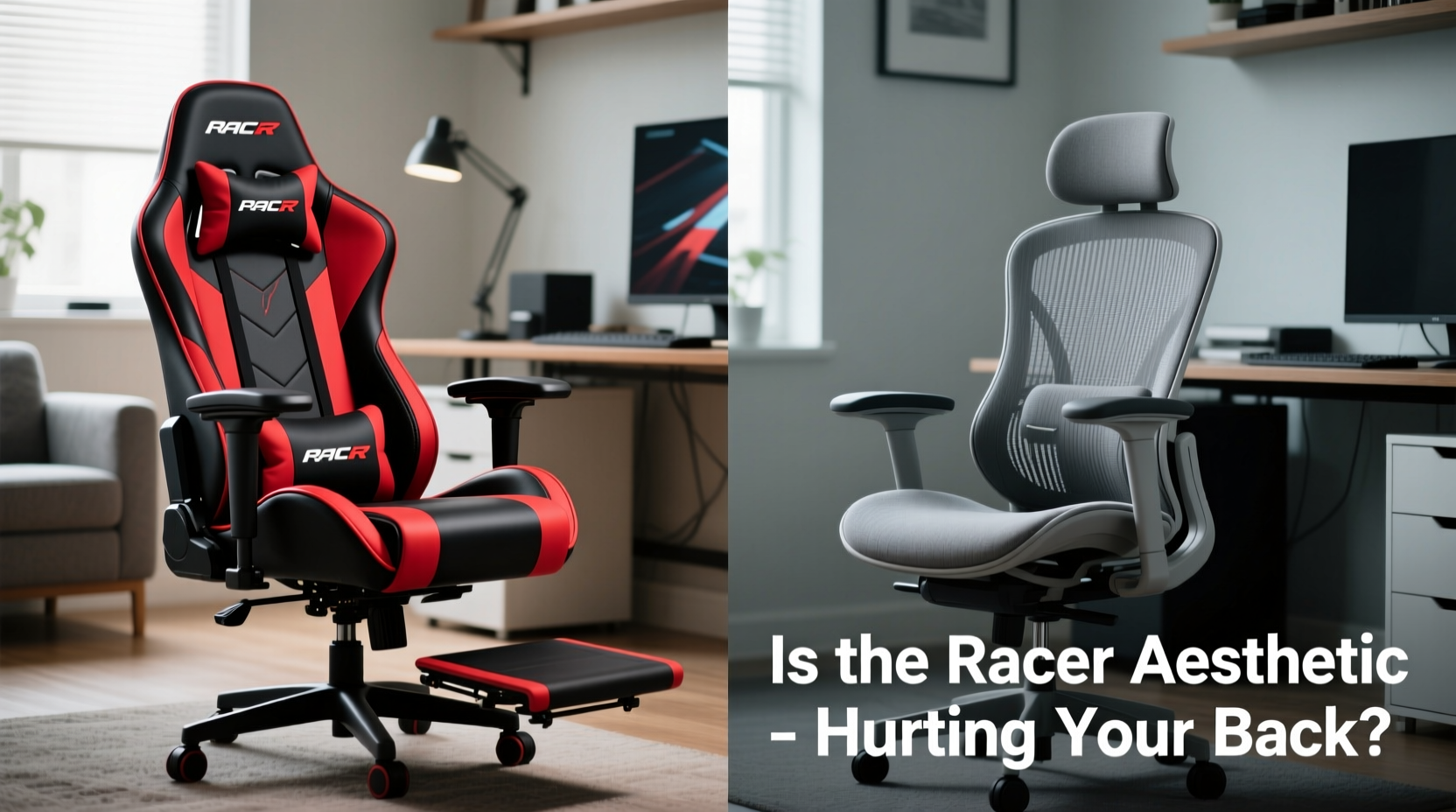
Gaming chairs borrow their design language from high-performance racing seats—bucket-shaped backs, pronounced lumbar curves, headrest wings, and bold stitching. These features were originally engineered for drivers enduring intense G-forces on racetracks, not people typing emails or grinding through late-night raids. Yet manufacturers have repackaged this aesthetic as synonymous with \"premium comfort\" and \"professional-grade support.\"
Marketing campaigns reinforce this idea with slogans like “engineered for victory” and visuals of players in intense focus, draped across neon-accented thrones. The result? A cultural shift where owning a gaming chair signals status, dedication, and tech-savviness—even if you only play casually.
But while the look appeals to our desire for identity and immersion, it doesn’t automatically translate into superior biomechanical support. In fact, many users report increased lower back pain, neck strain, and discomfort after switching from standard ergonomic office seating to gaming models.
Tip: Just because a chair looks supportive doesn't mean it functions well for prolonged seated work. Always test adjustability and alignment before purchasing.Ergonomic Reality: What Your Spine Actually Needs
Human posture during seated tasks relies on three key spinal supports: lumbar (lower back), thoracic (mid-back), and cervical (neck). An effective chair must maintain the natural S-curve of the spine, encourage neutral joint alignment, and allow dynamic movement without strain.
According to Dr. Helena Madsen, a clinical physiotherapist specializing in workplace musculoskeletal disorders:
“The ideal chair supports micro-movements throughout the day. It shouldn’t lock you into one position—even if that position looks 'cool.' Static postures, especially those exaggerated by deep reclines or fixed contours, increase disc pressure and muscle fatigue.”
Traditional office chairs, particularly high-end ergonomic models, are built around this principle. They feature:
- Adjustable seat depth and height
- Synchro-tilt or balanced recline mechanisms
- Dynamic lumbar support that moves with the user
- Armrests adjustable in multiple planes
- Breathable mesh backs for temperature regulation
In contrast, many gaming chairs prioritize rigid foam construction and fixed curvature. Their lumbar pillows are often detachable add-ons rather than integrated systems, leading to improper placement. Headrests, while visually striking, can encourage a backward head tilt that strains cervical vertebrae over time.
Comparing Key Features: Gaming vs Office Chairs
| Feature | Gaming Chairs (Typical) | Office Chairs (Ergonomic) |
|---|---|---|
| Lumbar Support | Fixed curve + removable pillow; often too high or stiff | Adjustable depth/height; conforms dynamically to spine |
| Seat Material | Padded PU leather; traps heat, degrades faster | Breathable mesh or high-resilience foam; promotes airflow |
| Recline Mechanism | Lockable tilt with limited range; encourages static lounging | Synchronized mechanism; maintains torso-thigh angle naturally |
| Armrest Adjustability | Often 2D (up/down, left/right); some 4D models exist | Routinely 4D (height, width, depth, pivot); precise alignment |
| Evidence-Based Design | Limited peer-reviewed testing; driven by market trends | Developed with input from ergonomists, backed by clinical studies |
| Average Long-Term Durability | 3–5 years (foam compression, material peeling) | 7–10+ years (industrial-grade components) |
This comparison reveals a critical gap: while gaming chairs excel at branding and visual impact, they frequently fall short in delivering adaptable, sustainable support. The rigid bucket seat, meant to mimic race car confinement, restricts natural hip rotation and pelvic movement—key factors in preventing sacroiliac joint stress.
Real-World Impact: A Case Study
Consider Mark T., a software developer who transitioned to full-time remote work in 2021. Eager to upgrade his home office, he purchased a premium-branded gaming chair with red-black trim, memory foam lumbar cushion, and 180-degree recline. Initially impressed by the look and initial comfort, he began experiencing persistent lower back tightness within two months.
“I thought I was investing in something high-performance,” Mark said. “But after six months, I had to stop using it. My hips felt locked, and my lower back ached every morning. I switched back to my old Herman Miller, and within a week, the pain decreased significantly.”
Upon evaluation by a physical therapist, Mark was diagnosed with mild posterior pelvic tilt caused by prolonged sitting in a chair that forced his pelvis into a tucked-under position. His gaming chair’s deep seat and elevated front edge prevented proper thigh support, reducing circulation and increasing pressure on the ischial tuberosities (sit bones).
This case isn’t isolated. Online forums like Reddit’s r/ergonomics are filled with similar testimonials—users reporting relief only after abandoning stylized seating in favor of evidence-based ergonomic alternatives.
Why the Aesthetic Wins—And Why That’s Dangerous
The appeal of the racer aesthetic taps into deeper psychological drivers: identity, aspiration, and belonging. Gamers want to feel like pros. Remote workers seek validation of their professionalism. Students aim to create a “serious setup.” The gaming chair becomes a symbol—a piece of gear that says, “I take this seriously.”
Unfortunately, perception often overrides practicality. Retailers capitalize on this by using influencer endorsements, RGB lighting bundles, and limited-edition collaborations. Meanwhile, few disclose limitations such as non-breathable materials, suboptimal weight distribution, or lack of ISO/ANSI certification.
Worse, some budget gaming chairs exaggerate the bucket seat design so much that users cannot sit upright without leaning forward excessively. This forces a slouched posture, defeats lumbar support, and increases disc load in the L4-L5 region—the most common site of herniation.
Tip: If your chair requires you to lean forward to type comfortably, it's likely misaligned with your desk or body proportions.How to Choose a Chair That Supports You—Not Just Your Style
Selecting the right chair shouldn’t be about choosing sides between “gamer” and “office” labels. Instead, focus on measurable ergonomic criteria. Follow this checklist before making any purchase:
Ergonomic Chair Selection Checklist
- ✅ Seat depth adjustable so 2–4 fingers fit between knee and seat edge
- ✅ Lumbar support aligns with the inward curve of your lower back (L3 vertebra)
- ✅ Armrests allow shoulders to relax and elbows to rest at 90–110°
- ✅ Backrest reclines smoothly with tension control matching your body weight
- ✅ Materials promote breathability (mesh > synthetic leather)
- ✅ Five-star base with dual-wheel casters for smooth mobility
- ✅ Meets BIFMA or ISO 9241-5 standards for commercial use
If considering a gaming chair, verify whether it includes true ergonomic adjustability—not just cosmetic tweaks. Some higher-end hybrid models (e.g., Secretlab Titan Evo, Autonomous ErgoChair Pro) blend gamer styling with functional improvements like magnetic lumbar systems and multi-tilt mechanisms. However, these remain exceptions in a market saturated with low-to-mid-tier products prioritizing appearance over anatomy.
Step-by-Step Guide to Assessing Your Current Chair
- Check Pelvic Position: Sit all the way back. Your tailbone should touch the backrest. If your pelvis tucks under or slides forward, the seat pan may be too deep or too sloped.
- Evaluate Lumbar Contact: Without adjusting anything, notice where your lower back touches the chair. There should be firm, continuous contact along the inward curve. If there’s a gap, support is insufficient.
- Test Armrest Height: Rest hands on keyboard. Shoulders should be relaxed, not hunched or raised. Elbows should bend at slightly more than 90 degrees.
- Observe Posture After 30 Minutes: Set a timer. When it goes off, note any discomfort, fidgeting, or urge to stand. Early fatigue suggests poor support.
- Assess Heat Build-Up: After an hour, check if your back feels sweaty or sticky. Non-breathable materials contribute to discomfort and reduced focus.
Frequently Asked Questions
Can gaming chairs cause permanent back damage?
While no chair alone causes irreversible harm, prolonged use of poorly designed seating can contribute to chronic issues like disc degeneration, muscle imbalances, and postural kyphosis. Risk increases when combined with sedentary habits and lack of movement breaks.
Are expensive gaming chairs worth it?
Some premium models incorporate better materials and improved mechanics, but price doesn’t always correlate with ergonomic efficacy. A $600 gaming chair may still lack the adaptive responsiveness of a $400 certified office chair designed with human factors engineering principles.
Can I make my gaming chair more ergonomic?
Yes—within limits. Add a rolled towel or custom cushion for proper lumbar alignment. Adjust armrests to elbow height. Limit recline to 100–110 degrees. Take standing breaks every 30 minutes. Still, structural flaws like shallow seats or rigid foam cannot be fully corrected with accessories.
Conclusion: Prioritize Function Over Form
The allure of the racing-style gaming chair is undeniable. It speaks to passion, intensity, and modern digital culture. But when it comes to protecting your spine during hours of daily sitting, aesthetics should never override anatomy.
Back health isn’t built on bold logos or flashy colors—it’s built on alignment, adaptability, and sustained support. Whether you're streaming games, coding, or writing reports, your chair should enable productivity without costing your physical well-being.
Instead of defaulting to what looks impressive in photos, invest in what works best for your body. Try sitting in multiple chairs before buying. Consult ergonomic guidelines. Listen to your spine, not the marketing.
🚀 Your back will thank you later. Share this article with someone who’s about to buy a flashy new chair—or reconsider their current one. Let’s start valuing real comfort over perceived coolness.