Spending hours at a desk—whether for work, gaming, or creative projects—puts significant strain on the spine. The right chair can make the difference between chronic discomfort and sustained comfort. Two popular options dominate the market: gaming chairs and ergonomic office chairs. While both promise support, their design philosophies, structural features, and long-term benefits differ significantly. Understanding these differences is essential for anyone prioritizing spinal health during extended sitting periods.
Design Philosophy: Form vs Function
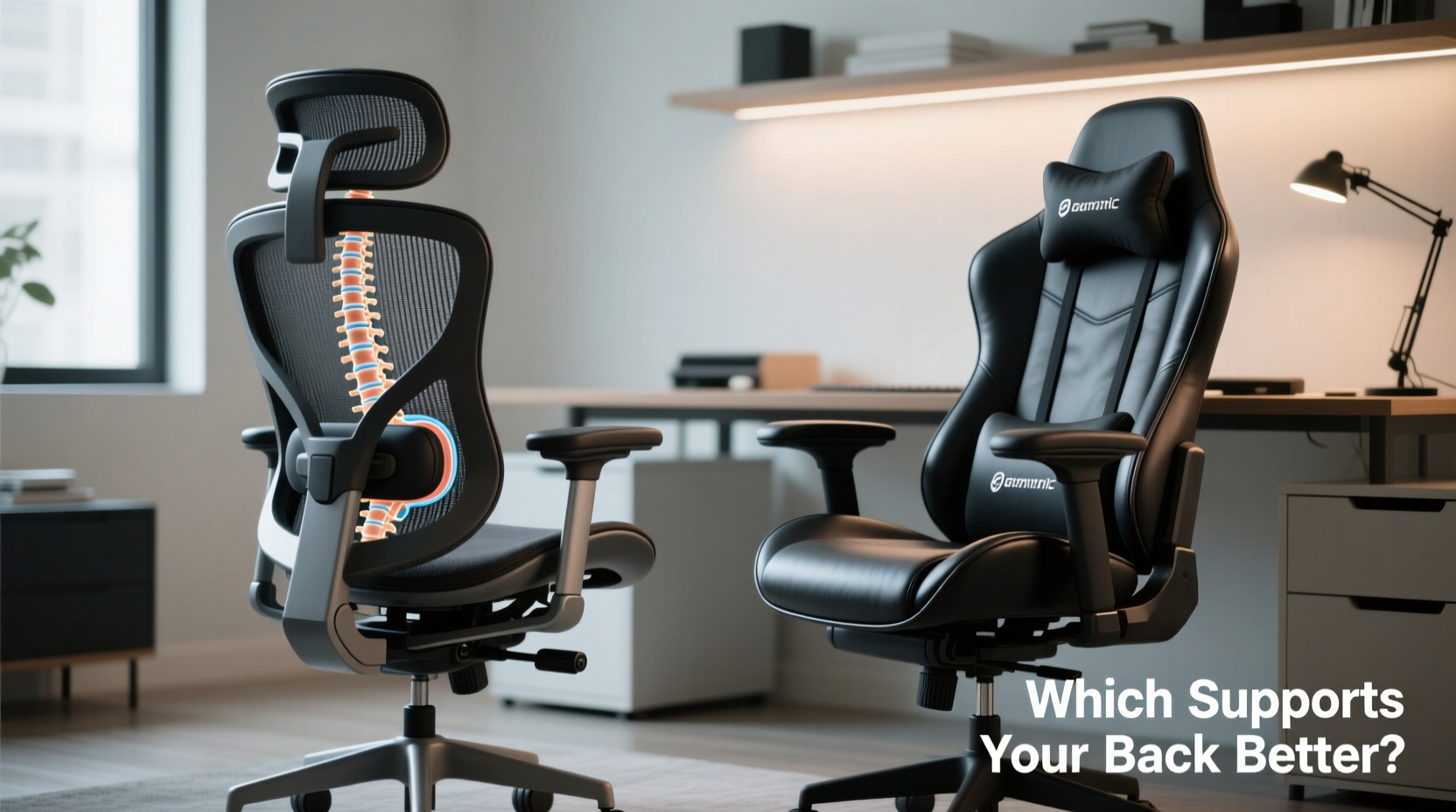
Gaming chairs emerged from the esports and enthusiast gaming communities, emphasizing aesthetics, bold colors, and aggressive styling reminiscent of racing seats. They are marketed as performance gear for digital athletes, often featuring high backs, headrests, and lumbar pillows. Their design prioritizes immersion and visual appeal, sometimes at the expense of anatomical precision.
Ergonomic office chairs, in contrast, are developed with input from occupational therapists, physiotherapists, and human factors engineers. Their goal is to align with the natural curvature of the spine, promote neutral posture, and reduce biomechanical stress over time. These chairs prioritize adjustability, material breathability, and dynamic support rather than flashy appearances.
The divergence in philosophy leads to fundamental differences in how each chair type interacts with the body—especially the lower back, pelvis, and shoulders—during prolonged use.
Tip: A chair that looks impressive doesn’t always offer superior support. Prioritize adjustable lumbar zones and seat depth over aesthetic flair.Anatomical Support: Where Each Chair Excels (and Falls Short)
The lower back—specifically the lumbar region—is the most vulnerable area during seated activity. Poor lumbar support leads to slouching, disc pressure, and eventual muscle fatigue. Both chair types claim to address this, but their approaches vary.
Gaming Chairs: Built-In Pillows and Fixed Curves
Most gaming chairs feature a fixed S-shaped backrest with a separate lumbar pillow. This pillow is typically foam-filled and attached via straps. While it provides some pressure relief, it often sits too high or too low for individual users. Because it’s not integrated into the frame, it can shift during movement, reducing consistent support.
The seat pan in gaming chairs is usually made of molded foam with steep contours. While initially comfortable, these tend to compress over time, leading to reduced blood flow in the legs and increased pressure on the ischial tuberosities (sit bones). Additionally, the pronounced backward tilt of many gaming chairs encourages a reclined posture that may feel relaxing short-term but can weaken core engagement over hours.
Ergonomic Office Chairs: Dynamic, Adjustable Support
Ergonomic chairs integrate lumbar support directly into the backrest, allowing vertical and sometimes horizontal adjustment to match the user’s spine. High-end models like the Herman Miller Aeron or Steelcase Leap use responsive mesh or adaptive materials that flex with movement, maintaining contact with the lower back throughout different postures.
Seat pans are generally wider, flatter, and feature adjustable depth (via slide mechanisms), ensuring proper thigh support without cutting off circulation. The synchro-tilt or multi-adjustable recline mechanisms allow controlled backward lean while preserving spinal alignment. Armrests are fully adjustable—height, width, pivot, and depth—reducing shoulder tension.
“Long-term spinal health depends less on how ‘supportive’ a chair feels and more on whether it allows micro-movements and maintains pelvic neutrality.” — Dr. Lena Patel, Physical Therapist & Ergonomics Consultant
Comparative Analysis: Key Features Side-by-Side
| Feature | Gaming Chairs | Ergonomic Office Chairs |
|---|---|---|
| Lumbar Support | Removable pillow; limited adjustability | Integrated, height/depth adjustable |
| Seat Pan Adjustability | Rarely adjustable; fixed depth | Depth, angle, and edge contour adjustable |
| Backrest Flexibility | Stiff foam; minimal give | Responsive mesh or adaptive suspension |
| Armrest Adjustability | Height and tilt (sometimes 2D) | 4D or 5D adjustments (height, width, depth, pivot) |
| Recline Mechanism | Fixed tilt with lock positions | Synchronized, tension-controlled recline |
| Breathability | Faux leather traps heat; fabric variants improving | Mesh back promotes airflow |
| Durability (5+ years) | Mixed; foam degrades, stitching fails | High; commercial-grade materials and frames |
Real-World Performance: A Day in the Life
Consider Alex, a software developer who works 10-hour days and streams coding sessions in the evenings. Initially drawn to a $350 gaming chair with RGB lighting and “racing-style” ergonomics, Alex found initial comfort appealing. However, after three weeks, persistent lower back tightness and numbness in the thighs emerged. The lumbar pillow slipped constantly, and the faux leather heated up within an hour, making long sessions uncomfortable.
After switching to a mid-range ergonomic chair (Haworth Fern) with adjustable lumbar, seat depth, and breathable mesh, Alex reported noticeable improvement within a week. The ability to fine-tune the chair to his 5'8\" frame allowed his pelvis to remain in a neutral tilt, reducing strain on the lumbar discs. He also found himself shifting positions more naturally, thanks to the chair’s responsive backrest.
This case reflects a broader trend: chairs designed for static, prolonged postures benefit most from dynamic support systems that encourage subtle movement—something ergonomic office chairs are engineered to provide.
Expert Recommendations: What Professionals Advise
Healthcare professionals consistently emphasize that no chair eliminates the need for movement. However, when selecting seating for long sessions, they recommend features proven to preserve spinal integrity.
- Pelvic Support: The chair should encourage a slight anterior pelvic tilt, maintaining the natural lumbar curve.
- Adjustable Seat Depth: There should be 1–2 inches between the edge of the seat and the back of the knees.
- Dynamic Backrest: It should move with the user, not force the user to adapt to it.
- Armrests That Offload Shoulders: Properly positioned armrests reduce trapezius strain by up to 30%.
Dr. Patel adds: “I’ve seen patients improve chronic back pain simply by switching from a gaming chair with a lumbar pillow to an ergonomic model with integrated, adjustable support. The key isn’t just having support—it’s having support in the right place, at the right time.”
Tip: When testing a chair, sit for at least 15 minutes and perform common tasks (typing, reaching, reclining). Notice where pressure builds and whether you instinctively slouch.Actionable Checklist: Choosing the Right Chair for Back Health
Before purchasing, evaluate any chair against these evidence-based criteria:
- Can the lumbar support be adjusted vertically (and ideally horizontally) to fit the small of your back?
- Is the seat depth adjustable so your thighs are supported without pressure behind the knees?
- Do the armrests allow independent adjustment of height, width, and angle?
- Does the backrest recline smoothly with adjustable tension?
- Is the material breathable, especially in the back and seat areas?
- Does the chair encourage a neutral posture (ears over shoulders, shoulders over hips)?
- Is the base five-point for stability, with casters suitable for your floor type?
If a gaming chair meets most of these, it may suffice. But most fall short on adjustability and long-term support integration.
Frequently Asked Questions
Can a gaming chair be good for my back if I sit all day?
Some higher-end gaming chairs now include improved lumbar systems and mesh backs. However, even premium models typically lack the granular adjustability of ergonomic office chairs. For full-time use, especially with pre-existing back issues, an ergonomic chair remains the safer choice.
Are ergonomic chairs worth the higher price?
When considering cost per use, yes. A $600 ergonomic chair used daily for five years costs about $0.33 per day. Compare that to medical visits, lost productivity, or replacing a $300 gaming chair every two years due to foam collapse or mechanism failure. Long-term value favors ergonomic investment.
What if I already have a gaming chair? Can I improve its support?
Absolutely. You can enhance support by:
- Replacing the stock lumbar pillow with a memory foam alternative
- Using a seat cushion with a cut-out to reduce tailbone pressure
- Adding a DIY lumbar roll using a rolled towel secured with clips
- Placing a footrest under your feet if your legs aren’t fully supported
Final Verdict: Which Chair Supports Your Back Better?
For sustained back health during long sessions, ergonomic office chairs outperform gaming chairs in nearly every measurable category. Their design is rooted in decades of biomechanical research, offering personalized, dynamic support that adapts to the user—not the other way around.
Gaming chairs can be suitable for occasional use or shorter durations, particularly newer models with enhanced ergonomics. However, their limitations in adjustability, breathability, and long-term structural integrity make them suboptimal for those spending six or more hours daily seated.
The best choice isn’t about brand loyalty or visual appeal—it’s about respecting the complexity of the human spine. If your priority is comfort, injury prevention, and endurance through long work or play sessions, an ergonomic office chair is the scientifically supported solution.
🚀 Take action today: Audit your current chair using the checklist above. If it falls short, explore ergonomic upgrades—even small changes can dramatically improve your posture and long-term well-being. Share your experience or questions below to help others make informed choices.