Sitting for extended periods—whether at a desk or in front of a screen—is an unavoidable reality for millions. As remote work and digital entertainment become the norm, concerns about back pain have surged. One common debate centers on seating: should you choose a gaming chair or a traditional office chair to protect your spine? While both promise comfort and support, their designs, priorities, and real-world performance differ significantly. Understanding these differences is essential for anyone seeking relief from chronic back discomfort or aiming to prevent it before it starts.
Ergonomic Design: What Science Says About Spine Support
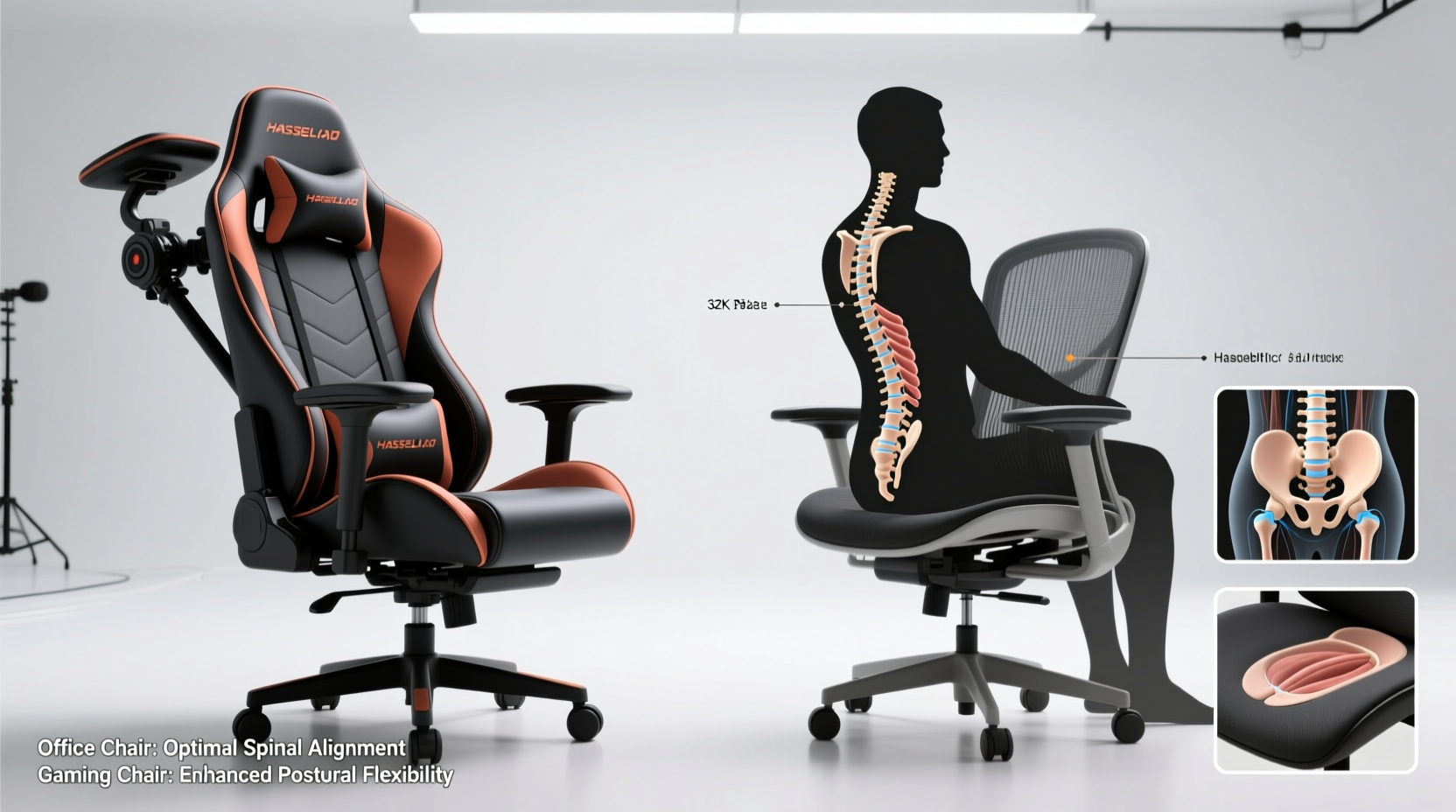
The foundation of back pain prevention lies in ergonomic design. Ergonomics refers to how equipment fits the human body and supports natural posture. The spine has three natural curves: cervical (neck), thoracic (upper back), and lumbar (lower back). Maintaining these curves while seated reduces pressure on spinal discs and ligaments, minimizing fatigue and strain.
Office chairs are typically designed with this principle in mind. Most high-quality models feature adjustable lumbar support, seat depth, armrests, and recline tension—all calibrated to promote neutral posture. They're built for 8+ hours of daily use, often tested by occupational health experts and certified under standards like BIFMA (Business and Institutional Furniture Manufacturers Association).
Gaming chairs, by contrast, emerged from a different context. Originally inspired by racing car seats, they emphasize bold aesthetics, headrests, and aggressive styling. While many now include lumbar pillows and reclining functions, their structural approach often prioritizes visual appeal over biomechanical precision. Some models force users into a slightly reclined position (100–110 degrees), which may not align with optimal typing posture.
“Prolonged sitting in non-neutral postures—even with padding—can lead to disc degeneration over time. True ergonomics isn’t about comfort; it’s about alignment.” — Dr. Lena Patel, Physical Therapist & Posture SpecialistTip: Look for chairs that allow independent adjustment of lumbar support height and depth—not just a removable pillow.
Comparing Key Features: A Side-by-Side Analysis
To assess which chair type better prevents back pain, consider how they perform across critical categories:
| Feature | Office Chair | Gaming Chair |
|---|---|---|
| Lumbar Support | Integrated, height-adjustable support aligned with lower back curvature | Often relies on detachable pillows; positioning can be inconsistent |
| Seat Depth & Pan | Adjustable depth to fit thigh length; waterfall edge reduces leg pressure | Fixed or limited adjustment; deeper seats may cause knee strain |
| Backrest Angle | Adjustable between 90°–115° with synchronized tilt mechanism | Frequently locked into reclined positions (100°–110°), less ideal for typing |
| Material Breathability | Mesh backs common; promotes airflow and reduces heat buildup | Faux leather prevalent; traps heat, leading to discomfort during long sessions |
| Armrest Adjustability | 4D adjustability (height, width, depth, pivot) standard in premium models | Typically 2D (height and angle); limits shoulder relaxation |
| Weight Capacity & Durability | Built for 24/7 use; commercial-grade materials and gas lifts | Varies widely; some budget models degrade within 1–2 years |
This comparison reveals a consistent trend: office chairs offer more precise, adaptable support tailored to individual anatomy. Gaming chairs may look impressive but often lack the nuanced adjustability needed for sustained spinal health.
Real-World Impact: Who Actually Benefits More?
Consider Sarah, a software developer who transitioned to full-time remote work in 2021. Initially drawn to a sleek black-and-red gaming chair due to influencer reviews, she experienced increasing lower back stiffness after six months. Despite using the included lumbar pillow, her pelvis tilted backward, flattening her natural lumbar curve. After switching to a mid-range mesh office chair with dynamic lumbar support, her morning back tightness disappeared within two weeks.
Sarah’s experience reflects broader user trends. A 2023 study published in *Applied Ergonomics* found that participants using adjustable office chairs reported 38% less lower back pain compared to those using fixed-design gaming seats, even when both groups followed identical sitting schedules.
The issue isn't solely about materials—it's about movement. Healthy sitting involves micro-motions: shifting weight, changing angles, and engaging core muscles. High-end office chairs encourage this through synchro-tilt mechanisms and responsive bases. Many gaming chairs, however, lock users into a single reclined posture, reducing muscular engagement and promoting static loading—a known risk factor for disc compression.
How to Choose the Right Chair for Back Pain Prevention
Selecting the best chair isn’t about brand names or color schemes—it’s about matching features to your physical needs and usage patterns. Follow this step-by-step guide to make an informed decision:
- Assess Your Daily Use Case: Are you typing for 8 hours a day, or gaming intermittently? Office tasks require upright, forward-facing posture; gaming allows more recline.
- Measure Your Body Dimensions: Seat depth should leave 2–4 inches between the edge of the chair and the back of your knees. Taller individuals (>6') need higher backrests.
- Test Lumbar Alignment: Sit down and check if the lumbar support fills the inward curve of your lower back without pushing you forward.
- Evaluate Adjustability: Prioritize chairs where you can modify armrest height, seat depth, and backrest angle independently.
- Check Material Longevity: Mesh lasts longer than PU leather, which tends to crack after 2–3 years. Avoid vinyl in humid climates.
- Try Before You Buy (If Possible): Visit a furniture showroom or order from retailers with generous return policies.
Common Myths About Gaming and Office Chairs
Misinformation abounds in online forums and marketing copy. Let’s clarify a few persistent myths:
- Myth: “Gaming chairs are just upgraded office chairs.”
Reality: While some high-end gaming models incorporate ergonomic elements, most are structurally distinct, favoring style over certified ergonomic function. - Myth: “More padding means better back support.”
Reality: Excessive cushioning can cause sinking and misalignment. Firm, contoured support is more effective than soft foam. - Myth: “If it costs over $300, it must be good for your back.”
Reality: Price doesn’t guarantee ergonomics. Some expensive gaming chairs fail basic posture tests.
Essential Checklist: Features That Prevent Back Pain
Use this checklist when evaluating any chair. Tick off each item as confirmed:
- ✅ Adjustable lumbar support that aligns with your natural spine curve
- ✅ Seat depth adjustable to fit your leg length (no pressure behind knees)
- ✅ Armrests that support elbows at 90° without raising shoulders
- ✅ Reclining backrest with tension control (not just a fixed angle)
- ✅ High-quality, breathable material (mesh preferred over faux leather)
- ✅ Stable base with five casters and durable gas lift (Class 4 recommended)
- ✅ SGS/BIFMA certification for safety and durability (especially for office models)
FAQ: Common Questions About Chairs and Back Pain
Can a gaming chair cause long-term back problems?
Poorly designed gaming chairs—especially those lacking proper lumbar support or forcing unnatural postures—can contribute to chronic issues like disc strain, muscle imbalances, and poor posture habits. However, not all gaming chairs are harmful. Models with true ergonomic engineering (e.g., autonomous lumbar systems) can be suitable, though they’re rare and often cost as much as premium office chairs.
Is mesh better than leather for back health?
Yes, in most cases. Mesh promotes airflow, reducing sweat and heat accumulation that leads to discomfort and slouching. It also provides slight give, allowing subtle spinal movement. Faux leather, while easy to clean, becomes sticky in warm environments and lacks breathability, encouraging prolonged static sitting.
Do I need a headrest to prevent back pain?
No. Headrests are primarily useful for reclining breaks, not active work. In fact, leaning your head against a headrest while typing often pulls the neck forward, increasing upper back strain. For focused tasks, keep your head balanced over your spine without external support.
Final Verdict: Which Chair Wins for Back Pain Prevention?
When evaluated strictly on biomechanical effectiveness, **office chairs outperform gaming chairs** in preventing back pain. Their design philosophy centers on adaptability, alignment, and endurance—qualities proven to reduce musculoskeletal strain. While some premium gaming chairs have narrowed the gap, they remain outliers in a market dominated by form-over-function products.
This doesn’t mean gaming chairs are inherently bad. For casual users or hybrid setups involving media consumption, they can provide adequate comfort. But for anyone spending four or more hours daily at a desk��whether working, studying, or creating content—an ergonomic office chair is the smarter investment for long-term spinal health.
Ultimately, the best chair is one that fits your body, supports neutral posture, and encourages movement. Don’t be swayed by flashy colors or aggressive marketing. Focus instead on measurable features: adjustability, material quality, and independent lumbar alignment. Your back will thank you years down the line.
💬 Have you switched from a gaming to an office chair—or vice versa? Share your experience in the comments below and help others make informed seating choices!