Sitting for long hours at a desk is a reality for millions of workers, and the consequences for spinal health can be significant. Lower back pain affects nearly 80% of adults at some point in their lives, and prolonged sitting—especially on poorly designed seating—is a major contributor. As awareness grows, people are turning to alternative seating solutions like ergonomic office chairs and kneeling chairs to reduce strain and improve posture. But when it comes to supporting the lower back, which option truly wins?
This article dives deep into the biomechanics, benefits, limitations, and user experiences of both types of chairs. By examining support structures, posture alignment, and medical recommendations, we aim to provide a clear answer backed by evidence and expert insight.
Understanding Lower Back Support Needs
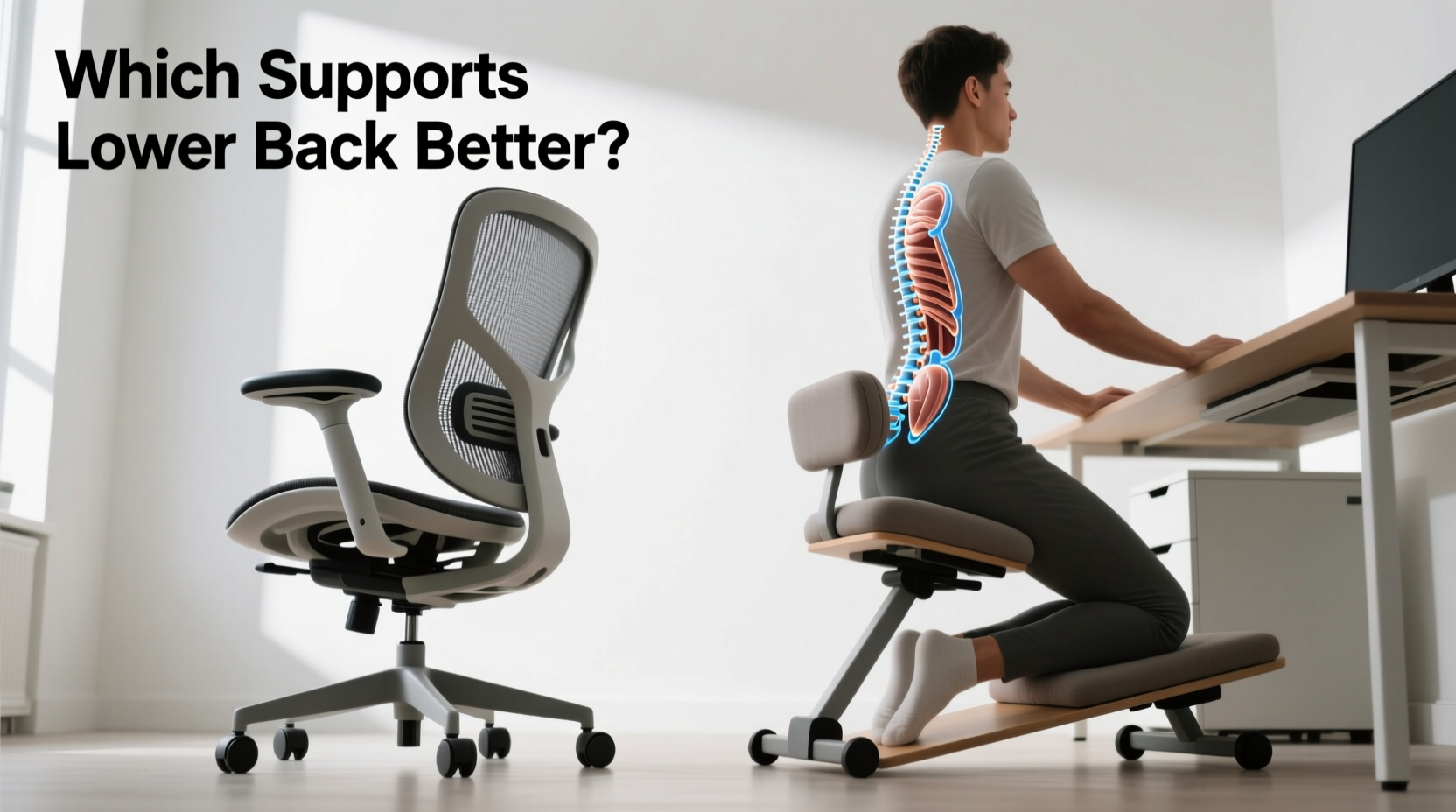
The lumbar region—the lower part of the spine—is naturally curved inward (lordosis). Maintaining this curve while seated is essential to prevent muscle fatigue, disc compression, and chronic discomfort. Poorly supported sitting flattens or reverses this curve, placing undue stress on intervertebral discs and surrounding muscles.
An ideal chair should:
- Promote neutral spine alignment
- Distribute body weight evenly across the pelvis and thighs
- Allow dynamic movement without sacrificing support
- Reduce pressure on the lumbar vertebrae and sacroiliac joints
Both ergonomic office chairs and kneeling chairs claim to meet these criteria—but they do so in fundamentally different ways.
Ergonomic Office Chairs: Designed for Lumbar Support
Ergonomic office chairs are engineered specifically to support the natural curvature of the spine. Most high-quality models feature adjustable lumbar cushions that fit snugly into the small of the back, reinforcing the lordotic curve.
Key features include:
- Adjustable lumbar support: Can be positioned vertically and sometimes depth-wise to match individual anatomy.
- Synchro-tilt mechanisms: Allow the seat and backrest to recline together, maintaining contact with the lower back during movement.
- Seat depth and height adjustment: Ensures proper thigh support and hip alignment.
- Contoured seat pans: Reduce pressure on the sciatic nerve and promote circulation.
These chairs are designed for extended use and typically encourage a seated posture where the hips are slightly higher than the knees, aligning the pelvis in a neutral tilt. This position helps maintain the natural lumbar curve without requiring active muscular effort.
Tip: When adjusting your ergonomic chair, ensure the lumbar pad fits precisely into the inward curve of your lower back—not above or below it.Real-World Example: Sarah’s Transition to an Ergonomic Chair
Sarah, a software developer, experienced persistent lower back pain after working from home for over a year. Her dining chair lacked any back support, leading to slouching and increased strain. After switching to a mid-range ergonomic chair with adjustable lumbar support, she reported noticeable improvement within two weeks. “I didn’t realize how much I was hunching until I sat in a chair that actually held my back,” she said. “Now I sit longer without discomfort.”
Her experience reflects a common trend: users with existing lower back issues often find immediate relief with properly adjusted ergonomic chairs.
Kneeling Chairs: Shifting Load, Not Supporting Spine
Kneeling chairs operate on a different principle. Instead of fully supporting the lower back, they shift the body’s weight forward onto the shins and knees via a front knee pad. The seat is shorter and angled upward, tilting the pelvis forward and encouraging a more upright spinal posture.
Proponents argue that this design reduces lumbar flexion and promotes core engagement. However, the trade-off is that there is little to no direct support for the lower back itself. In fact, most kneeling chairs lack a backrest entirely.
The forward tilt of the pelvis does help maintain the natural lumbar curve passively, but only if the user maintains correct upper-body positioning. Once fatigue sets in, slumping becomes more likely—and without a backrest, there’s nothing to prevent it.
“Kneeling chairs can temporarily improve posture by tilting the pelvis forward, but they don’t provide sustained lower back support. For individuals with chronic lumbar strain, they may not be sufficient alone.” — Dr. Marcus Lin, Physical Therapist & Spine Health Specialist
Limitations of Kneeling Chairs for Long-Term Use
While some users report feeling more alert and upright on kneeling chairs, research indicates mixed results regarding long-term comfort and spinal support:
- Lack of backrest means no passive lumbar reinforcement
- Increased pressure on knees and shins, especially for those with joint sensitivities
- Not suitable for extended sitting sessions (typically recommended for 20–30 minutes at a time)
- May lead to compensatory tension in the neck and shoulders due to over-correction
In essence, kneeling chairs rely on the user’s musculature to maintain good posture rather than providing external structural support.
Comparative Analysis: Key Differences in Lower Back Support
| Feature | Ergonomic Office Chair | Kneeling Chair |
|---|---|---|
| Lumbar Support | Yes – adjustable built-in support | No – relies on posture maintenance |
| Pelvic Alignment | Moderate anterior tilt (adjustable) | Strong forward tilt |
| Weight Distribution | Hips and buttocks (with some thigh support) | Hips, thighs, and shins |
| Backrest | Full-height, reclining options | None or minimal |
| Recommended Use Duration | 6–8 hours (with breaks) | 20–30 minutes per session |
| Ideal For | Long workdays, chronic back pain, desk-based tasks | Short-term focus, posture training, intermittent use |
| Joint Pressure | Low on knees, moderate on hips | High on knees and shins |
The data shows a clear distinction: ergonomic chairs offer direct, customizable support for the lower back, while kneeling chairs prioritize postural correction through skeletal alignment without structural reinforcement.
Step-by-Step Guide to Choosing the Right Chair for Your Back
Selecting the best seating solution depends on your physical needs, work habits, and lifestyle. Follow this sequence to make an informed decision:
- Assess your daily sitting duration: If you sit for more than four hours a day, prioritize a chair with full lumbar support and adjustability.
- Evaluate existing back conditions: Those with diagnosed lower back issues (e.g., herniated discs, sciatica) benefit more from ergonomic chairs with targeted support.
- Test posture sustainability: Try sitting upright without back support for 20 minutes. If you struggle to maintain form, a kneeling chair may increase strain.
- Consider usage patterns: Use a kneeling chair as a supplement during focused short tasks, not as a primary workstation seat.
- Invest in adjustability: Choose chairs with customizable seat height, depth, armrests, and lumbar settings for long-term adaptability.
- Alternate seating: Combine both types—use an ergonomic chair for most of the day and switch to a kneeling chair for brief intervals to engage core muscles.
Expert Recommendations and Clinical Insights
According to the American Chiropractic Association, \"The best chair supports the natural curves of the spine and allows frequent changes in position.\" This aligns closely with modern ergonomic designs that incorporate dynamic movement and micro-adjustments.
A 2020 study published in *Applied Ergonomics* compared spinal loading across various chair types. Results showed that participants using ergonomic chairs with lumbar support had up to 27% less disc pressure in the L4-L5 region compared to those using flat or kneeling seats.
However, kneeling chairs did show benefits in reducing slouching during short-duration cognitive tasks. Researchers concluded that they could serve as transitional tools for improving awareness of posture but were not replacements for supportive seating in full-day environments.
“The goal isn’t just to sit differently—it’s to reduce cumulative load on the spine. That requires consistent support, not just momentary correction.” — Dr. Lena Patel, Biomechanics Researcher at Northwestern University
Frequently Asked Questions
Can a kneeling chair fix lower back pain?
Not reliably. While it may temporarily improve posture by tilting the pelvis forward, it lacks direct lumbar support. For chronic or severe lower back pain, a medically approved ergonomic chair is a better choice. Kneeling chairs should be used cautiously and intermittently, not as a cure.
Is it safe to use a kneeling chair all day?
No. Prolonged use can lead to excessive pressure on the knees, reduced circulation in the legs, and shoulder tension from over-upright positioning. Experts recommend limiting kneeling chair use to 20–30 minutes at a time, followed by a return to a supportive seated position.
Do ergonomic chairs really make a difference?
Yes, especially when properly adjusted. Studies consistently show that well-designed ergonomic chairs reduce lower back discomfort by up to 50% in office workers. The key is customization: a chair must fit the individual’s body dimensions and work setup to deliver real benefits.
Conclusion: Prioritize Support Over Novelty
When comparing ergonomic office chairs and kneeling chairs for lower back support, the evidence strongly favors ergonomic designs. Their ability to provide adjustable, continuous lumbar reinforcement makes them superior for long-term spinal health, particularly in sedentary work environments.
Kneeling chairs have a role—they can enhance posture awareness and engage core muscles during short bursts of activity—but they do not replace the need for structured back support. For anyone dealing with lower back strain, investing in a high-quality ergonomic chair tailored to their body is a proven, science-backed strategy.
The best approach may be integration: use an ergonomic chair as your primary seat and incorporate a kneeling chair occasionally for variety and muscle activation. Above all, remember that no chair eliminates the need for movement. Regular standing, stretching, and walking remain essential components of a healthy spine.
🚀 Take action today: Evaluate your current chair’s lumbar support, adjust it properly, or consider upgrading to a certified ergonomic model. Your lower back will thank you in the weeks—and years—ahead.