Smart speakers have become central to modern homes, simplifying daily tasks with voice-activated convenience. Yet, nothing undermines that ease faster than a device that consistently mishears you. Whether it’s turning on the wrong lights, playing the wrong song, or simply failing to respond, misunderstood commands can be frustrating. The good news? Most issues aren’t due to faulty hardware but rather environmental factors, setup oversights, or subtle misconfigurations. With a few strategic adjustments, you can dramatically improve your smart speaker’s ability to understand you—quickly and reliably.
Why Smart Speakers Misunderstand Voice Commands
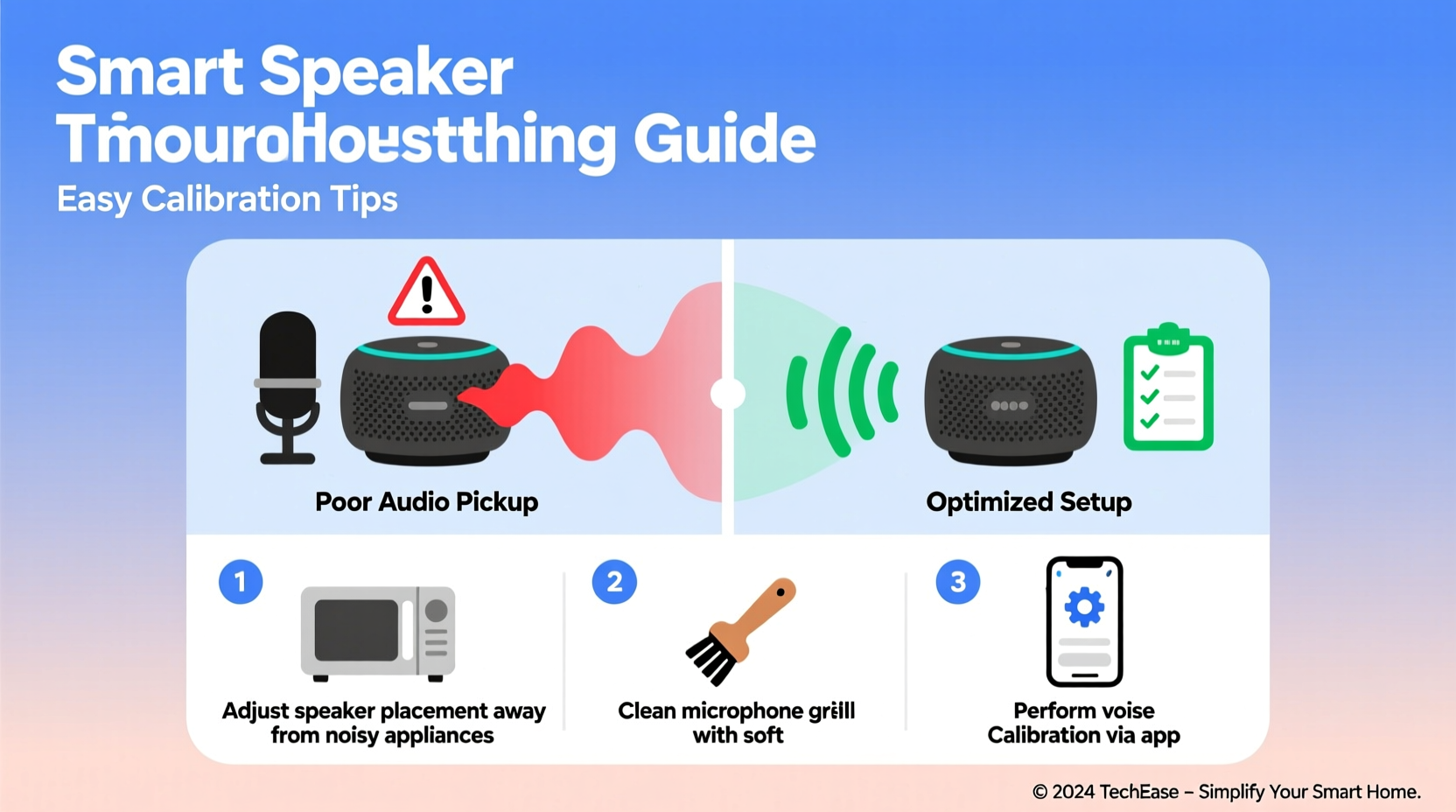
Understanding the root causes of miscommunication between you and your smart speaker is the first step toward resolution. These devices rely on complex algorithms, microphone arrays, and cloud-based processing to interpret speech. However, several real-world variables can interfere with this process.
- Background noise: Fans, TVs, or household appliances generate ambient sound that masks vocal clarity.
- Distance and placement: If the speaker is too far from the user or blocked by furniture, microphones struggle to capture clear audio.
- Poor microphone sensitivity: Dust buildup or incorrect settings may reduce mic responsiveness.
- Accent or speech pattern mismatch: Some assistants are trained primarily on standard dialects and may struggle with regional accents or fast speech.
- Outdated firmware: Older software versions may lack improvements in natural language processing.
- Multiple voices in the home: Without voice match enabled, the device may not distinguish between users accurately.
According to Dr. Lena Patel, Senior Acoustics Engineer at the Consumer Electronics Research Institute:
“Voice recognition systems perform best when they’re tuned to their environment. A smart speaker placed near a window facing a busy street will naturally struggle more than one in a quiet hallway—even if both use identical hardware.”Tip: Speak clearly and pause slightly after saying the wake word (e.g., “Alexa,” “Hey Google”) to give the system time to fully activate.
Step-by-Step Guide to Calibrating Your Smart Speaker
Calibration isn't just for high-end audio gear—it's essential for voice assistants too. Follow this practical sequence to optimize performance.
- Reposition the device centrally: Place the speaker at ear level in an open area, away from walls, corners, or enclosed shelves. Avoid placing it face-down or behind objects.
- Run a sound test: Say your wake word followed by “What time is it?” from different distances and angles. Note where responses falter.
- Enable voice enrollment: In your assistant app (Google Home, Alexa, etc.), go to settings and complete voice training. This helps the AI recognize your unique tone and cadence.
- Adjust microphone sensitivity: Some models allow manual gain control. Increase sensitivity only if background noise is low; otherwise, automatic mode works best.
- Update firmware: Check for updates in the companion app. Manufacturers regularly release speech recognition improvements.
- Reduce echo interference: If using multiple smart speakers, disable microphone pickup on secondary units during media playback to prevent command conflicts.
- Test with varied phrasing: Try rewording common commands (e.g., “Turn off the kitchen light” vs. “Kitchen light off”) to find what the system interprets most consistently.
Common Mistakes That Degrade Performance
Even well-intentioned habits can sabotage your smart speaker��s accuracy. Recognizing these pitfalls allows for immediate correction.
| Mistake | Why It Hurts Accuracy | Solution |
|---|---|---|
| Placing speaker inside a cabinet | Obstructs microphones and muffles input | Relocate to open space |
| Using overly casual phrasing | Increases ambiguity (e.g., “Play something cool”) | Use structured commands like “Play jazz music on Spotify” |
| Ignoring voice profile setup | Device cannot personalize responses or recognize speaker identity | Complete voice match enrollment |
| Leaving old routines active | Conflicting automations trigger unintended actions | Review and delete unused routines monthly |
| Not cleaning the device | Dust clogs microphone ports, reducing sensitivity | Gently wipe with dry microfiber cloth monthly |
Real Example: Fixing a Frustrating Kitchen Speaker
Mark, a homeowner in Portland, installed a smart speaker above his stove to control lights and timers while cooking. He frequently had to repeat commands or resorted to manual switches. After investigation, he realized two key problems: the exhaust fan created constant background noise, and grease had accumulated around the microphone grille. He moved the speaker to a nearby countertop shelf, cleaned the mic area with a soft brush, and used the Alexa app to retrain his voice profile. Within a day, accuracy improved from about 50% to over 90%. “It was like getting a new device,” he said. “I didn’t realize how much placement and maintenance mattered.”
Essential Calibration Checklist
Use this checklist monthly—or anytime voice recognition declines—to ensure peak performance.
- ✅ Speaker is positioned in an open, central location at conversational height
- ✅ Microphone is unobstructed and free of dust or debris
- ✅ Voice match or personal recognition is enabled and up to date
- ✅ Firmware and app are updated to the latest version
- ✅ Background noise sources (fans, TVs) are minimized during testing
- ✅ Wake word sensitivity is set appropriately (not too high in noisy areas)
- ✅ Test commands spoken at normal volume from typical usage distance
- ✅ Review and streamline active routines to avoid conflicts
Optimizing for Accents and Speech Patterns
Many users report better results after training their assistant to understand regional accents or speech quirks. While global tech companies have made strides in inclusivity, default models still favor certain dialects. You can bridge the gap through deliberate calibration.
Start by accessing the “Voice Training” section in your smart assistant app. You’ll be prompted to speak a series of phrases aloud. The system learns from these samples, adapting its phonetic models to your pronunciation. For example, users with Southern U.S. accents or Scottish intonations often see significant gains after completing this process. Similarly, those who speak quickly or softly benefit from repeated training sessions.
Experts recommend repeating the voice training every few months, especially if you notice a decline in responsiveness. Changes in health, such as colds or allergies, can temporarily alter your voice—and retuning helps maintain consistency.
Expert Insight on Language Models
“Modern voice assistants use adaptive neural networks, but they need data to adapt. Users who actively train their devices reduce error rates by up to 60% compared to those relying solely on out-of-box settings.” — Dr. Rajiv Mehta, NLP Research Lead at TechVoice Labs
Frequently Asked Questions
How do I know if my smart speaker’s microphone is working?
Most devices provide visual feedback—such as a glowing ring or flashing light—when the wake word is detected. You can also say “Microphone test” or ask, “Did you hear me?” to prompt a response. If there’s no reaction, check the mute button (physical or in-app) and ensure the device is connected to Wi-Fi.
Can I improve accuracy without moving the speaker?
Yes, though relocation is often the most effective fix. Alternatives include lowering background noise, enabling voice match, updating firmware, and cleaning the microphone. Using clearer, more consistent phrasing also helps. However, if the speaker is buried in a bookshelf or near a loud appliance, physical adjustment remains the best long-term solution.
Does speaking louder help the speaker understand me?
Not necessarily. Shouting can distort your voice and overwhelm the microphone, leading to worse interpretation. Instead, speak at a normal conversational volume, enunciate clearly, and pause briefly after the wake word. Think of it as having a calm conversation, not giving orders.
Final Tips for Long-Term Clarity
Maintaining your smart speaker’s responsiveness doesn’t require technical expertise—just attention to detail. Integrate quick checks into your routine, just as you would reboot a router or clean a keyboard. Pay attention to seasonal changes: humid summer air can affect internal components, while winter static may interfere with touch-sensitive surfaces.
Additionally, consider using speaker-specific features like “far-field voice verification” or “contextual awareness” if available. These allow the device to use recent interactions to infer intent—for instance, recognizing that “turn it up” likely refers to volume if music is already playing.
Finally, remember that no system is perfect. Even the most advanced AI makes mistakes. The goal isn’t flawless performance but consistent, usable reliability. With proper calibration, your smart speaker should understand you the majority of the time—freeing you to focus on life, not repetition.
🚀 Take action today: Pick one tip from this guide—reposition your speaker, run a voice training session, or clean the mic—and apply it now. Small changes lead to smarter responses. Share your success story in the comments and help others get the most from their voice tech!